When you set up login-mapping, the login must be something that can authenticate with the remote data source directly. When the linked server is another SQL Server instances, this must be an SQL login with a password. It cannot be a Windows login, because SQL Server can only accept a Windows login if it first have been authenticated by Windows, and this does not happen here.
How to create a Linked Server with ******@domain.com credentials
' cx='32' cy='32' r='32' /%3E%3Ctext x='50%25' y='55%25' dominant-baseline='middle' text-anchor='middle' fill='%23FFF' %3EPJ%3C/text%3E%3C/svg%3E)
Priya Jha
901
Reputation points
I am trying to create a linked server by providing the credentials in xyz@keyman .com format in Be made using this security context property as shown below:
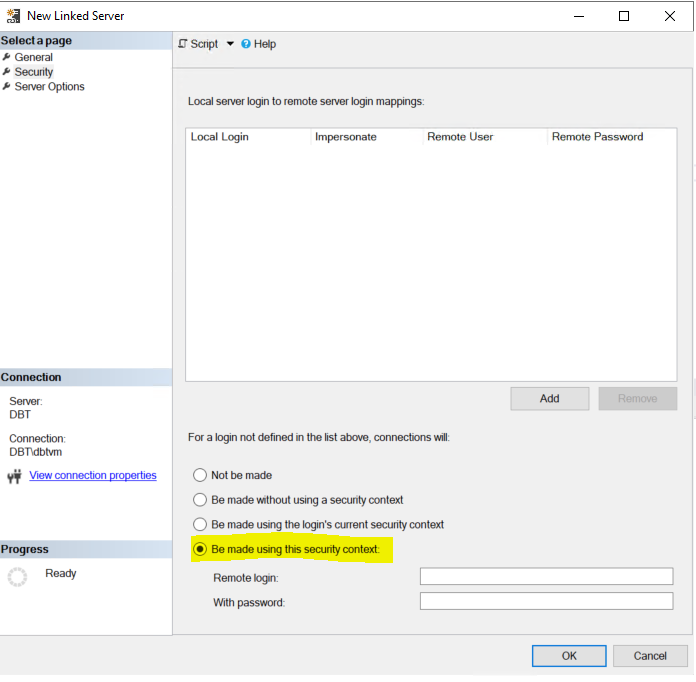
This account has read access on the server that is used in Data Source.
But getting this error when creating the linked server:
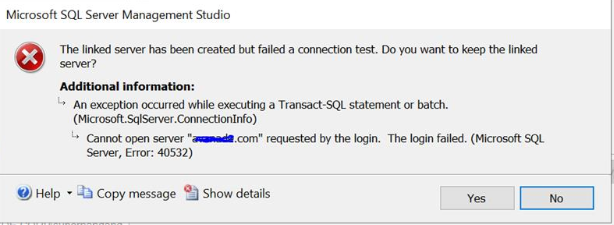
Is it not allowed to use this kind of credential or am i selecting some wrong security options?
SQL Server | Other
{count} votes
-
 CarrinWu-MSFT 6,891 Reputation points
2021-02-23T07:19:08.16+00:00 Did the answers help you? If not, please feel free to ask questions. If the response helped, do "Accept Answer". By doing so, it will benefit all community members who are having this similar issue. Your contribution is highly appreciated.
Sign in to comment
2 answers
Sort by: Most helpful
-
 Erland Sommarskog 128.9K Reputation points MVP Volunteer Moderator
2021-02-17T22:51:45.65+00:00 -
CarrinWu-MSFT 6,891 Reputation points
2021-02-18T06:51:24.277+00:00 Hi @Priya Jha ,
When you select "be made using this security context", it means that the remote login must be a SQL Server Authentication login on the remote server. When you are creating logins that are mapped from a Windows domain account, you must use the pre-Windows 2000 user logon name in the format [<domainName>\<login_name>].
Please refer to How to Create a Linked Server to get more information.
Please refer to CREATE LOGIN (Transact-SQL) to get more information about the policy of login_name.Best regards,
Carrin
If the answer is helpful, please click "Accept Answer" and upvote it.
Note: Please follow the steps in our documentation to enable e-mail notifications if you want to receive the related email notification for this thread.