Share via

AthBtTray.exe - Application error

Anonymous
2018-01-01T02:39:50+00:00

AthBtTray.exe - Application error

My Antivirus software requested a restart following a software update

On rebooting an error message appeared as displayed in the following image
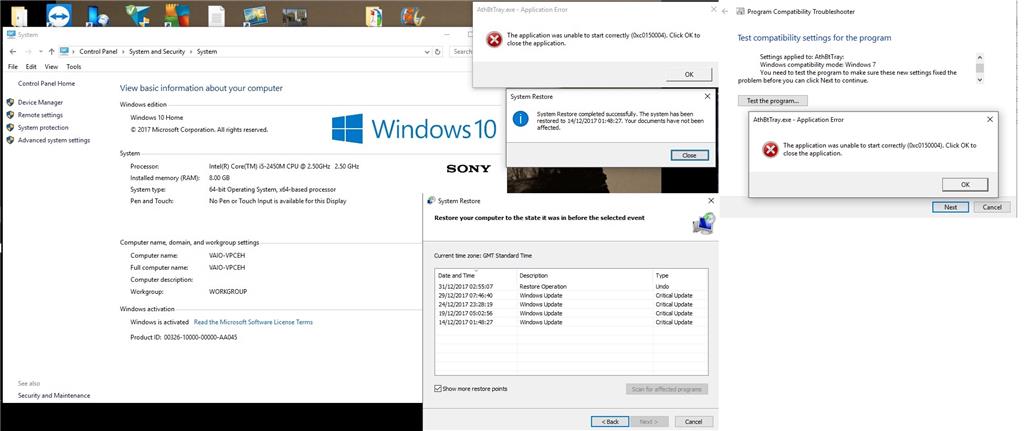
My first idea was to use system restore to overcome the problem but despite successfully restoring all four available backups the error message reappeared on rebooting.

My next idea was to use the Program compatibility Troubleshooter but the result for that attempt is also shown in the above image.

As the Bluetooth Speaker that is paired with my laptop is working satisfactorily what action should be taken to remove this annoyance?

There is a Bluetooth Win7 Suite (64) v7.3.0.100 shown (without a repair option) on the list at Control Panel > Programs > Programs and Features > Uninstall or change a program 

There was mention that this file may have been compromised but my AntiVirus program has not indicated anything to that effect.

It is my understanding that the 0xc0150004 code indicates the a dll requirement is missing (or damaged?)

Please advise

Thanking you in advance for your assistance

Mobydoc

***Moved from: Windows / Windows 10 / Devices & drivers ***

Windows for home | Windows 10 | Performance and system failures

Locked Question. This question was migrated from the Microsoft Support Community. You can vote on whether it's helpful, but you can't add comments or replies or follow the question.

0 comments No comments

7 answers

Sort by: Most helpful
  1. Anonymous
    2018-01-01T06:41:55+00:00

    Hi,

    Error code 0xc0150004 may suggests that a .dll is missing or a file may be corrupted.

    Let us try to isolate the issue. Performing a clean boot will help us check if any third party service is causing this issue. To know how to do it, please check How to perform a clean boot in Windows.

    To troubleshoot missing or corrupted system files on Windows 10. You may as well perform the System File Checker.

    Let us know if the solutions provided worked for you. Otherwise, we’ll be here if you need further assistance.

    Was this answer helpful?

    1 person found this answer helpful.
    0 comments No comments
  2. Anonymous
    2018-04-13T10:35:34+00:00

    Clean boot performed

    System opened with no error messages

    Reset computer to start normally and AthBtTray.exe error message appeared after restart

    Task manager items selected as follows

    Will now try to act on link suggested by Joanna777 re 

    [RESOLVED] DISM "error 0x800f081f The source files could not be found"

    Was this answer helpful?

    0 comments No comments
  3. Anonymous
    2018-02-24T11:23:17+00:00

    Hi,

    Community Insider TeeCarter had the same issue before and shared the solution that worked for him. We suggest checking it out by clicking on the link below.

    Get back to us if you need further assistance.

    Was this answer helpful?

    0 comments No comments
  4. Anonymous
    2018-02-22T21:39:30+00:00

    tried to run system file checker as advised

    screendump attached shows result - please advise

    Was this answer helpful?

    0 comments No comments
  5. Anonymous
    2018-02-21T03:01:12+00:00

    Thank you - have not yet had time to do this but intend to do so

    Was this answer helpful?

    0 comments No comments
