Hi,
I have an "upgraded" windows 10 Home version, from windows 8.1 laptop. A few months ago I did a clean install due to the system getting hung up & it wasn't long until I got the BSOD. When I was trying various recovery options I got the "\Device\Harddisk0\DR0
has a bad block" error. So, with the help of a forum we worked through it & the clean install was completed & things were going ok.... were.... now it is getting progressively worse again. Did I not check the event viewer the first time this happened, before
the clean install? I've got'a say "yes" because it would confirm that the exact same thing is happening again & now I cannot be 100% sure of this, only 99.9%.
So what is happening is the system errors are alternating between "\Device\Harddisk0\DR0 has a bad block" event ID 7 & volume information on \?\Volume{a86ec0fd-4dc6-4ae9-85e4-a2683ef453be} cannot be read, error code - 0xc000009c, event ID - 26420.
Did chkdsk /f /r /x
Actually got a clean bill of health
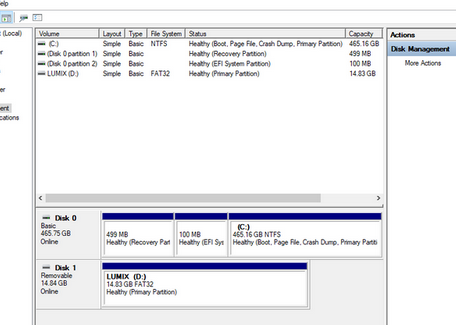
As you can see, disk management gives all the partitions clean bills of health.
Virus scans come up empty.
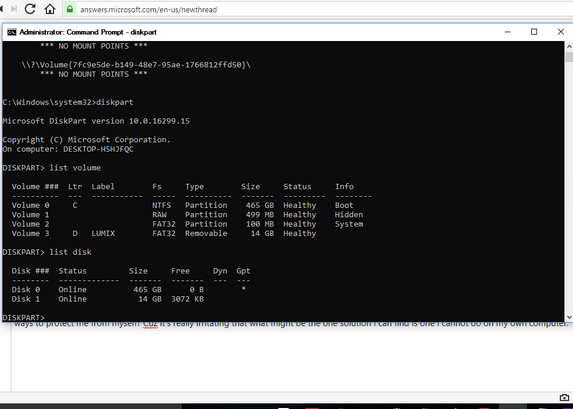
So, please advise on how to assign a letter to these drives, so maybe, hopefully, bit-locker will leave them alone. I cannot do this through disk management by right clicking on the volume. Any idea why? I can access c:, however it obviously has a letter,
so no need. Is this another of microsoft's ways to protect me from myself? Cuz it's really irritating that what might be the one solution I can find is one I cannot do on my own computer.
I don't/can't even use bit-locker anyway. I mean I guess I can use it to read encrypted stuff, however I don't, so why the heck it's even active, I don't know. & I can't use it for anything else cuz I have Home edition. & I have had Windows 10 for a couple/few
years now & while I have had many other problems, this has not been one, so ???? what gives????
Very frustrated. Linux is looking better & better everyday.
Thank you - Kristi
Moved from: Windows / Windows 10 / Devices & drivers
' cx='32' cy='32' r='32' /%3E%3Ctext x='50%25' y='55%25' dominant-baseline='middle' text-anchor='middle' fill='%23FFF' %3EA%3C/text%3E%3C/svg%3E)
