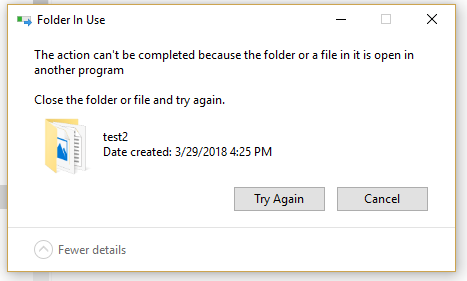
After I open and close a file in File Explorer, I can't move or rename the folder containing it. I get the error "The action can't be completed because the folder or a file in it is open in another program." This persists after closing and re-opening Explorer,
and after clearing Explorer history. It occurs with all file types I have tested: Plain text, PDF, images, Word, Excel. I have tested with files copied from an external drive, downloaded from the internet, and newly created. All show the same result.
I am able to delete these folders and files without an issue. When I restart my computer, I am able to move and modify the folders, until I open one of the files inside them. After I open and close a file, I can still move and modify that individual file,
but not the folder containing it. If I remove the file I opened from the folder, I can move the folder again.
When I open command prompt as an administrator and attempt to move these folders, I get the error message "Access is denied."
The problem began after I reset my computer and reinstalled Windows 10.
Here is a screenshot of the error message:

Details:
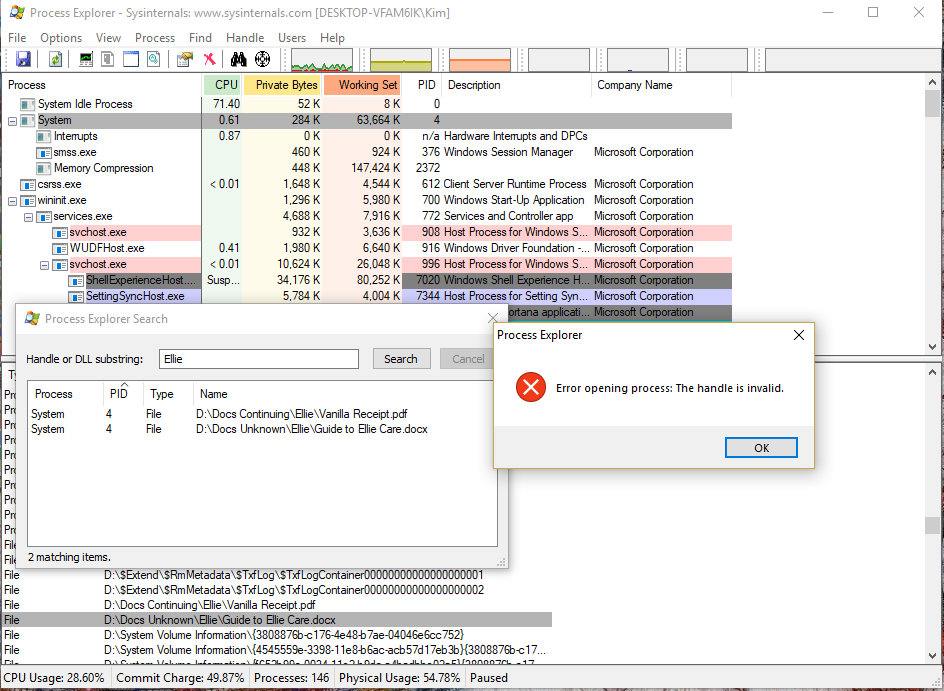
- I've been using Process Explorer to try to figure out what is happening. The handles are held by System. When I try to close a handle, I get the error message: "Error opening process: The handle is invalid." Here is a screenshot example, taken while Explorer
was closed:
Steps I've tried (from other posts):
- I have emptied the Recycle Bin.
- I've changed options in Explorer as recommended in other posts. I am not using the preview panel. I have turned off the options to show recently used or frequently used files in Quick access. I have repeatedly cleared the File Explorer history. The view
options to "Launch folder windows in a separate process" and to "Restore previous folder windows at logon" are both unchecked. I have checked "Always show icons, never thumbnails."
- I've checked the folder permissions. I am the folder owner. The permission entries are myself, SYSTEM, and Administrators. All have full control.
- I ran SFC and DISM according to the instructions in this forum article: https://answers.microsoft.com/en-us/windows/forum/windows_10-update/system-file-check-sfc-scan-and-repair-system-files/bc609315-da1f-4775-812c-
Please help! I've tried every fix I could find for similar problems, and don't know where to go next aside from reinstalling Windows again.
' cx='32' cy='32' r='32' /%3E%3Ctext x='50%25' y='55%25' dominant-baseline='middle' text-anchor='middle' fill='%23FFF' %3EA%3C/text%3E%3C/svg%3E)
