Share via

Windows 10 100% disk usage in Task Manager

Anonymous
2018-01-20T16:18:22+00:00

Hi,

i have dell laptop -  inspiron 15 , 5000 series , OS is windows 10 64 bit.

Recently i had a problem at the laptop:

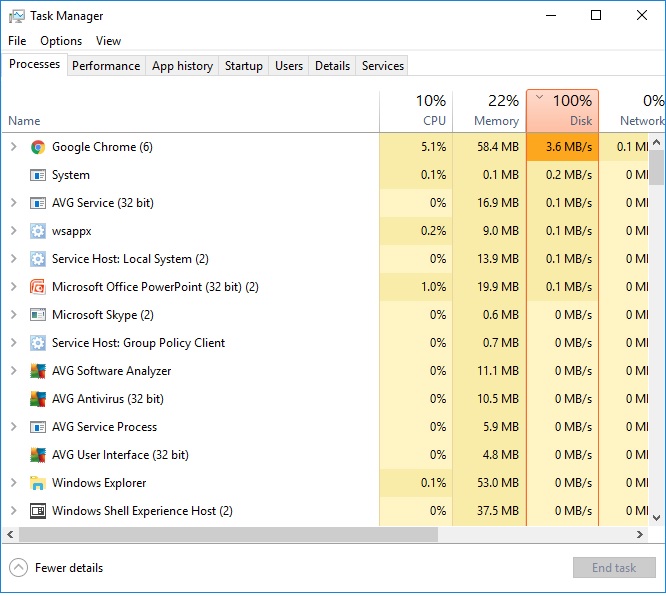
Disk utilization is quite constant at 100% even though no program runs parallel and there is no traffic between the hard disk and the external device.

I searched in Google for solutions and found this issue quite common in Windows 10. I tried all the options from the solutions offered such as stop and disable : Windows Search,Superfetch and Background Intelligent Transfer Service without any success .

I also tried to run a disk repair on Windows 10 and even "Reset to default" of the windows which means getting clean operating system - deleting all the files that I had and that did not help either.

Still after booting the computer and during work the disk utilization is 100% and the computer is very very slow.

Do you have a solution?

Is the hard disk malformed and is this what causes windows to show 100% disk utilization ?
Hi,

i have dell inspiron 15 , 5000 series , OS is windows 10 64 bit.

Recently i had a problem at the laptop:

Disk utilization is quite constant at 100% even though no program runs parallel and there is no traffic between the hard disk and the external device.

I searched in Google for solutions and found this issue quite common in Windows 10. I tried all the options from the solutions offered in the links but without any success :

1. https://www.drivereasy.com/knowledg...manager-improve-pc-performance-on-windows-10/

2. https://www.partitionwizard.com/partitionmagic/100-disk-usage-windows-10.html

I also tried to run a disk repair on Windows 10 and even "Reset to default" of the windows which means getting clean operating system - deleting all the files that I had and that did not help either.

Still after booting the computer and during work the disk utilization is 100% fand the computer is very very slow.

Do you have a solution?

Is the hard disk malformed and is this what causes windows to show 100% disk utilization ?

Hi,

i have dell inspiron 15 , 5000 series , OS is windows 10 64 bit.

Recently i had a problem at the laptop:

Disk utilization is quite constant at 100% even though no program runs parallel and there is no traffic between the hard disk and the external device.

I searched in Google for solutions and found this issue quite common in Windows 10. I tried all the options from the solutions offered in the links but without any success :

1. https://www.drivereasy.com/knowledg...manager-improve-pc-performance-on-windows-10/

2. https://www.partitionwizard.com/partitionmagic/100-disk-usage-windows-10.html

I also tried to run a disk repair on Windows 10 and even "Reset to default" of the windows which means getting clean operating system - deleting all the files that I had and that did not help either.

Still after booting the computer and during work the disk utilization is 100% fand the computer is very very slow.

Do you have a solution?

Is the hard disk malformed and is this what causes windows to show 100% disk utilization ?

Windows for home | Windows 10 | Performance and system failures

Locked Question. This question was migrated from the Microsoft Support Community. You can vote on whether it's helpful, but you can't add comments or replies or follow the question.

0 comments No comments

24 answers

Sort by: Most helpful
  1. Anonymous
    2018-01-20T16:57:01+00:00

    Open Start > Settings > Privacy > Background apps

    Disable all Background apps.

    Disabling Windows Update:

    Press Windows key + R

    Type: services.msc

    Hit Enter

    Scroll down to Windows Update

    Select it then right click it

    Click Properties

    Under the General tab, choose Startup type to Disabled

    Click Stop

    Click Apply then OK

    Also, check whats starting up with Windows.

    Press Windows key + X

    Click Task Manager

    Click Startup tab

    Disable all except Windows Defender.


    Press Windows key + R

    Type: msconfig

    Hit Enter

    Go to the services tab

    Check the box,

    hide all Microsoft services

    Disable the remaining services

    Click Apply then OK

    Restart if prompted


    Open Start, type: problem reports

    Hit Enter

    Delete any failed or pending reports.

    Go to Start > Settings > System > Notifications and actions > Turn off "Show me tips about Windows."

    If you have Chrome installed, uninstall then reinstall it.

    Was this answer helpful?

    10+ people found this answer helpful.
    0 comments No comments
  2. Anonymous
    2018-01-20T21:17:48+00:00

    I am going to recommend you downgrade to Windows 10 1703.

    Step 1: download Windows 10 1703 from the following link:

    https://tb.rg-adguard.net/index.php?sid=74a7cf5...

    Step 2: create a bootable copy

    https://answers.microsoft.com/en-us/windows/wik...

    Step 3: perform a custom install

    http://answers.microsoft.com/en-us/insider/wiki...

    There are some compatibility issues with Windows 10 version 1709 and older hardware or software. There is no explanation why a lot of these problems are happening in Windows 10 1709, but the release is significantly flawed. Software and Hardware that once worked in previous versions, just suddenly stops working in Windows 10 1709 after an upgrade and sometimes loses functionality or stability.

    Was this answer helpful?

    1 person found this answer helpful.
    0 comments No comments
  3. Anonymous
    2018-01-20T21:15:26+00:00

    The version currently installed is :

    Version 1709 (OS Build 16299.192)

    I bought my laptop with Windows 8.1 installed (original version).

    Few months later i upgrade to Windows 10 and it worked great for the last 2 years until this issue .

    Was this answer helpful?

    0 comments No comments
  4. Anonymous
    2018-01-20T20:46:37+00:00

    Which version of Windows 10 is currently installed? See how to verify:

    https://answers.microsoft.com/en-us/windows/wik...

    Which version and edition Windows did you originally upgrade from or was installed prior to your current version:

    Windows 10 - 1703, 1607, 1511, 1507 (build 10240)

    Windows 7 Starter, Home Basic, Home Premium, Windows 8.0 Core, Windows 8.1 Windows 7 Professional, Windows 7 Ultimate, Windows 8.0 Pro, Windows 8.1 Pro

    Was this answer helpful?

    0 comments No comments
  5. Anonymous
    2018-01-20T20:39:24+00:00

    Hi,

    i did those action according to your instruction but the problem didn't solved.

    Disk Usage is still 100% from time to time even if no other process except for OS runs .

    Do you have any more ideas ?

    Thanks !

    Was this answer helpful?

    0 comments No comments
