I recently got an SSD to be used as a boot drive for my laptop with the intention of using the old 1TB HDD for storage, but when I start up my laptop, it keeps trying to boot with the old HDD?
I migrated the OS from the hard drive to the SSD and set it to boot first in the BIOS. After booting from the SSD, I formatted the hard drive and I figured that would be that. Now, however, whenever I start up my laptop I keep getting stuck in the automatic
repair loop because, I assume, it's still trying to boot from the HDD even though there's nothing there anymore. I have to hit F12 on startup and manually select to boot from my SSD every time.
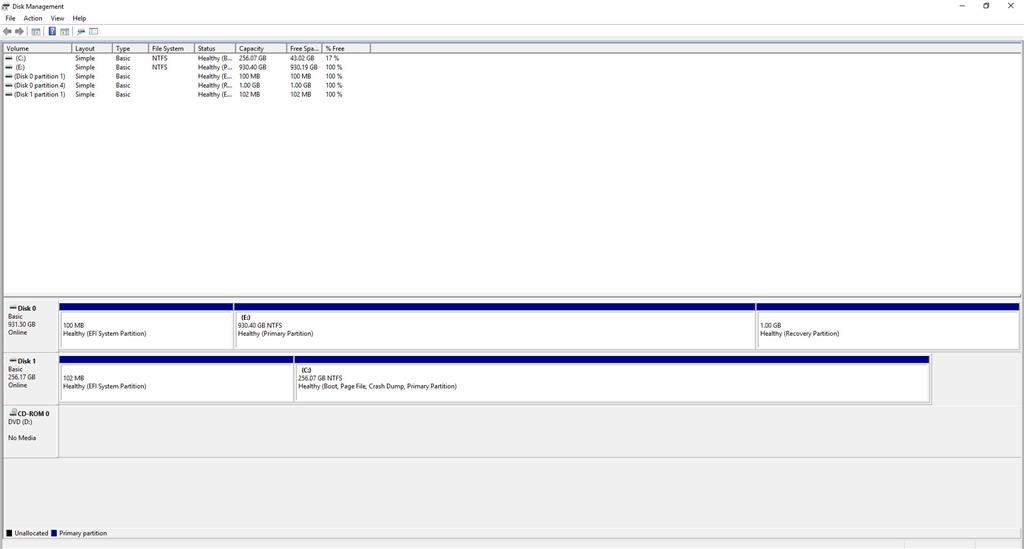
If I remove the HDD and leave only the SSD inside, then everything works 100% fine. I couldjust leave out the hard drive entirely but I'd really prefer not to since I want the extra space. How can I get my system to stop trying to boot from the hard drive? Here's a screenshot of my disk management if that helps.
' cx='32' cy='32' r='32' /%3E%3Ctext x='50%25' y='55%25' dominant-baseline='middle' text-anchor='middle' fill='%23FFF' %3EA%3C/text%3E%3C/svg%3E)

