Developer technologies | Windows Presentation Foundation
A part of the .NET Framework that provides a unified programming model for building line-of-business desktop applications on Windows.
This browser is no longer supported.
Upgrade to Microsoft Edge to take advantage of the latest features, security updates, and technical support.
' cx='32' cy='32' r='32' /%3E%3Ctext x='50%25' y='55%25' dominant-baseline='middle' text-anchor='middle' fill='%23FFF' %3ELS%3C/text%3E%3C/svg%3E)
I have a 2 DataGrids. The first column of each datagrid is the name of a person. I have defined the column as such :
                                    <DataGridTemplateColumn  Header="Name">
                                        <DataGridTemplateColumn.CellTemplate>
                                            <DataTemplate>
                                                <TextBlock Text="{Binding Name}">
                                                    <TextBlock.ContextMenu>
                                                        <ContextMenu>
                                                            <MenuItem Header="Go to Player" Click="LetsGoToPlayer"></MenuItem>
                                                        </ContextMenu>
                                                    </TextBlock.ContextMenu>
                                                </TextBlock>
                                            </DataTemplate>
                                        </DataGridTemplateColumn.CellTemplate>
                                    </DataGridTemplateColumn>
This works (I will tell the problem after I show the second definition).
The second definition is :
                                            <DataGridTemplateColumn Header="Name">
                                                <DataGridTemplateColumn.CellTemplate>
                                                    <DataTemplate>
                                                        <Button Click="SampleClick">
                                                            <Button.Content>
                                                                <TextBlock Text="{Binding Name}">
                                                                    <TextBlock.ContextMenu>
                                                                        <ContextMenu>
                                                                            <MenuItem Header="Go to Player" Click="doti"></MenuItem>
                                                                        </ContextMenu>
                                                                    </TextBlock.ContextMenu>
                                                                </TextBlock>
                                                            </Button.Content>
                                                        </Button>
                                                        <!--<TextBlock Text="{Binding Name}">
                                                            <TextBlock.ContextMenu>
                                                                <ContextMenu>
                                                                    <MenuItem Header="Go to Player" Click="doti"></MenuItem>
                                                                </ContextMenu>
                                                            </TextBlock.ContextMenu>
                                                        </TextBlock>-->
                                                    </DataTemplate>
                                                </DataGridTemplateColumn.CellTemplate>
                                            </DataGridTemplateColumn>
As you can see the second one (which doesn't work) had just a textblock and was changed to a button just for testing.
The problem is that the first one works in that the context menu on the textblock is called. The second one does not work. The context menu when the column is defined just as a textblock is not called. When I changed it to a button the click event is never called.
Now the first one (working) displays the context menu right away when right clicked but the second one does not. To get the context menu to even show you need to select an item from the datagrid and then another and back to the one you want before the context menu will even show up.
The definition of the datagrid (working) is:
                            <DataGrid Grid.Row="1" ItemsSource="{Binding SkaterStats,NotifyOnSourceUpdated=True ,NotifyOnTargetUpdated=True}"
                                            CanUserAddRows="False" IsReadOnly="True" FrozenColumnCount="1"
                                          AutoGenerateColumns="False" Margin="0,0,0,20" Sorting="DataGrid_Sorting" TargetUpdated="DataGrid_TargetUpdated">
The defintion of the datagrid that has problems is :
                                    <DataGrid ItemsSource="{Binding SkaterStats,NotifyOnSourceUpdated=True ,NotifyOnTargetUpdated=True}"
                                        CanUserAddRows="False" IsReadOnly="True" FrozenColumnCount="2" ScrollViewer.CanContentScroll="False"
                                        AutoGenerateColumns="False" Margin="0,0,0,20"
                                        Sorting="DataGrid_Sorting" TargetUpdated="DataGrid_TargetUpdated" LoadingRow="theLoadingRow">
Any ideas what might be causing the problem?
PS just noticed in trying to figure out what the problem is that the Sorting and TargetUpdated events are not called for either Datagrid. The LoadingRow is called as I use it the get the actual row number for a rank.

I used your code to make a demo, and both of DataGrid work well.
Code for Xaml:
<Window.DataContext>
        <local:viewModel></local:viewModel>
    </Window.DataContext>
    <Grid>
        <Grid.RowDefinitions>
            <RowDefinition/>
            <RowDefinition/>
        </Grid.RowDefinitions>
        <DataGrid  Grid.Row="0" ItemsSource="{Binding SkaterStats,NotifyOnSourceUpdated=True ,NotifyOnTargetUpdated=True}"
                                             CanUserAddRows="False" IsReadOnly="True" FrozenColumnCount="1"
                                           AutoGenerateColumns="False" Margin="0,0,0,20" Sorting="DataGrid_Sorting" TargetUpdated="DataGrid_TargetUpdated">
            <DataGrid.Columns>
                <DataGridTemplateColumn  Header="Name">
                    <DataGridTemplateColumn.CellTemplate>
                        <DataTemplate>
                            <TextBlock Text="{Binding Name}">
                                <TextBlock.ContextMenu>
                                    <ContextMenu>
                                        <MenuItem Header="Go to Player" Click="LetsGoToPlayer"></MenuItem>
                                    </ContextMenu>
                                </TextBlock.ContextMenu></TextBlock>
                        </DataTemplate>
                    </DataGridTemplateColumn.CellTemplate>
                </DataGridTemplateColumn>
            </DataGrid.Columns>
        </DataGrid>
        <DataGrid Grid.Row="1" ItemsSource="{Binding SkaterStats,NotifyOnSourceUpdated=True ,NotifyOnTargetUpdated=True}"
                                         CanUserAddRows="False" IsReadOnly="True" FrozenColumnCount="2" ScrollViewer.CanContentScroll="False"
                                         AutoGenerateColumns="False" Margin="0,0,0,20"
                                         Sorting="DataGrid_Sorting" TargetUpdated="DataGrid_TargetUpdated" LoadingRow="theLoadingRow">

                <DataGrid.Columns>
                <DataGridTemplateColumn Header="Name">
                    <DataGridTemplateColumn.CellTemplate>
                        <DataTemplate>
                            <Button>
                                <Button.Content>
                                    <TextBlock Text="{Binding Name}">
                                        <TextBlock.ContextMenu>
                                            <ContextMenu>
                                                <MenuItem Header="Go to Player" Click="doti"></MenuItem>
                                            </ContextMenu>
                                        </TextBlock.ContextMenu>
                                    </TextBlock>
                                </Button.Content>
                            </Button>
                        </DataTemplate>
                    </DataGridTemplateColumn.CellTemplate>
                </DataGridTemplateColumn>
            </DataGrid.Columns>
        </DataGrid>
    </Grid>
The cs code is:
 public class viewModel
    {
        public ObservableCollection<SkaterState> SkaterStats { get; set; } = new ObservableCollection<SkaterState>();

        public viewModel()
        {
            SkaterStats = new ObservableCollection<SkaterState>();
            SkaterStats.Add(new SkaterState() { ID = 1, Name = "a", State = "0" });
            SkaterStats.Add(new SkaterState() { ID = 2, Name = "aa", State = "1" });
        }
    }
    public class SkaterState
    {
        public SkaterState() { }
        public int ID { get; set; }
        public string Name { get; set; }
        public string State { get; set; }

    }
The result picture is:
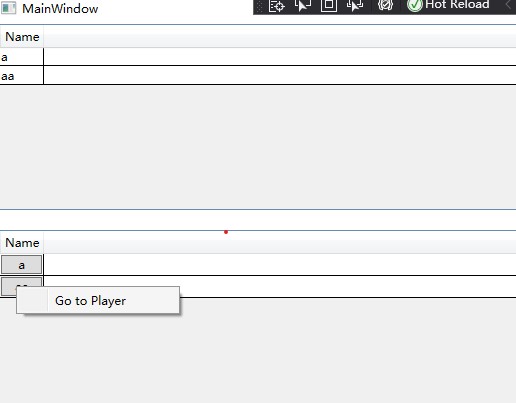
Does my demo work for you? If it doesn't, did I miss any step or code to reproduce your error?
If the response is helpful, please click "Accept Answer" and upvote it.
Note: Please follow the steps in our documentation to enable e-mail notifications if you want to receive the related email notification for this thread.
Sorry for the delay in replying. The methods were in fact being called. I had VS set to Release as I had compiled the app to distribute to those using it so the breakpoints were not being used.
The second problem (that of the context menu not being shown without selecting, selecting a second row and going back to the row you want). Why the context menu does not just show is still a problem.
@Lloyd Sheen
How did you distribute the app? Breakpoints are one of the most important debugging techniques in your developer's toolbox. If you run the installed wpf project, breakpoints will not work. I am little confused for your second problem, the ContextMenu can show in my result picture, could you give me a detailed description?