Hi Ricky,
The System Thread Exception Not Handled blue screen that you're getting is related to a corrupted or outdated graphics card driver.
Atikmdag.sys is associated with ATI Radeon. Since you've mentioned that you've already tried uninstalling, reinstalling, and updating your graphics card, we would like to gather more information to investigate the issue. Kindly
answer the following:
- Which build and version of Windows your computer is running? To check it, press the
Windows key + R key, type winver, then press
Enter.
- Have you made any changes prior to the issue?
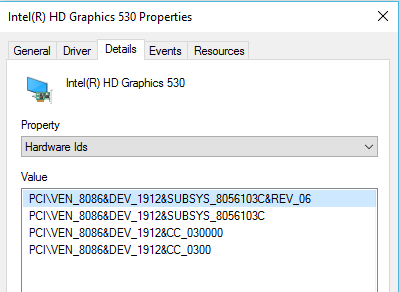
- What is your graphics card driver hardware ID? To get it, here's how:
- Go to Device Manager.
- Double-click Display adapters to expand it.
- Right-click on your graphics card, then select Properties.
- Go to the Details tab.
- On the Property section, click on the drop-down menu and select
Hardware Ids. Refer to the screenshot below:
In the meantime, you can perform the steps provided on this
link. Under
"When did you get the error?" section, select the option that's applicable to you.
Let us know if you need further assistance.
' cx='32' cy='32' r='32' /%3E%3Ctext x='50%25' y='55%25' dominant-baseline='middle' text-anchor='middle' fill='%23FFF' %3EA%3C/text%3E%3C/svg%3E)
