
bring up Device Manager
expand Display Adapter
right-click the AMD Driver
click Update Driver
click Browse option
click Let Me Pick
install the old version (based on the date of the driver)
this solution works for me it should works for you too
This browser is no longer supported.
Upgrade to Microsoft Edge to take advantage of the latest features, security updates, and technical support.
' cx='32' cy='32' r='32' /%3E%3Ctext x='50%25' y='55%25' dominant-baseline='middle' text-anchor='middle' fill='%23FFF' %3EA%3C/text%3E%3C/svg%3E)
Advanced Micro Devices, Inc. - Display - 7/25/2017 12:00:00 AM - 22.19.128.0
this update has affected my resolution and lower it and can return as it was before
cant uninstall this update which cause this problem 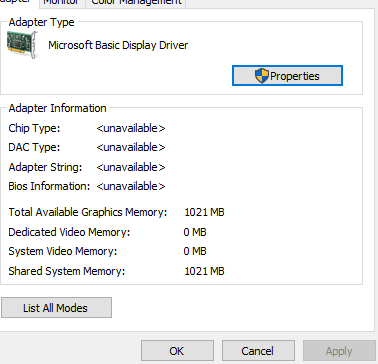
Locked Question. This question was migrated from the Microsoft Support Community. You can vote on whether it's helpful, but you can't add comments or replies or follow the question.
Answer accepted by question author
bring up Device Manager
expand Display Adapter
right-click the AMD Driver
click Update Driver
click Browse option
click Let Me Pick
install the old version (based on the date of the driver)
this solution works for me it should works for you too
bring up Device Manager
expand Display Adapter
right-click the AMD Driver
click Update Driver
click Browse option
click Let Me Pick
install the old version (based on the date of the driver)
this solution works for me it should works for you too
Thx, work fine and go back to 8.970.100.9001 from 13/01/2015
Same problema here on AMD HD 3400 and on AMD HD 4250 recommended resolution is 1024x768 on both of them.
how can i do that because i tried rest this pc and it wont to do it
you can use system restore and then tell it not to update system drivers.
But yes its a bad update..