Microsoft 365 and Office | SharePoint | For business | Windows
A group of Microsoft Products and technologies used for sharing and managing content, knowledge, and applications.

This browser is no longer supported.
Upgrade to Microsoft Edge to take advantage of the latest features, security updates, and technical support.
' cx='32' cy='32' r='32' /%3E%3Ctext x='50%25' y='55%25' dominant-baseline='middle' text-anchor='middle' fill='%23FFF' %3EAA%3C/text%3E%3C/svg%3E)
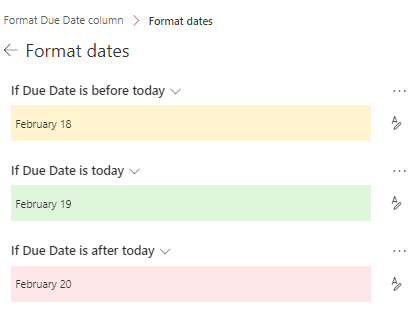
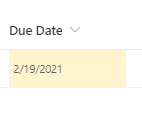
I'm trying to conditionally format a date column. Unfortunately, it looks like even the out-of-box formatting options for dates isn't working properly to "today". As you can see in the below screen shot, "Today" should format in green, yesterday in yellow. Today is formatting in yellow. I believe a date column stores the date with a 12:01 am time. which means that when compared to now, today's date will be less than now for 23 hours and 59 minutes of that day. "Tomorrow" isn't an option and ultimately, I'd like to apply formatting based on +/- days from due date reliably. Any suggestions?
A group of Microsoft Products and technologies used for sharing and managing content, knowledge, and applications.

Using the same time zones across devices should allow the “out-of-box formatting options” read the correct date for “Today”, per my test.
Check your local computer regional settings (Windows Settings > Time & Language > Date & time) and make sure the time zone matches the regional settings for this SharePoint site via Site Settings > Regional settings > Time Zone. Also remove your personal regional setting if any.
Please note: The column formatting for SharePoint Online uses only @now and Today is not supported.
You can see the JSON code by clicking “Advanced mode” on the “Format this column” pane.
References: "@now ". / Formatting an item when a date column is before or after today's date (advanced).
*Note: Microsoft is providing this information as a convenience to you. The sites are not controlled by Microsoft. Microsoft cannot make any representations regarding the quality, safety, or suitability of any software or information found there. Please make sure that you completely understand the risk before retrieving any suggestions from the above link. *
If an Answer is helpful, please click "Accept Answer" and upvote it.
**Note: Please follow the steps in our documentation to enable e-mail notifications if you want to receive the related email notification for this thread. **
Thank you for the response, @Chelsea Wu . Unfortunately, not all of our users are in the same time zone and we don't have control over personal regional settings for all users. I am looking for a solution that will work for all users no matter their location.
Please use Comment instead of Write an Answer section to post the reply unless when you provide a valid solution to the question. We will be converting this reply for you.
The problem is not with the conditional formatting options though.
Column values are affected directly by site level regional settings, while @now reads from local time on machine. So you will not be getting the correct output if the time zones do not match.
As far as I know, there is no other solution using column formatting.
Hi @Angela Adams , do you have any progress on this thread? Please feel free to let us know if you need further assistance.