' cx='32' cy='32' r='32' /%3E%3Ctext x='50%25' y='55%25' dominant-baseline='middle' text-anchor='middle' fill='%23FFF' %3EA%3C/text%3E%3C/svg%3E)

Hi Alison,
If your scanner doesn’t work in Windows 10 after an update, it's possible that the driver is not compatible with the current update or the driver is already outdated.
To help you resolve your concern, please follow these steps:
Method 1: Run the printing troubleshooter. You may refer to this link. Note: The automated troubleshooter will try to identify and then resolve the issues that it finds
Method 2: **Configure Related Services.**If some related services are not started, the scanner cannot work properly.
Here are the related services. Be sure these services are started:
- Remote Procedure Call RPC
- DCOM Server Process Launcher
- RPC Endpoint Mapper
- Shell Hardware Detection
- Windows Image Acquisition (WIA)
Steps below are for your reference how to check for the service status. Here, let’s take Shell Hardware Detectionfor example**.**
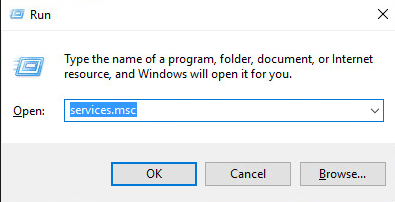
- Hold Down Windows logo and press R key. A Run dialog box will pop up.
- Type services.mscin the run box and click OK button.
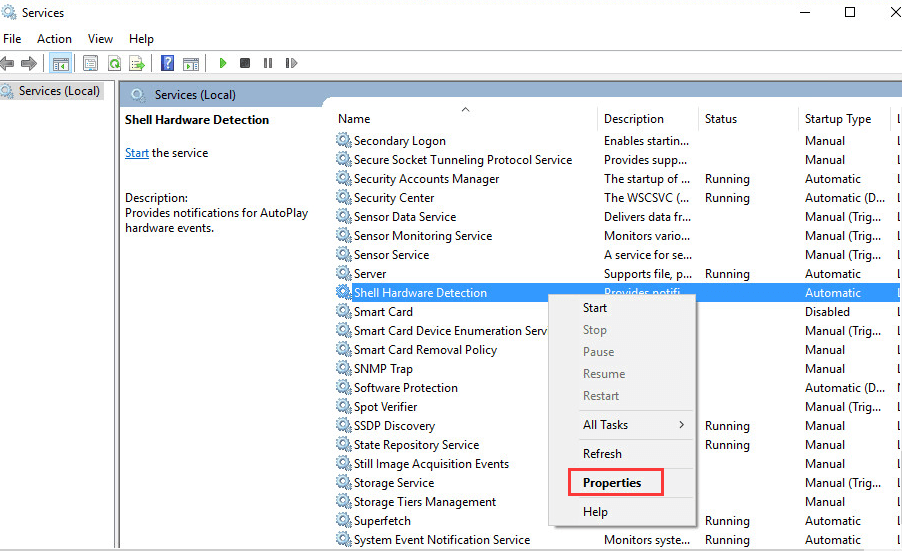
- Find Shell Hardware Detection from Namelist**.**Right-click on it and select Properties from the context menu.
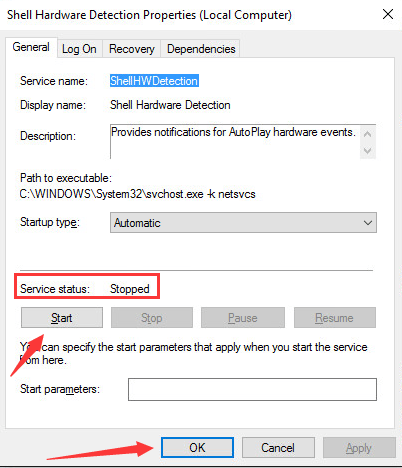
- If you see “Service status” is Stopped, click Start button and OK button. Then the service will start again.
Method 3: Update Driver for Your Scanner in the Device Manager. You may refer to this link.
Note: You can go to your scanner’s manufacturer’s website to download the latest Windows 10 driver.
Do let us know if you have any other concerns.