Community Center | Not monitored
Tag not monitored by Microsoft.

This browser is no longer supported.
Upgrade to Microsoft Edge to take advantage of the latest features, security updates, and technical support.
' cx='32' cy='32' r='32' /%3E%3Ctext x='50%25' y='55%25' dominant-baseline='middle' text-anchor='middle' fill='%23FFF' %3EFS%3C/text%3E%3C/svg%3E)
Hi, I have a problem that I can solve.
I have a database with sales data. I want to be able to show this data as sales per product group in an Excel pivot table,
1 column with the total sales of the company for each product group and 1 column with only the sales from one or more specifc vendor/s that I specify with a filter in the Excel pivot table.
I dont know how to keep the total sales of the product group when I use the filter for a specific vendor?
I know I can make a specific column in my power query editor but then I have to specify what vendor it should be already there and I need to be able to choose this with the filter in the Excel Pivot table.
I would like it to look similar to this (i don't know if I managed to upload the image.

Tag not monitored by Microsoft.
Answer accepted by question author

Hi @Fredrik Söderholm Pettersson
A picture of your source table would have helped... Assuming Table1 loaded as is to the Data Model:

1/ Create measure Total Sales: =SUM(Table1[Amount])
With your scenario use it for your expected Vendor Sales column
2/ Create measure Total Company Sales: =CALCULATE([Total Sales];ALL(Table1[Vendor]))
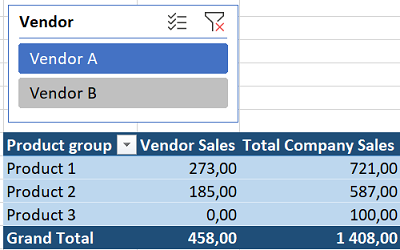
Corresponding sample available here
Wow, thank you very much. You nailed it.
So easy when you know how to do it. I'm in the beginning of learning Power Query M so I'm learnng every day :)
Thank you very much, This was really helpful!!
Glad I could help @Fredrik Söderholm Pettersson & Thanks for posting back
(Don't confuse Power Query with Power Pivot)
Nope, I won't confuse it :) Thanks! Measures in Pover Pivot I have done before, not a lot but some :)