Share via

Task Manger Performance Bluetooth display doesn't show headset connection

Anonymous
2018-09-12T21:36:25+00:00

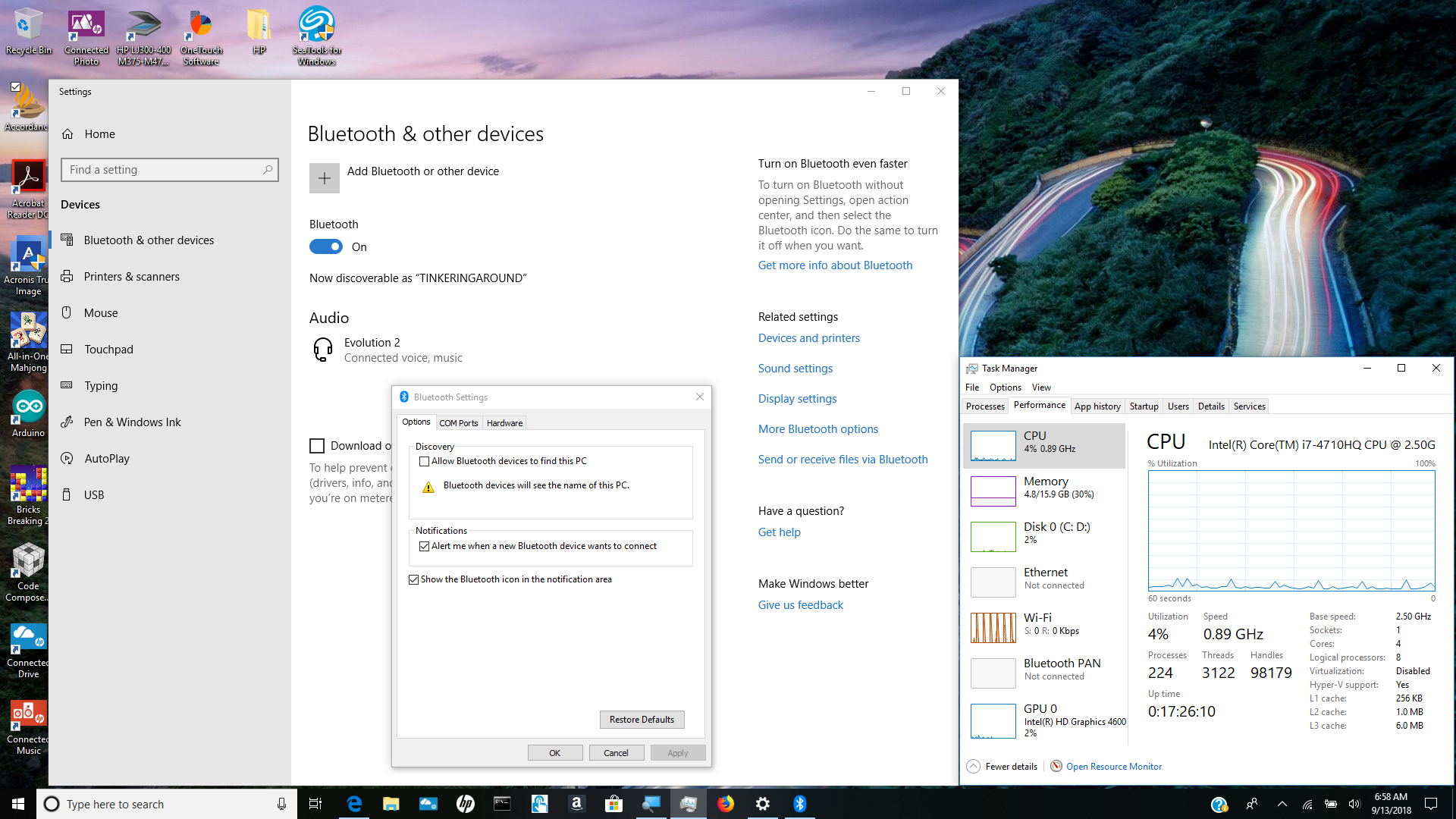
Running Windows 10 version1893 and took in update 2018-09 last night. I am able to enable Bluetooth and connect up my headset just fine, but the Task Manager only shows a Bluetooth window when it is enabled as it should, but it never displays any Bluetooth activity. The Task Manager only shows "Bluetooth PAN Not connected" even when I'm listening with them and the "Bluetooth & other devices" window of "Settings" shows Bluetooth as On with "Audio Evolution 2 Connected voice, music". It used to show Bluetooth headset activity if I remember correctly. Is this a feature or a bug?

Moved from: Windows 10/ Ease of access

Windows for home | Windows 10 | Devices and drivers

Locked Question. This question was migrated from the Microsoft Support Community. You can vote on whether it's helpful, but you can't add comments or replies or follow the question.

0 comments No comments

3 answers

Sort by: Most helpful
  1. Anonymous
    2018-09-14T23:04:29+00:00

    Additional information. If I first establish my Bluetooth connection and then start my audio, I hear the audio just fine. But if I first start the audio, my Bluetooth connection gets established as far as the "Bluetooth and other devices" window is concerned, but the audio is not redirected on the fly to my headset.

    Was this answer helpful?

    0 comments No comments
  2. Anonymous
    2018-09-13T14:47:24+00:00

    Attached is a screen shot of what you asked for. Interestingly the Bluetooth icon along the bottom of my screen only appears when I click on "More Bluetooth options" to bring up the "Bluetooth Settings" window and goes away when I close that window. I was going to attach an additional screen shot or two to show you the list of device names that appear in the "Hardware" tab of the "Bluetooth Settings" window, but I can't get my computer to take an additional screen shot even after restarting it. Anyway the hardware device list shows:

    Evolution 2

    Evolution 2 Avrcp Transport Adaptor

    Intel(R) Wireless Bluetooth(R)

    Microsoft Bluetooth Enumerator

    Microsoft Bluetooth LE Enumerator
    Was this answer helpful?

    0 comments No comments
  3. Anonymous
    2018-09-13T11:07:33+00:00

    Hi Joe,

    I would like to verify some information regarding your concern. Could you share a screenshot of the Task Manager where the Bluetooth PAN Not connected appear?

    Basically, if the Show the Bluetooth icon in the notification area is enabled, the Bluetooth icon should appear in the notification area on the system tray. It should also flash the current Bluetooth activity if you're using it. You can enable it by navigating to Settings > Devices > Bluetooth & other devices > More Bluetooth settings.

    I'm looking forward to your reply.

    Regards.

    Was this answer helpful?

    0 comments No comments
