Microsoft 365 and Office | Excel | For business | Windows
A family of Microsoft spreadsheet software with tools for analyzing, charting, and communicating data

This browser is no longer supported.
Upgrade to Microsoft Edge to take advantage of the latest features, security updates, and technical support.
' cx='32' cy='32' r='32' /%3E%3Ctext x='50%25' y='55%25' dominant-baseline='middle' text-anchor='middle' fill='%23FFF' %3EB%3C/text%3E%3C/svg%3E)
I am trying to unprotect and protect excel sheet.
i am able to unprotect sheet. but, finally after all processing done, protect sheet not working.
before closing workbook1.Close(); ==> It will throw popup to save changes. ==> How to avoid this
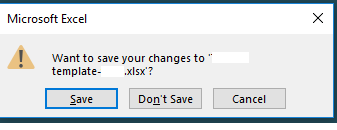 ==> want avoid to popup when close.....????
what could be the problem. below is the code.
string XLpath = "C:\Documents\excel1.xlsx";
static Excel.Application application1 = null;
static Excel.Workbook workbook1 = null;
SaveToXL(dt, XLpworkbookpwd);
CalcFile();
public void SaveToXL(System.Data.DataTable dt, string XLwbkpwd)
{
xlApp = new Excel.Application();
XLWBook1 = xlApp.Workbooks.Open(XLpath);
foreach (Excel.Worksheet wsht_ex in XLWBook1.Worksheets)
{
//unprotect excel sheet with password before saving
wsht_ex.Unprotect(XLwbkpwd);
}
XLWBook1.Save();
XLWBook1.Close();
xlApp.Quit(); // Quit Excel Application
}
public void CalcFile(string sheetName, string XLwbkpwd)
     {

         try
         {
             WriteToXL();
         }
         catch (Exception ex)
         {

         }
         finally
         {
             workbook1.Save(); //data saved after calculation
             workbook1.Worksheets[sheetName].Protect(XLwbkpwd);  **// Sheet protecting here**
             **//throw popup to save your changes - Need to Avoid popup to save**
            ![70503-image.png][2]
             workbook1.Close(); **// code hanging here.**
             application1.Quit();
         }
     }

Hi,
Thanks for accepting answer here. Other partners who read the forums with the same issue can get more information from the correct result.

Maybe execute workbook1.Save() after Protect (before Close) too.
Thanks. i did it already.. Thanks for your suggestion.
' cx='32' cy='32' r='32' /%3E%3Ctext x='50%25' y='55%25' dominant-baseline='middle' text-anchor='middle' fill='%23FFF' %3EL3%3C/text%3E%3C/svg%3E)
Then your problem is solved as you marked it as answered
(it was not clear with "i did it already"...)