Share via

Cannot Remove "Unavailable App" (Windows 10)

Anonymous
2018-05-06T04:54:38+00:00

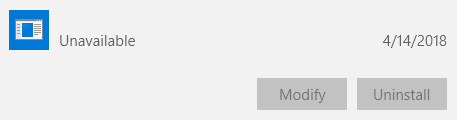
I was reviewing my Apps & Features list I noticed this app simply called "Unavailable". I can't find a way to remove it. Clicking or Modify or Uninstall does nothing. I looked through some other answers and I could only find where the size was "Unavailable" (there is no size at all in this instance) or the app is named but has "Unavailable" listed underneath. I don't even know what this app was originally supposed to be.

4/14/18 is the day I first booted up my computer and I only installed basic necessities like an internet browser, etc. I used the program CCleaner to view an alternate uninstall/remove programs list and the only program that was one CCleaner and not the Windows Apps & Features list was a Windows Update (probably the one I had to download from the website since it failed when using the automatic updater). I uninstalled said update anyways but the problem still persists. 

The computer started as Windows 10 and did not upgrade from a previous OS. 

EDIT: I forgot to mention this is an ASUS computer. The Apps list is normally in alphabetical order but there are programs called "ASUSTek Computer Inc." at the bottom of the list (when they should technically be at the top). The unavailable program is actually in the middle of these programs at the bottom. Not sure if this is relevant.

Windows for home | Windows 10 | Microsoft Store

Locked Question. This question was migrated from the Microsoft Support Community. You can vote on whether it's helpful, but you can't add comments or replies or follow the question.

0 comments No comments

Answer accepted by question author

DaveM121 891.9K Reputation points Independent Advisor
2018-05-06T06:22:57+00:00

Hi Ankhun, you mention that at the bottom of your app list is the ASUSTek Computer Inc bloatware that comes pre-installed on your system.

Asus deliberately group their software together on their systems. That 'Unavailable' App must have been part of the Asus Pre=installed apps and at some point Windows Update found it to be incompatible and removed it prior to a major update and all that remains is the registry entry for that app

Was this answer helpful?

2 people found this answer helpful.
0 comments No comments

3 additional answers

Sort by: Most helpful
  1. Sumit 43,806 Reputation points Volunteer Moderator
    2018-05-06T05:02:06+00:00

    Hi,

    Though chances are bleak but try using Revo uninstaller and see it is listed:

    https://www.revouninstaller.com/revo_uninstalle...

    If it doesn't help, let us know.

    Disclaimer: This is a non-Microsoft website. The page appears to be providing accurate, safe information. Watch out for ads on the site that may advertise products frequently classified as a PUP (Potentially Unwanted Products). Thoroughly research any product advertised on the site before you decide to download and install it.

    Was this answer helpful?

    2 people found this answer helpful.
    0 comments No comments
  2. Sumit 43,806 Reputation points Volunteer Moderator
    2018-05-06T06:31:57+00:00

    It looks to a bug, nothing suspicious.

    Does removing the program from the Registry offer any help?

    https://www.bleepingcomputer.com/tutorials/manu...

    Was this answer helpful?

    1 person found this answer helpful.
    0 comments No comments
  3. Anonymous
    2018-05-06T05:12:45+00:00

    Thanks for responding. I used RevoUninstaller but unfortunately the list of programs is the same as CCleaner/Apps lists with no traces of the Unavailable program.

    Was this answer helpful?

    0 comments No comments
