Share via

Task Manager Startup Dropables Issue?

Anonymous
2018-05-06T14:13:36+00:00

Hey all,

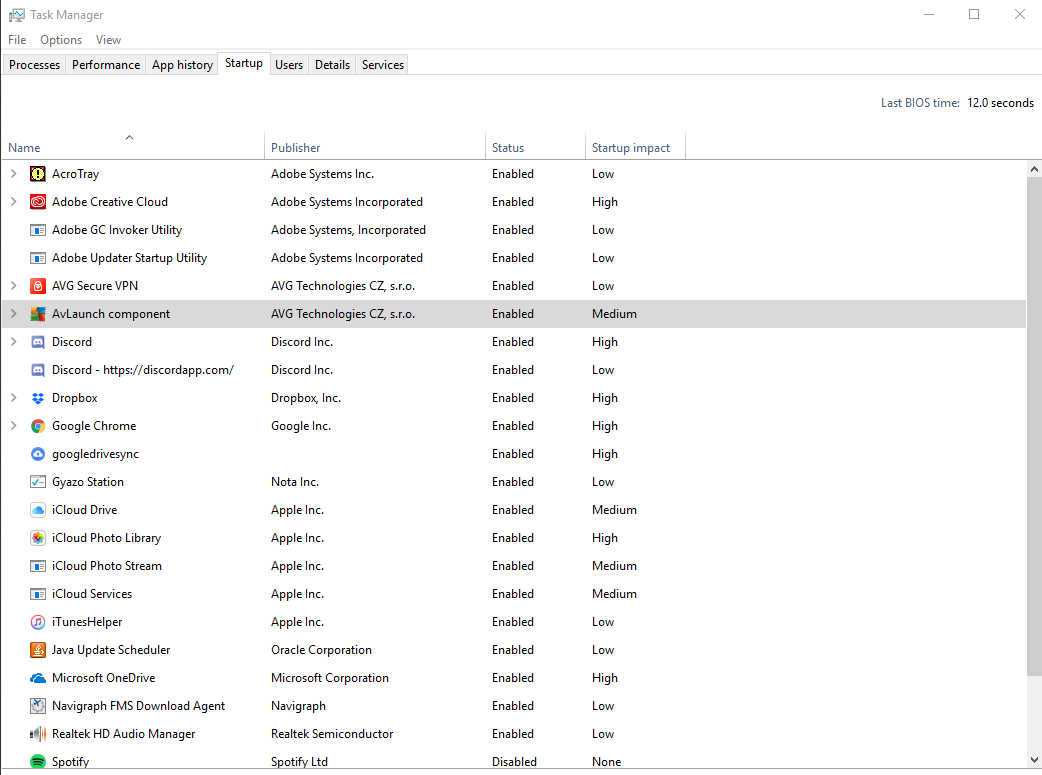
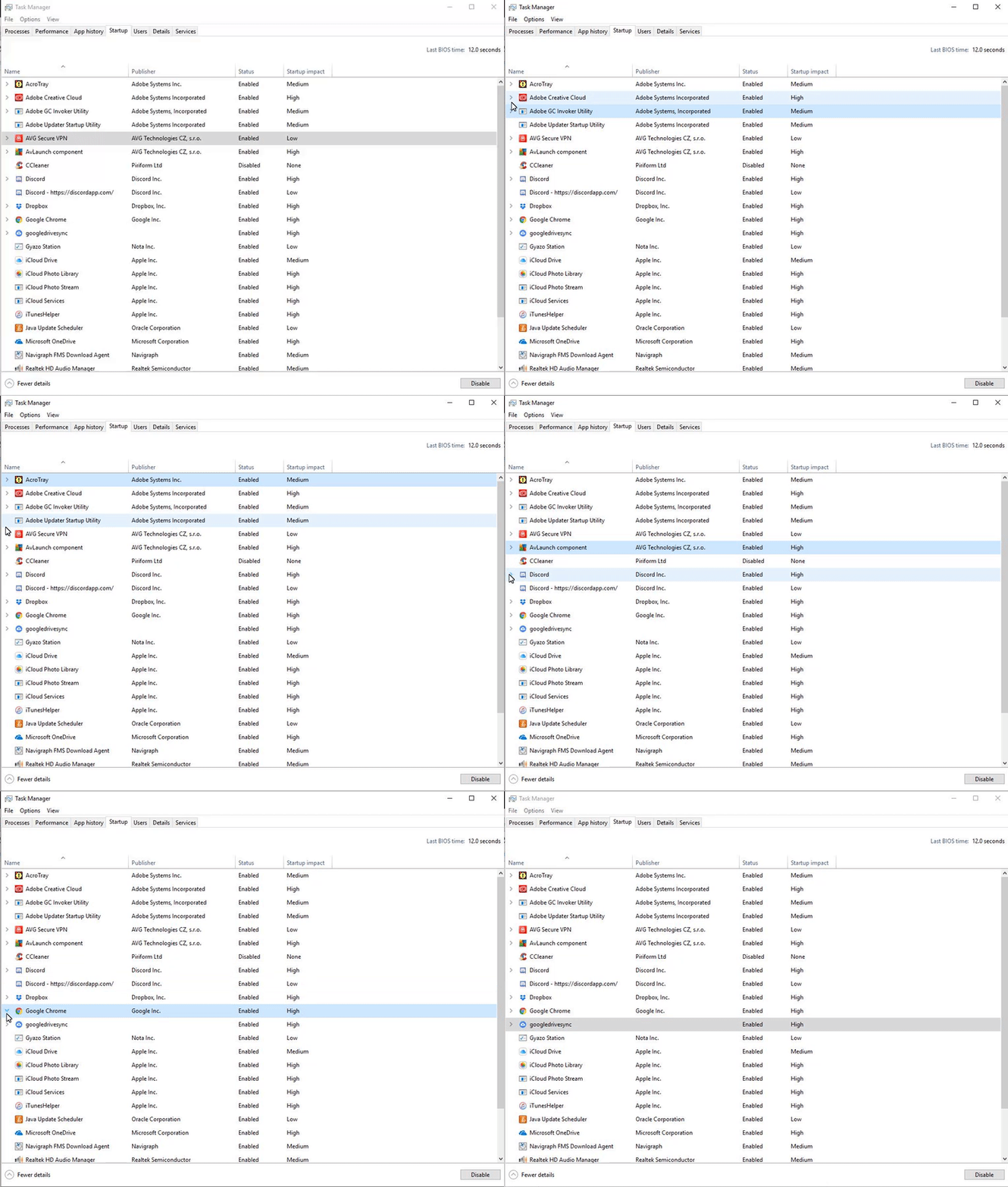
Recently updated to 1803 update of Windows 10. I noticed a sort of "bug" with the startup menu on the task manager. The arrows does not expand nor contract the programs who have multiple instances of itself. Has anyone gotten this, or is it just me? Thanks for the help!

https://i.gyazo.com/64d80d788534e4e05d3d6090583386a9.png

Updated: https://i.gyazo.com/9955cdc6ed7f818e469c83795fe8be6c.gif

  • Reynaldo Rodriguez
Windows for home | Windows 10 | Settings

Locked Question. This question was migrated from the Microsoft Support Community. You can vote on whether it's helpful, but you can't add comments or replies or follow the question.

0 comments No comments

11 answers

Sort by: Most helpful
  1. Anonymous
    2018-05-09T01:24:30+00:00

    At this time, we would like to request to create a new user profile or local account in your computer. This is to test if the issue persists on the new profile with clean files and system configurations. If you own this computer, we suggest that you create an another Administrator account to have full control of it.

    To create one, you can visit this link: https://support.microsoft.com/en-us/help/4026923/windows-10-create-a-local-user-or-administrator-account[Create a local user or administrator account in Windows 10](https://support.microsoft.com/en-us/help/4026923/windows-10-create-a-local-user-or-administrator-account)

    and follow the instructions given. If the issue did not happen in this new profile, you can now start copying your personal files here.

    Let us know if this resolves your concern.

    I can't do this because it requires me to know another known email address which I don't have. I did a fresh install of Windows 1803 prior to this issue happening as I came from a previous version of it. I just want to know if you or anyone else has this particular issue. Me creating a new account is not going to help much, because I already did so by reinstalling windows.

    • Reynaldo

    Was this answer helpful?

    0 comments No comments
  2. Anonymous
    2018-05-08T14:07:23+00:00

    At this time, we would like to request to create a new user profile or local account in your computer. This is to test if the issue persists on the new profile with clean files and system configurations. If you own this computer, we suggest that you create an another Administrator account to have full control of it.

    To create one, you can visit this link: https://support.microsoft.com/en-us/help/4026923/windows-10-create-a-local-user-or-administrator-account[Create a local user or administrator account in Windows 10](https://support.microsoft.com/en-us/help/4026923/windows-10-create-a-local-user-or-administrator-account) and follow the instructions given. If the issue did not happen in this new profile, you can now start copying your personal files here.

    Let us know if this resolves your concern.

    Was this answer helpful?

    0 comments No comments
  3. Anonymous
    2018-05-07T16:09:16+00:00

    Hi Reynaldo,

    We recreated the issue and verified that it is not a bug. The drop-down arrows in the Task Manager is working perfectly.

    Hi, its not there, but in the "Startup" window menu next to "App history" and "Users"

    • Reynaldo

    Please take a look at this screenshot gif that I made that will hopefully make the issue clear? I have another PC running older version of windows and this issue is not present. 

    https://i.gyazo.com/9955cdc6ed7f818e469c83795fe8be6c.gif

    • Reynaldo

    Was this answer helpful?

    0 comments No comments
  4. Anonymous
    2018-05-07T16:05:50+00:00

    Hi Reynaldo,

    We recreated the issue and verified that it is not a bug. The drop-down arrows in the Task Manager is working perfectly.

    Hi, its not there, but in the "Startup" window menu next to "App history" and "Users"

    • Reynaldo

    Was this answer helpful?

    0 comments No comments
  5. Anonymous
    2018-05-07T16:03:32+00:00

    Hi Reynaldo,

    We recreated the issue and verified that it is not a bug. The drop-down arrows in the Task Manager are working perfectly in our end.

    If it affects your computer usage, we recommend reinstalling Windows 10 by using the Media Creation Tool. This tool has the latest version of Windows 10 (Version 1803 Spring Creators update) that will give you fresh copy of files for your computer.

    Let us know if you need more help.

    Was this answer helpful?

    0 comments No comments