Azure Data Factory
An Azure service for ingesting, preparing, and transforming data at scale.
This browser is no longer supported.
Upgrade to Microsoft Edge to take advantage of the latest features, security updates, and technical support.

We need to process traditional mainframe batch files using ADF. These text files are fixed record length AND multi-line per logical record, meaning all the columns to be extracted span across multiple rows of the input file. Any way to do this in ADF natively without preprocessing the file?
Example:
HGAXX2021-02-23 // Header Row
GAAELEMENT1 ELEMENT2 ELEMENT3 ELEMENT4 // Record 1
GABELEMENT5 ELEMENT6 ELEMENT7 ELEMENT8 // Record 1
GAAELEMENT1 ELEMENT2 ELEMENT3 ELEMENT4 // Record 2
GABELEMENT5 ELEMENT6 ELEMENT7 ELEMENT8 // Record 2
GAAELEMENT1 ELEMENT2 ELEMENT3 ELEMENT4 // Record 3
GABELEMENT5 ELEMENT6 ELEMENT7 ELEMENT8 // Record 3
FGAXX000003 // Footer Row with Count of Records
Thank you!
Jon

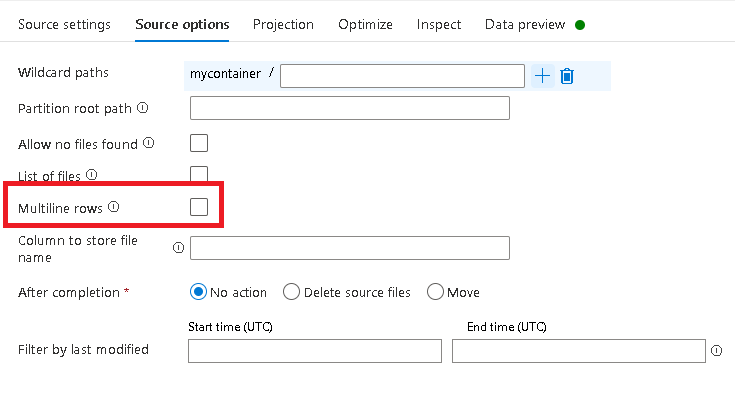
Add a Data Flow to your Pipeline. In the Source transformation, select "Multiline rows".
Thanks for the quick insight!
' cx='32' cy='32' r='32' /%3E%3Ctext x='50%25' y='55%25' dominant-baseline='middle' text-anchor='middle' fill='%23FFF' %3EMM%3C/text%3E%3C/svg%3E)
@Jon Meyer if MarkKromer 's answer solved your issue, could you please mark it as accepted answer, otherwise let us know how we may better assist.