Developer technologies | Universal Windows Platform (UWP)
A Microsoft platform for building and publishing apps for Windows devices.
This browser is no longer supported.
Upgrade to Microsoft Edge to take advantage of the latest features, security updates, and technical support.
' cx='32' cy='32' r='32' /%3E%3Ctext x='50%25' y='55%25' dominant-baseline='middle' text-anchor='middle' fill='%23FFF' %3EH%3C/text%3E%3C/svg%3E)
VS 2019 display the following at the end of a UWP app bundle building:
A package has been successfully built for Release (x86).
A package has been successfully built for Release (x64).
A package has been successfully built for Release (ARM).
========== Package: 3 succeeded, 0 failed ===========
An app bundle has been successfully built for Release (x86), Release (x64), Release (ARM).
========== App Bundle: 1 succeeded, 0 failed ===========
Now, it takes more than half an hour to build an app bundle. Is there a way to make VS display the total building time?
' cx='32' cy='32' r='32' /%3E%3Ctext x='50%25' y='55%25' dominant-baseline='middle' text-anchor='middle' fill='%23FFF' %3EA%3C/text%3E%3C/svg%3E)
Hello,
Welcome to Microsoft Q&A!
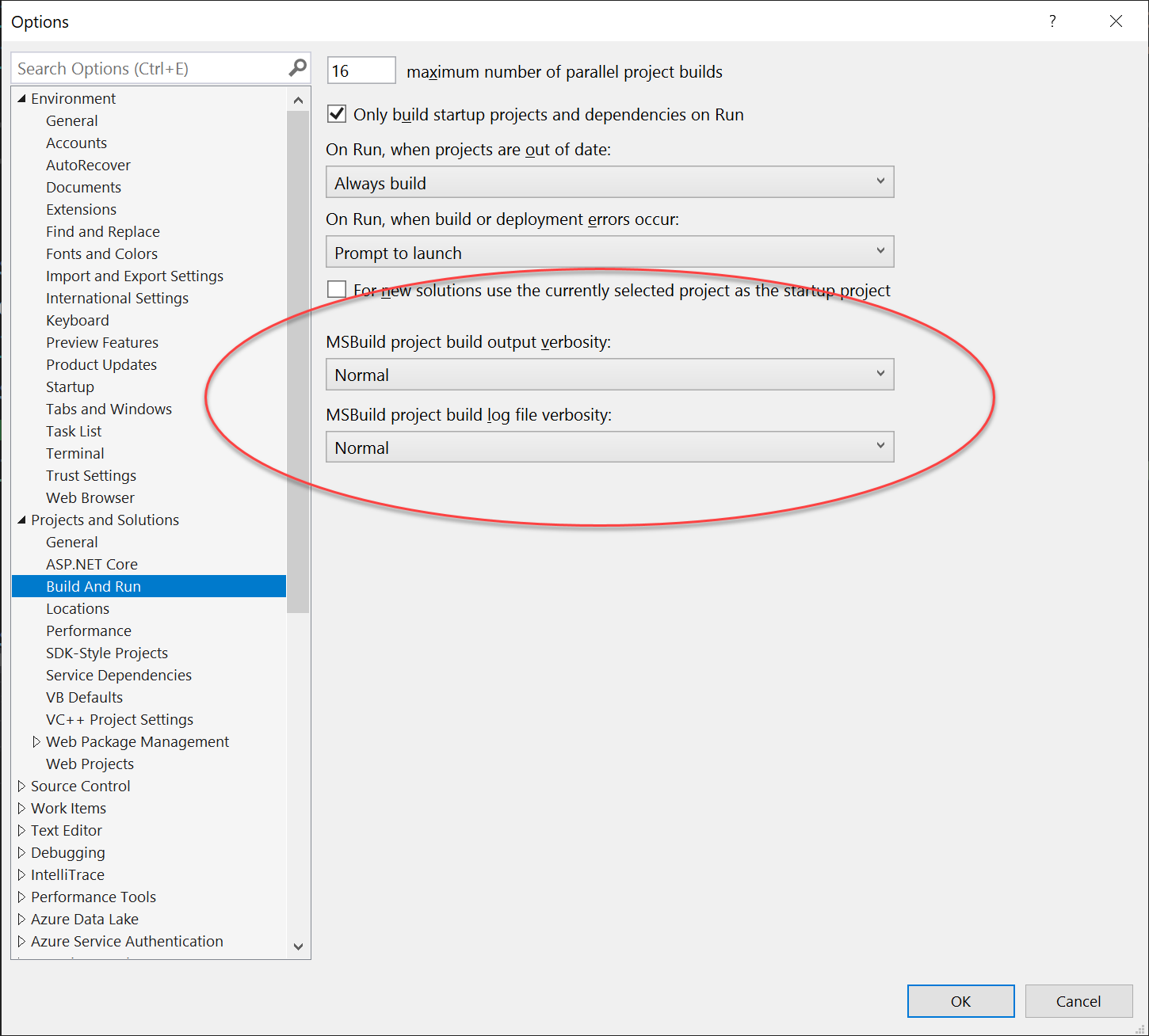
You could try to change the Visual Studio configuration. Please go to Tools-> Options-> Projects and Solutions-> Build And Run-> MSBuild project build output verbosity. Change it from Minimal to Normal. Then you should be able to get the time.
Like the following image:
Please also note that this issue is more related to the Visual Studio tool not UWP. Please add the VS-General tag instead of UWP tag next time.
Thank you.
If the response is helpful, please click "Accept Answer" and upvote it.
Note: Please follow the steps in our documentation to enable e-mail notifications if you want to receive the related email notification for this thread.
Thank you for trying to help. I have been using "Normal" all the time, but still do not get the elapsed time.
Please note this is about building an app bundle for release, not debug build.
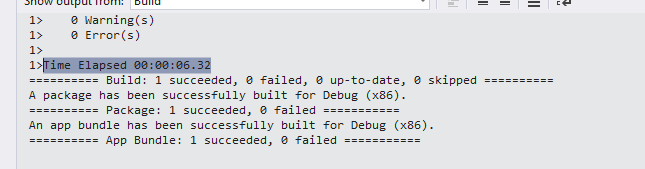
I package my demo again in the release mode. And the result still shows the time it used.
Like this:

Could you please share the output message with me after you packaged the app?
Thank you for testing it again. The quote in my original question was copied from VS output.
I wonder why I have "Package: 3 succeeded, 0 failed" while you have "Package: 1 succeeded, 0 failed".
I have never been able to build a package with .Net Native in less than 20 minutes.

Could you please try to run your Visual Studio in saft mode? Please open Developer Command Prompt and use the /SafeMode command. Then try again to see if you could see the time.
I started VS in the safe mode, but all the projects in the solution have the note (needs migration), hence cannot be loaded.
I built another app bundle. The VS output for the bundle is the same:
========== Build: 4 succeeded, 0 failed, 1 up-to-date, 0 skipped ==========
A package has been successfully built for Release (x86).
A package has been successfully built for Release (x64).
A package has been successfully built for Release (ARM).
========== Package: 3 succeeded, 0 failed ===========
An app bundle has been successfully built for Release (x86), Release (x64), Release (ARM).
========== App Bundle: 1 succeeded, 0 failed ===========
I have just built another bundle for sideloading. The result is the same:
========== Build: 4 succeeded, 0 failed, 1 up-to-date, 0 skipped ==========
A package has been successfully built for Release (x86).
A package has been successfully built for Release (x64).
A package has been successfully built for Release (ARM).
========== Package: 3 succeeded, 0 failed ===========
An app bundle has been successfully built for Release (x86), Release (x64), Release (ARM).
========== App Bundle: 1 succeeded, 0 failed ===========
Could you please try to repair your Visual Studio and try again? And maybe you could set the Tools-> Options-> Projects and Solutions-> Build And Run-> MSBuild project build output verbosity configuration to detailed or diagnostic.
Very sorry but I have just found out the problem is caused by VSColorOutput. "Time Elapsed" appears if VSColorOutput is disabled.
Glad to hear that! It's really good news. You could post a reply here and make it as answer so that if other people have the same issue could find a solution.
I will post any response from the extension developer here. Thank you again for your help.