Community Center | Not monitored
Tag not monitored by Microsoft.

This browser is no longer supported.
Upgrade to Microsoft Edge to take advantage of the latest features, security updates, and technical support.
' cx='32' cy='32' r='32' /%3E%3Ctext x='50%25' y='55%25' dominant-baseline='middle' text-anchor='middle' fill='%23FFF' %3EPR%3C/text%3E%3C/svg%3E)
I am trying to open .mpproj files in visual studio using vsmsbuild. We are using VsMsBuild.Corext.3.2.15. When i run vsmsbuild command from command prompt for specific project,the below error is displayed:
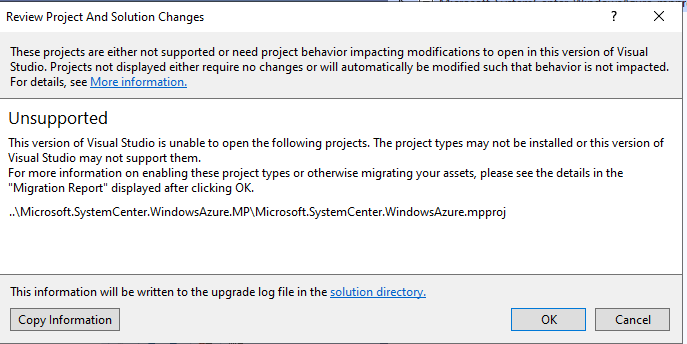
After that, mpproj is shown as incompatible: enter image description here
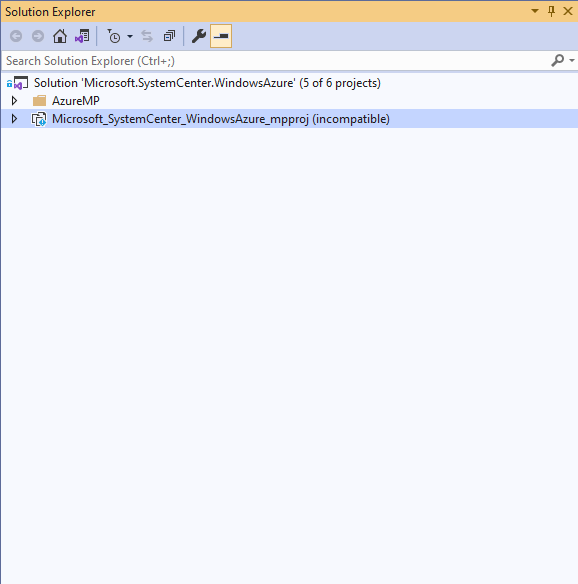
Please suggest on how to proceed.
' cx='32' cy='32' r='32' /%3E%3Ctext x='50%25' y='55%25' dominant-baseline='middle' text-anchor='middle' fill='%23FFF' %3ETS%3C/text%3E%3C/svg%3E)
Hi @Prajval Ramesh (Cognizant Worldwide Limited) ,
Welcome to Microsoft Q&A forum.
Please try to download and install this extension: System Center Visual Studio Authoring Extensions and check if you can open your mpproj file in Visual Studio 2019.
Besides, could you describe more about VsMsBuild.Corext, did you install and use it from a nuget package maybe? Also, could you please share me the related command line that you used to run and open specific project?
BTW, I did some tests, if you both have VS previous versions installed, for example Visual Studio 2013/2015, it seems this extension(System Center Visual Studio Authoring Extensions) may not work properly.
Best Regards,
Tianyu
Hi @Tianyu Sun-MSFT ,
Thanks for the response. I have already installed System Center Visual Studio Authoring Extensions and able to open mpproj files in visual studio 2019.
Yes, i have installed VsMsBuild.Corext from nuget package.
Please find the command for opening the project:

Hi @Tianyu Sun-MSFT i uninstalled earlier versions of visual studio and ran vsmsbuild command through command prompt. now a different error is displayed:

The below error is displayed in output window:

Hi @Prajval Ramesh (Cognizant Worldwide Limited) , thank you for your feedback. On Nuget.org, I didn’t find the related NuGet package about VsMsBuild.Corext, may I ask how you get and install this package? Does the Microsoft.SystemCenter.Azure.Dashboard.DataProviders.dll and its dependencies really exist in your solution folder?