Azure App Service
Azure App Service is a service used to create and deploy scalable, mission-critical web apps.
This browser is no longer supported.
Upgrade to Microsoft Edge to take advantage of the latest features, security updates, and technical support.
' cx='32' cy='32' r='32' /%3E%3Ctext x='50%25' y='55%25' dominant-baseline='middle' text-anchor='middle' fill='%23FFF' %3ED%3C/text%3E%3C/svg%3E)
I'm trying to determine my best pricing tier to set up the Azure WebApps environment.
We currently have 4 environments. DEV/QA/STG and production. We would like to have the first 3 sites to have SSL/domain with dedicated(static) IP address like:
https://dev.defineddomainname.com
https://qa.defineddomainname.com
https://stg.defineddomainname.com
These sites can only be seen in our network.
As for production, do we need 3 app, one for East US, Central US and West US? Just in case one of the azure platforms goes down? We are technically located in Central and for most cases...should not be used in the West.
Database....3 database for the 3 area or should there be 1 database that all three are using?
OR...could we have 1 production web app. And since some plans have 5 - 20 staging slots, allow those slots be DEV/QA/UAT? (And can I put SSL/Domains on them with dedicated IP address)
Ideas?
I see in the DEV/Test plan, there is B1 plan that has domain/SSL. No dedicated IP address for it?
Azure App Service is a service used to create and deploy scalable, mission-critical web apps.
So far...loving your answer!! But want to be clear on this.
With the deployment slots, your Dev/QA/UAT and STG each has their one static IP address? So that I can create my own domain like dev.mydomain.com, qa.mydomain.com, etc?
And noted by your second comment, if I have so much CPU power, if you are using DEV and QA, along with Production then the same CPU power has to work all three environments. So DEV could demand a lot of CPU and slow down Production because of the demand. Or can you cap it? (Is that what that "Traffic %" represents?)
' cx='32' cy='32' r='32' /%3E%3Ctext x='50%25' y='55%25' dominant-baseline='middle' text-anchor='middle' fill='%23FFF' %3EAK%3C/text%3E%3C/svg%3E)
@dpaisig ,
The IP address will be the same across the slots.
If you want to access the WebApp in the slot, you could just configure a **CNAME record** mapping to that hostname of the slot URL.
Individual hostnames for each app on each own slots.
In this case - The SSL certificate in SSL Binding should match the selected custom domain in each slot.
If you want to configure the custom domains as your example:
*dev.customdoaminname.com [dev]
qa.customdoaminname.com [qa]
.customdoaminname.com [production slot]
After a swap, the slot with previously staged app now has the previous production app.
Custom domain name settings aren’t swapped/It will not swap (sticky) the custom domain names, meaning it stays in the Production slot. .
Your production and staging slot will have its IP addresses (static and outbound) listed under Settings> “Properties”. on the Azure Portal .

@dpaisig ,
In my 2nd comments, I’d shared more info on App Service Plan (ASP), to double-click more on that - At high level, it is a container in which your apps run, ASP defines a set of compute resources for apps to run.
Yes, all the slots run on the same ASP. By default, all your traffic is routed to the production slot. Only if you route traffic to slot (traffic %), it’s consumes more compute resource, but all those slots are under the same ASP.
Let’s say you set to route traffic percentage to 10% on the staging slot (Dev). With that simple change, a tenth of your production traffic will now go to the new build. This practice is known as a “canary deployment” or “canarying a build”.
Traffic % - This feature is useful if you need user feedback for a new update, but you're not ready to release it to production.
@dpaisig ,
At any point of the swap operation, all work of initializing the swapped apps happens on the source slot. The target slot remains online while the source slot is being prepared and warmed up, regardless of where the swap succeeds or fails. To swap a staging slot with the production slot, make sure that the production slot is always the target slot. This way, the swap operation doesn't affect your production app.
So, essentially Deployment slots are way to test /validate your app before it goes live (just like a Blue-Green deployment).
See this doc for more details.
Thanks for your good feedback!
Apologies for the long post/ just sharing more information for better insights.
@dpaisig , Thanks for the great question.
For the WebApp to support deployment slot, Standard, Premium, or Isolated App Service plan (ASP) tier must be used. So, your pricing tier must be Standard and above.
Just to highlight, these deployment slots are live apps with their own host names. App content and configurations elements can be swapped.
For instance, “dev” slot will have a URL - http://website-dev.azurewebsites.net.
access restrictions- Azure App Service IP restrictions . database shared by staging and production Azure App Service slots. stick to a specific slot. same region (in your case Central US/even in my test deployment). no IP SSL connections included. If you must leverage deployment slots, then the WebApp must be on Standard ASP and above. I just test deployed my WebApp with deployment slots (WebApp name 'slotwebapp' test and created slots) on Standard ASP tier.
Prod- https://slotwebapptest.azurewebsites.net
https://slotwebapptest-dev.azurewebsites.net
https://slotwebapptest-qa.azurewebsites.net
https://slotwebapptest-stg.azurewebsites.net
https://slotwebapptest-uat.azurewebsites.net
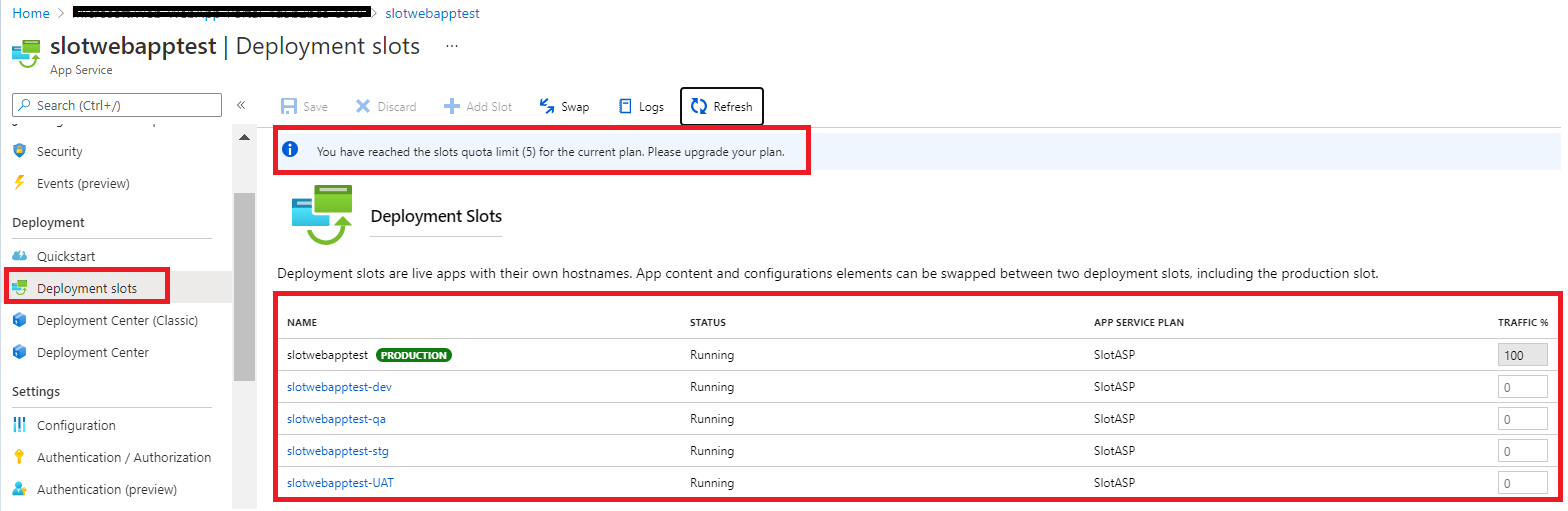
Note: My test App URLs are deleted (now), just shared to help you understand these concepts better.
Hope this helps!
--------------------------------------------------------------------------------------------------------------------------------------------------------------
To benefit the community find the right answers, please do mark the post which was helpful by clicking on ‘Accept Answer’ & ‘Up-Vote’.
When you create an app in App Service, it is put into an App Service plan. When the app runs, it runs on all the VM instances configured in the App Service plan. If multiple apps are in the same App Service plan, they all share the same VM instances. If you have multiple deployment slots for an app, all deployment slots also run on the same VM instances. If you enable diagnostic logs, perform backups, or run WebJobs, they also use CPU cycles and memory on these VM instances.
Since you pay for the computing resources your App Service plan allocates, you can potentially save money by putting multiple apps into one App Service plan. You can continue to add apps to an existing plan as long as the plan has enough resources to handle the load. However, keep in mind that apps in the same App Service plan all share the same compute resources.