Microsoft Security | Intune | Configuration Manager | Other
Other Configuration Manager-related features and issues

This browser is no longer supported.
Upgrade to Microsoft Edge to take advantage of the latest features, security updates, and technical support.
' cx='32' cy='32' r='32' /%3E%3Ctext x='50%25' y='55%25' dominant-baseline='middle' text-anchor='middle' fill='%23FFF' %3EJS%3C/text%3E%3C/svg%3E)
I have a server 2016 that is a SCCM client that shows unknown to an application deployment that we have.
This client is in the same collections as the other 2000 clients and I don't understand why is not installing the application.
Locking at the log files I notice it does not generate any of the application deployment log files, like AppDiscovery.log or AppEnforce.log, so I lock at the PolicyAgent.log and states "[Assignment Request] No new assignments for Machine Srvxxxxx".
I try to remove and do a fresh agent install but the problem remains.
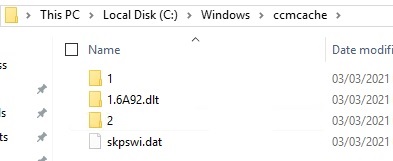
1 weird thing that happens is that under the cache folder, after a install a fresh agent, it starts to download some other software that we have but never finishes. If I try to cleanup the cache file using the client console in Control Panel, it doesn't clean it nor throws any errer.
Any pointers to discover where can I find the problem with this?
Thanks.
This problem was solved by reset the BITs service and reg all compoments.
Thank you

Hi @J.S ,
This client is in the same collections as the other 2000 clients and I don't understand why is not installing the application.
Could we know this means other client of this collection are normal, and could download and install the application?
Please check a server 2016 that is a SCCM client is active status on the console of SCCM, if not, On the client machines, kindly check the ClientLocation.log and ClientIDManagerStartup.log if there are any errors, which are preventing the clients to connect to the Management Point.
it starts to download some other software that we have but never finishes.
After it began to download, is there any changes in PolicyAgent.log? Could receive new assignment? If so, we could try re-deploy the application to the single server 2016 client to check if it is normal.
If the response is helpful, please click "Accept Answer" and upvote it.
Note: Please follow the steps in our documentation to enable e-mail notifications if you want to receive the related email notification for this thread.
Could we know this means other client of this collection are normal, and could download and install the application?
Yes
Please check a server 2016 that is a SCCM client is active status on the console of SCCM, if not, On the client machines, kindly check the ClientLocation.log and ClientIDManagerStartup.log if there are any errors, which are preventing the clients to connect to the Management Point.
The Client is active. The Location Log shows some warnings and errors:
Error - Failed verify the signature for issuing root cert list blob '<SMSIssuingCerts version="1.0"><Signature><SignatureAlgorithm AlgID="32780">1.2.840.113549.1.1.11</SignatureAlgorithm><SignatureValue> LONG ALFANUMERICA VALUE HERE </Certs></SMSIssuingCerts>' with error '0x80070057'
Warning - Instance of CCM_WindowsDOClientConfig doesn't exist in WMI LocationServices 03/03/2021 08:34:56 8568 (0x2178)
Error - Failed to get 'encryption' certificate for MP 'ServerName'. Error 0x80041002 LocationServices 03/03/2021 08:35:19 2708 (0x0A94)
I already check and compare with other servers, and under Local computer certificates I can see 2 certificates for local machine, 1 is a Signing certificate and the other is an SMS Encryption certificate.
After it began to download, is there any changes in PolicyAgent.log? Could receive new assignment? If so, we could try re-deploy the application to the single server 2016 client to check if it is normal.
I created a additional package and tried to deploy it, the agent detects that new package but the pakg never gets to the ccm cache folder.
I can see after other tests that this server appears to not being deploying anything, including packages and applications.
As other test, I removed the agent again locally and from the CCM server, deploy it again, clean. After I approve it it starts to try to download the SCCM agent (not sure why since I have install the latest client version: 5.00.9040.1015 - perhaps is trying to update with latest KB that we have in our SCCM - We have KB4594177), I known its the agent because of the CVLXXX in the logs (and I check it in the SMSPKGSIG sccm folder).
After that I assigned a dummy packg with a text file and a test program. The PolicyAgent.log sees the new assignment and initiates but the content never gets to the cache folder.
Here's a sample of the test deployment from LocationServices.log (I edited some info and prefixit with "Edit:")
Current AD site of machine is Edited:SiteXXX LocationServices 03/03/2021 09:42:20 8020 (0x1F54)
ContentLocationRequest : <ContentLocationRequest SchemaVersion="1.00" BGRVersion="1" ClientInOperation="PT0M" ExcludeFileList="">
<Package ID="CVL00043" Version="2" DeploymentFlags="9223372036855309009"/><AssignedSite SiteCode="CVL"/>
<ClientLocationInfo LocationType="SMSPackage" DistributeOnDemand="0" UseAzure="0" AllowWUMU="0" UseInternetDP="0" AllowHTTP="1"
AllowSMB="1" AllowMulticast="1" AllowSuperPeer="1" DPTokenAuth="1"><ADSite Name="XXXX0000"/>
Edited:lOCAL SERVER CONFIGURATION STUFF....</ContentLocationRequest>
LocationServices 03/03/2021 09:42:20 8020 (0x1F54)
Created and Sent Location Request '{25B4176F-3FB3-4504-A03D-44A461642B97}' for package CVL00043 LocationServices 03/03/2021 09:42:20 8020 (0x1F54)
Current AD site of machine is Edited:SiteXXX LocationServices 03/03/2021 09:42:21 8716 (0x220C)
This machine is not a workstation, returning false for MDMIsExternallyManaged. LocationServices 03/03/2021 09:42:21 8716 (0x220C)
ConfigMgr is no longer managing WindowsDO GPO. Set to default values. Mode = LAN. GroupID = empty LocationServices 03/03/2021 09:42:21 8716 (0x220C)
Calling back with the following distribution points LocationServices 03/03/2021 09:42:21 8716 (0x220C)
Distribution Point=Edited:'http://SERVERDP02.Domain.com/SMS_DP_SMSPKG$/CVL00043', Locality='BOUNDARYGROUP', Version='9040', Capabilities='<Capabilities SchemaVersion="1.0"><Property Name="SSLState" Value="0"/></Capabilities>', Signature=Edited:'http://SERVERDP02.Domain.com/SMS_DP_SMSSIG$/CVL00043', ForestTrust='TRUE', BlockInfo='0' LocationServices 03/03/2021 09:42:21 8716 (0x220C)
Distribution Point=Edited:'http://SERVERDP05.Domain.com/SMS_DP_SMSPKG$/CVL00043', Locality='BOUNDARYGROUP', Version='9040', Capabilities='<Capabilities SchemaVersion="1.0"><Property Name="SSLState" Value="0"/></Capabilities>', Signature=Edited:'http://SERVERDP05.Domain.com/SMS_DP_SMSSIG$/CVL00043', ForestTrust='TRUE', BlockInfo='0' LocationServices 03/03/2021 09:42:21 8716 (0x220C)
Calling back with locations for location request {25B4176F-3FB3-4504-A03D-44A461642B97} LocationServices 03/03/2021 09:42:21 8716 (0x220C)
Current AD site of machine is Edited:SiteXXX LocationServices 03/03/2021 09:49:56 8020 (0x1F54)
Current AD site of machine is Edited:SiteXXX LocationServices 03/03/2021 09:49:56 8020 (0x1F54)
Received reply of type PortalCertificateReply LocationServices 03/03/2021 09:49:56 192 (0x00C0)
The reply from location manager contains 0 certificates LocationServices 03/03/2021 09:49:56 192 (0x00C0)
Updating portal certificates LocationServices 03/03/2021 09:49:56 192 (0x00C0)
There are no certificates available to install LocationServices 03/03/2021 09:49:56 192 (0x00C0)
Finally I try to manually access to the url (http://SERVERDP05.Domain.com/SMS_DP_SMSPKG$/CVL00043) from the server, the url asks for authentication (not sure if its normal) and then I can see the Pkg. If I add the url to the trusted sites it no longer asks for authentication.
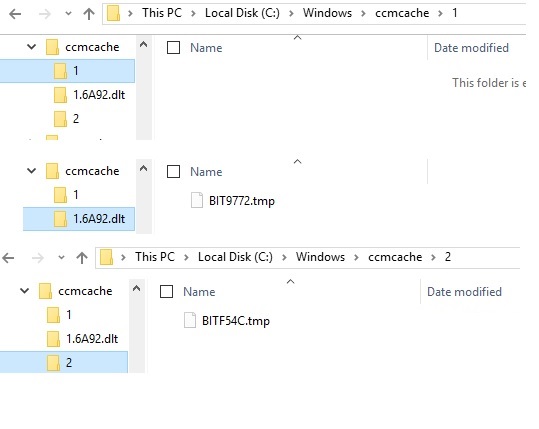
Update, the package gets to the server buit appears to be stuck in the .tmp file, at the stage I have 2 packges pending, the 1st one which is the sccm client (immidiatly after the sccm agent install and the second one which is the test Pkg that I created) looks like this: