Microsoft 365 and Office | SharePoint Server | For business
A family of Microsoft on-premises document management and storage systems.

This browser is no longer supported.
Upgrade to Microsoft Edge to take advantage of the latest features, security updates, and technical support.
' cx='32' cy='32' r='32' /%3E%3Ctext x='50%25' y='55%25' dominant-baseline='middle' text-anchor='middle' fill='%23FFF' %3ESG%3C/text%3E%3C/svg%3E)
There had been issues when secondary database replica was made primary (Always on High Availability for SQL Server 2017 with SharePoint 2019)
After the windows update on Primary Replica, the server is restarted. During this process, availability group went offline and secondary which was acting as primary is disconnected. The service was down for few minutes (primary replica restart time).
Failover shows everything fine but when primary was shutdown, secondary stopped working.

Hello @Sajith Gopalakrishnan Hema ,
Please perform the following troubleshooting:
1.Please make sure that the failover is successful? If the failover is successful, the original secondary node is shown in the figure below:
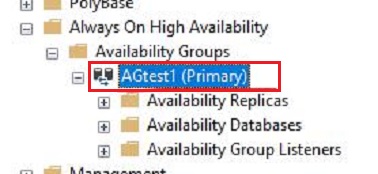
2.Are you configure automatic failover? If not, then when the primary node is shut down, the secondary node will not automatically become the primary node.
If possible, please attach detailed screenshots. This helps us to better slove with problem.
Thanks,
Echo Du
================
If an Answer is helpful, please click "Accept Answer" and upvote it.
Note: Please follow the steps in our documentation to enable e-mail notifications if you want to receive the related email notification for this thread.
From the secondary replica, File Witness Share is not accessible.
Hi @Sajith Gopalakrishnan Hema ,
Thanks for you reply.
Can you provide detailed error information or screenshots? For example, Windows cluster log error message.
This helps us better understand the problem and provide efficient solutions.
Thanks,
Echo Du