Microsoft 365 and Office | SharePoint | For business | Windows
A group of Microsoft Products and technologies used for sharing and managing content, knowledge, and applications.

This browser is no longer supported.
Upgrade to Microsoft Edge to take advantage of the latest features, security updates, and technical support.
' cx='32' cy='32' r='32' /%3E%3Ctext x='50%25' y='55%25' dominant-baseline='middle' text-anchor='middle' fill='%23FFF' %3EKE%3C/text%3E%3C/svg%3E)
Hello, is there any way to restore a previous version of a Custom list in SharePoint online? a site owner has changed some site columns and fields in a list and it has obviously applied these changes to each list item, he know wants to revert back to original fields and columns as there is a lot of errant data. Is there anyway to do this? I know you can restore previous version of Document libraries but Custom lists?
' cx='32' cy='32' r='32' /%3E%3Ctext x='50%25' y='55%25' dominant-baseline='middle' text-anchor='middle' fill='%23FFF' %3ENV%3C/text%3E%3C/svg%3E)
Does anyone know if there has been any change in SharePoint List capabilities since this post to allow restoration of a previous version of a complete list, rather than simply item-by-item?
' cx='32' cy='32' r='32' /%3E%3Ctext x='50%25' y='55%25' dominant-baseline='middle' text-anchor='middle' fill='%23FFF' %3EJB%3C/text%3E%3C/svg%3E)
It's sort of ridiculous that there is no RESTORE feature for a Sharepoint list. C'mon Microsoft!

Hi anonymous user,
You can only restore previous versions of an item in a list or a file in a library via version history option(The premise is that you have enabled versioning settings in the list/library settings.) Versioning settings don't apply to list and library level.
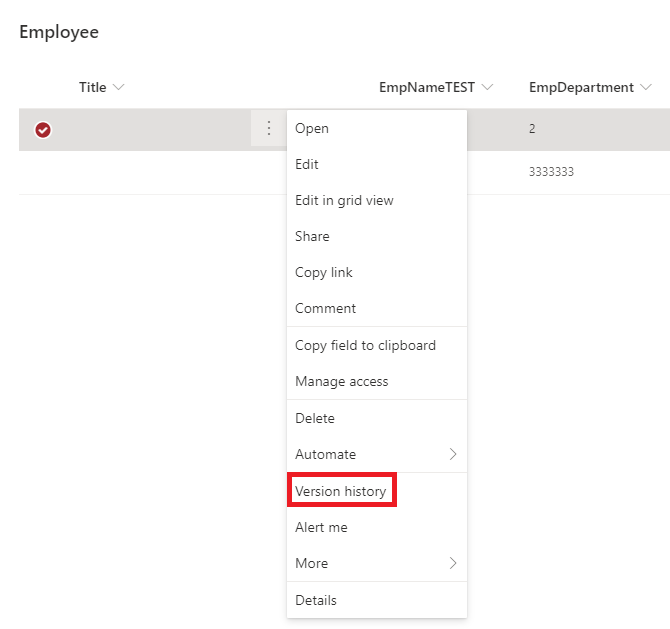
If you have modified columns/fields properties(column name, column type and etc.)in a list, there is no way to restore a previous version of a list. I'm afraid you have to modify them back manually.
If an Answer is helpful, please click "Accept Answer" and upvote it.
Note: Please follow the steps in our documentation to enable e-mail notifications if you want to receive the related email notification for this thread.
anonymous user,
Is there anything update on this issue? If the reply is helpful to you, you could mark the reply as answer via "Accept Answer" button.
anonymous user,
I'm checking how things are going on this thread. Please let us know if you would like further assiatance.