Azure Data Factory
An Azure service for ingesting, preparing, and transforming data at scale.
This browser is no longer supported.
Upgrade to Microsoft Edge to take advantage of the latest features, security updates, and technical support.
' cx='32' cy='32' r='32' /%3E%3Ctext x='50%25' y='55%25' dominant-baseline='middle' text-anchor='middle' fill='%23FFF' %3ERE%3C/text%3E%3C/svg%3E)
HI - I am calling a On Premise SQL server stored procedure which returns OUTPUT parameter from LOOKUP activity in Azure data pipeline. However i am getting below error. If I remove the OUTPUT parameter its working fine. Is there any known issue in using On premise sql servers OUTPUT parameter in Azure data pipeline.
errorCode": "2100",
"message": "Failure happened on 'Source' side. ErrorCode=SqlInvalidDbStoredProcedure,'Type=Microsoft.DataTransfer.Common.Shared.HybridDeliveryException,Message=The specified Stored Procedure is not valid. It could be caused by that the stored procedure doesn't return any data. Invalid Stored Procedure script: '[controls].[usp_Get_XXXXX]'.,Source=Microsoft.DataTransfer.ClientLibrary,'",
"failureType": "UserError",
"target": "Lookup1",
"details": []
}
' cx='32' cy='32' r='32' /%3E%3Ctext x='50%25' y='55%25' dominant-baseline='middle' text-anchor='middle' fill='%23FFF' %3ESS%3C/text%3E%3C/svg%3E)
@rajendar erabathini Thanks for using Microsoft Q&A !!
Can you please share your ADF code OR Look Up settings page to understand how you are capturing the return parameter ? Also, how are you returning the parameter in the stored procedure.
Is your stored procedure returning any other rows other than OUT parameter ? Please share the Stored procedure snippet if posible.
@rajendar erabathini ADF does not distinguish between stored procedure input and output parameters. Please refer to existing feedback on the same over here.
However, you can capture the stored procedure return value as SELECT statement at the end like -
select top(1) @Segment_ID = segment_id from @Segment_Fields
select @Segment_ID AS Segment_ID
But you need to make sure that your stored procedure returns only one and exact one result set, other wise lookup will fail.
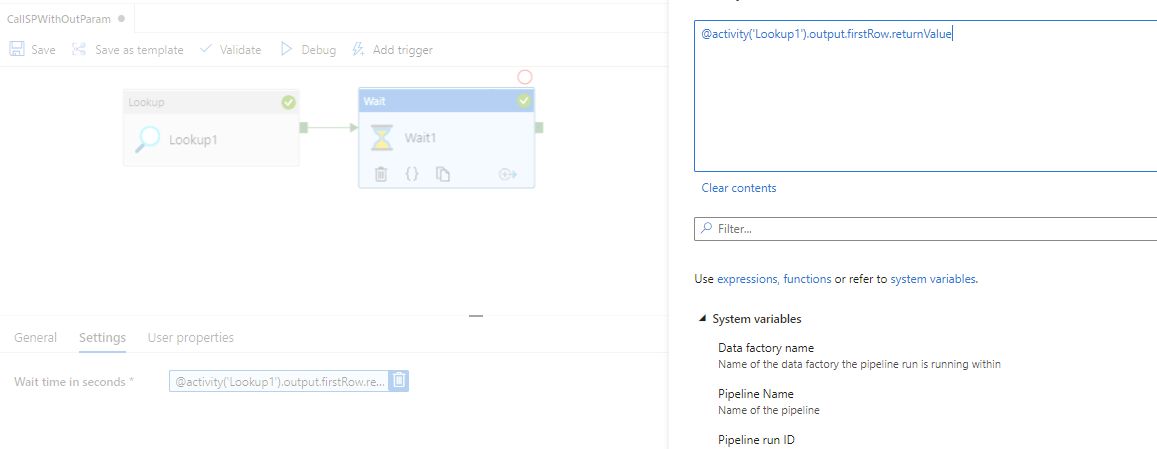
Then you can use the returned column from Lookup activity in your next ADF activity like below -
@activity('Lookup1').output.firstRow.Segment_ID
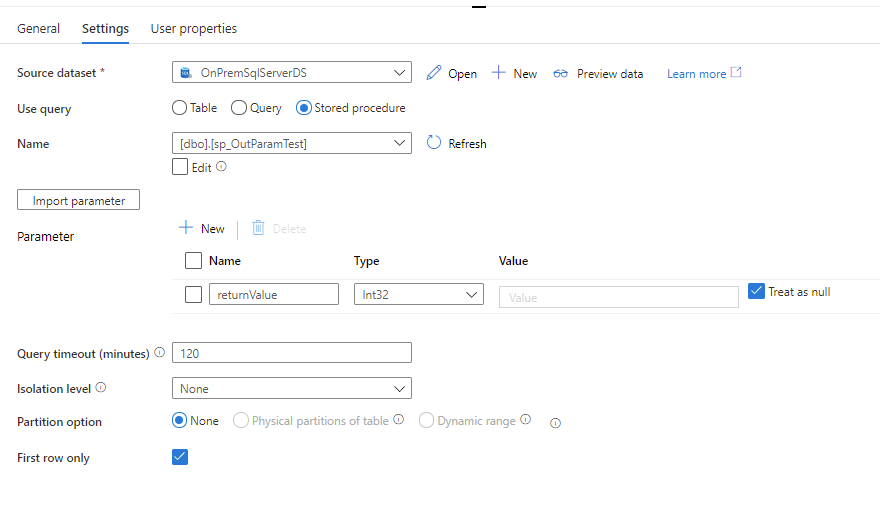
Please refer to the below sample code and Lookup pipeline.

Lookup Settings
** Next Activity (WAIT in my sample) Settings **
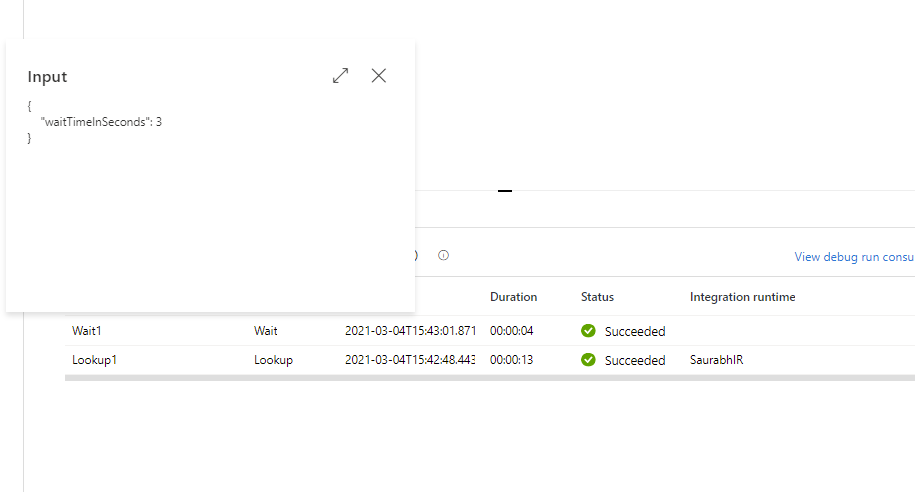
Result
Please let me know if you have any other questions.
----------
Please do not forget to "Accept the answer" wherever the information provided helps you to help others in the community.
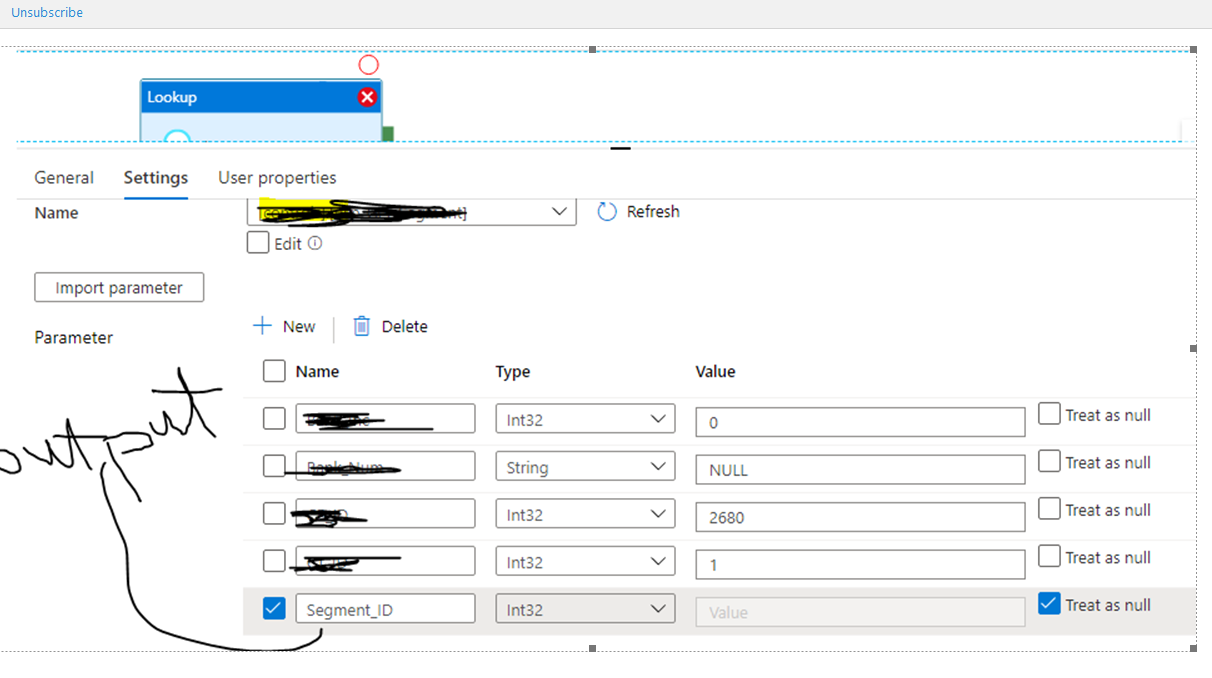
Hi @Saurabh Sharma - please see the lookup settings and procedure which returns output parameter
ALTER PROCEDURE [lookup].[usp_Get_Segment] @CP_ID int, @CT_ID int
,@BB_Inc INT, @BB_Num VARCHAR(4) = NULL,@Segment_ID INT  output
AS


BEGIN TRY
       SET NOCOUNT ON;

       DECLARE @Capture_Point_ID INT = @CP_ID
              ,@Control_Type_ID INT = @CT_ID
              ,@BB_Include INT = @BB_Inc
              ,@BB_Number VARCHAR(4) = @BB_Num

                     -- Insert parameters sent
       INSERT INTO [controls].[Log]
                        ([Log_Type],[Query_Type],[Object_Name],[Message])
              VALUES
                        ('Parameters','Get segment','usp_segt',  'Point_ID = ' + cast(@Capture_Point_ID as varchar)
                        + ' control_type_id = ' + cast(@Type_ID as varchar) + ', BB_inc = ' + cast(@BB_Include as varchar) + ',number = ' + case when @Number is null then 'no BB' else cast(@BNumber as varchar) END
                        )


       DECLARE @Segment_Fields TABLE
       (
              _point_id int
              ,ID int
              ,cCCvarchar(100)
              ,branch varchar(4)
              )
-- Process all standard capture points
DECLARE @Segment_Query nvarchar(MAX)
              ,@Query_Type varchar(50)
              ,@Object_Name varchar(200)
              ,@ERROR_TEXT varchar(100) = NULL


              Set @Query_Type = 'NONE'

        IF @Point_ID is null
              BEGIN
                     SET @ERROR_TEXT = 'No capture Point id supplied'
                           RAISERROR(@ERROR_TEXT,16,1)
              END

              Set @Object_Name = '_Segment,  point_id = ' +  cast(@C_Point_ID as varchar)


       SET @Segment_Query = 'SELECT
                                         controls.LKUP_Display.Capture
                                                ,controls.LKUP_Segment_ID
                                                , controls.LKUP_Display_Details.Control_Column

                                                --, controls.LKUP_Segment.Control_Type_ID
                                                , controls.LKUP_BB_Affiliate.BB_Affiliate_New

                                                FROM            controls.LKUP_Segment INNER JOIN
                                                                                         controls.LKUP_BB_Affiliate ON controls.LKUP_Segment.BB_Affiliate_ID = controls.LKUP_BB_Affiliate.BB_Affiliate_ID INNER JOIN
                                                                                         controls.LKUP_Application ON controls.LKUP_Segment.Application_ID = controls.LKUP_Application.Application_ID INNER JOIN
                                                                                         controls.LKUP_Control_Type ON controls.LKUP_Segment.Control_Type_ID = controls.LKUP_Control_Type.Control_Type_ID INNER JOIN
                                                                                         controls.LKUP_Display_Details ON controls.LKUP_Control_Type.Control_Type_ID = controls.LKUP_Display_Details.Control_Type_ID
                                                WHERE        (controls.LKUP_Application.Application IS NULL)
                                                --and ISNULL(controls.LKUP_BB_Affiliate.Active_Flag, 1) = 1
                                                and controls.LKUP_Display_Details.Capture_Point_ID   = ' + Cast(@capture_point_id as varchar)
                                                + ' and controls.LKUP_Segment.Control_Type_ID  = ' + cast(@control_type_id as varchar)


if ISNULL(@BB_Include,0) = 0
Begin
              Set @Segment_Query = @Segment_Query + ' AND controls.LKUP_BB_Affiliate.BB_Affiliate_New IS NULL'

       end
       else
       BEGIN
              Set @Segment_Query = @Segment_Query + ' AND controls.LKUP_BB_Affiliate.BB_Affiliate_New = ' + @BB_Number
       END

       --print @Segment_Query
       Set @Query_Type = 'Segment query '

       insert into @Segment_Fields
       EXECUTE SP_EXECUTESQL @Segment_Query

       IF @@ROWCOUNT = 0
       BEGIN
                     SET @ERROR_TEXT = 'Invalid capture point, control type or no records' + Cast(@capture_point_id as varchar)
                           RAISERROR(@ERROR_TEXT,16,1)
              END
       INSERT INTO [controls].[Query_Log]
           ([Log_Type],[Query_Type],[Object_Name],[Message],[Query])
     VALUES
           ('Segment query',@Query_Type,@Object_Name,'Query used to retrieve cp segments',@Segment_Query)

              if @@ROWCOUNT = 0
              begin
                     select -1 as segment_ID
              end

              select top(1) @Segment_ID =   segment_id from @Segment_Fields
--------------------------------------------------------------------------------------------------------
--------------------------------------------------------------------------------------------------------------
---
--        Success Log
---------------------------------------------------------------------------------------------------------

       INSERT INTO [controls].[Controls_Query_Log]
           ([Log_Type]
           ,[Query_Type]
           ,[Object_Name]
           ,[Message]
           ,[Query])
     VALUES
           (
                     'Segment Query'
                     ,@Query_Type
                     ,@Object_Name
                     ,'Query used to return segments'
                     ,@SQuery)

              END TRY
---------------------------------------------------------------------------------------------------------

--        Failure Log
---------------------------------------------------------------------------------------------------------
BEGIN CATCH


              INSERT INTO [controls].[C_Query_Log]
                        ([Log_Type]
                        ,[Query_Type]
                        ,[Object_Name]
                        ,[Message]
                        ,[Query]
                        ,[Number]
                        ,[Severity]
                        ,[State]
                       )
              VALUES
                        (
                                  'Failure'
                                  ,@Query_Type
                                  ,ERROR_PROCEDURE()
                              ,ISNULL(@ERROR_TEXT,ERROR_MESSAGE() + ' Line: ' + CAST(ERROR_LINE() AS VARCHAR) + ', ' + isnull(@Object_Name, ''))
                              ,isnull(@Segment_Query, 'blank')
                              ,ERROR_NUMBER()
                              ,ERROR_SEVERITY()
                              ,ERROR_STATE()
                           )
                           RAISERROR(@ERROR_TEXT,16,1)
END CATCH