I tried disabling Live Share..
but it did not work for me..
CascadePackage package not loaded
Hello, i just installed the latest version of vs2019ce (vers 16.9), and after that i got an errer message resembling "CascadePackage package not loaded...". I restarted both Windows & VS, but the message remained. Then, inadvertently, i clicked on the button telling to no longer display the message, and of course the message no longer appears and VS seems to work correctly. Nevertheless, this is strange; is this serious doctor? regards
Developer technologies | Visual Studio | Other
4 answers
Sort by: Most helpful
-
Joseph DeVore 1 Reputation point2021-06-10T04:27:05.64+00:00 -
Pasc059 1 Reputation point
2021-03-10T14:13:45.197+00:00 Hello,
By chance, I noticed that when i desactivate Live Share extension, the message no longer appears. My version of Live Sahre is 1.0.3884.0.
As i don't use Live Share, as i know and as i don't know what it is, deactivating this extension is a workaround for me.Regards
-
Pasc059 1 Reputation point
2021-03-10T12:08:54.717+00:00 Hello,
i just updated to verson 16.9.1, and the message appears again. Restarting VS changes nothing.
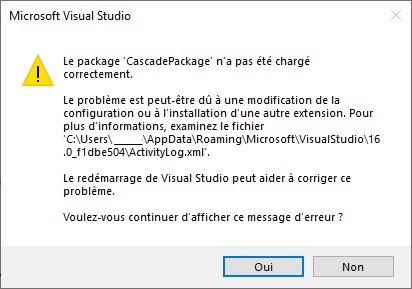
But now i can report the message chich is:
and the last lines of the file 'ActivityLog.xml' are:<entry> <record>706</record> <time>2021/03/10 11:52:37.278</time> <type>Error</type> <source>VisualStudio</source> <description>SetSite failed for package [CascadePackage]Source: 'System.ComponentModel.Composition' Description: La composition a produit plusieurs erreurs de composition, avec 3 causes initiales. Ces causes initiales sont fournies ci-après. Pour plus d'informations, passez en revue la propriété CompositionException.Errors.

1) Aucune exportation correspondant à la contrainte 
	ContractName	Microsoft.VisualStudio.Cascade.Commands.IJoinCommandLineHandler
	RequiredTypeIdentity	Microsoft.VisualStudio.Cascade.Commands.IJoinCommandLineHandler n'a été trouvée.

Résultat : Impossible de définir l'importation 'Microsoft.VisualStudio.Cascade.CascadePackage.JoinWorkspaceCommandHandler (ContractName="Microsoft.VisualStudio.Cascade.Commands.IJoinCommandLineHandler")' sur le composant 'Microsoft.VisualStudio.Cascade.CascadePackage'.
Élément : Microsoft.VisualStudio.Cascade.CascadePackage.JoinWorkspaceCommandHandler (ContractName="Microsoft.VisualStudio.Cascade.Commands.IJoinCommandLineHandler") --> Microsoft.VisualStudio.Cascade.CascadePackage

2) Aucune exportation correspondant à la contrainte 
	ContractName	Microsoft.VisualStudio.Cascade.Commands.IShareCommandLineHandler
	RequiredTypeIdentity	Microsoft.VisualStudio.Cascade.Commands.IShareCommandLineHandler n'a été trouvée.

Résultat : Impossible de définir l'importation 'Microsoft.VisualStudio.Cascade.CascadePackage.ShareWorkspaceCommandHandler (ContractName="Microsoft.VisualStudio.Cascade.Commands.IShareCommandLineHandler")' sur le composant 'Microsoft.VisualStudio.Cascade.CascadePackage'.
Élément : Microsoft.VisualStudio.Cascade.CascadePackage.ShareWorkspaceCommandHandler (ContractName="Microsoft.VisualStudio.Cascade.Commands.IShareCommandLineHandler") --> Microsoft.VisualStudio.Cascade.CascadePackage

3) Aucune exportation correspondant à la contrainte 
	ContractName	Microsoft.VisualStudio.Cascade.Contracts.IVsCascadeClientService
	RequiredTypeIdentity	Microsoft.VisualStudio.Cascade.Contracts.IVsCascadeClientService n'a été trouvée.

Résultat : Impossible de définir l'importation 'Microsoft.VisualStudio.Cascade.CascadePackage.ClientService (ContractName="Microsoft.VisualStudio.Cascade.Contracts.IVsCascadeClientService")' sur le composant 'Microsoft.VisualStudio.Cascade.CascadePackage'.
Élément : Microsoft.VisualStudio.Cascade.CascadePackage.ClientService (ContractName="Microsoft.VisualStudio.Cascade.Contracts.IVsCascadeClientService") --> Microsoft.VisualStudio.Cascade.CascadePackage

</description> <guid>{D86E17D6-7FC7-47F4-9259-21748EDFF93B}</guid> <hr>80131500</hr> <errorinfo></errorinfo> </entry> <entry> <record>707</record> <time>2021/03/10 11:52:37.284</time> <type>Error</type> <source>VisualStudio</source> <description>End package load [CascadePackage]</description> <guid>{D86E17D6-7FC7-47F4-9259-21748EDFF93B}</guid> <hr>80131500</hr> <errorinfo></errorinfo> </entry> </activity>if this can help...
regards -
Tianyu Sun-MSFT 34,806 Reputation points Microsoft External Staff
2021-03-08T06:40:15.5+00:00 Hello @Pasc059 ,
Welcome to Microsoft Q&A forum.
I think you saw Infobars in Visual Studio, and from your description, the error message “CascadePackage package not loaded…” should be reported by the system(VS IDE).
There is a similar thread which mentioned this error before, but according to this thread: The CascadePackage package did not load correctly, this issue should be fixed in Visual Studio version 16.5.
Is this serious doctor?
This should be an issue in your Visual Studio, since you click to no longer display the message, it will not display again, but it still exists. Perhaps, it depends on the specific project, or extensions. I suggest you report this issue to Visual Studio Product Team in our Developer Community, if you want to know the cause, and if this is a potential issue, it will be helpful for fixing it.
Best Regards,
Tianyu- If the answer is helpful, please click "Accept Answer" and upvote it.
Note: Please follow the steps in our documentation to enable e-mail notifications if you want to receive the related email notification for this thread.
- If the answer is helpful, please click "Accept Answer" and upvote it.