Azure Logic Apps
An Azure service that automates the access and use of data across clouds without writing code.
This browser is no longer supported.
Upgrade to Microsoft Edge to take advantage of the latest features, security updates, and technical support.
' cx='32' cy='32' r='32' /%3E%3Ctext x='50%25' y='55%25' dominant-baseline='middle' text-anchor='middle' fill='%23FFF' %3EAP%3C/text%3E%3C/svg%3E)
I am calling Power BI Rest API from Logic Apps (using Http action) to export paginated reports to excel.
The 2nd API is success and returns the output as status 100% completed along with the resource location.
But the 3rd API call fails with error " Http request failed: the server did not respond within the timeout"
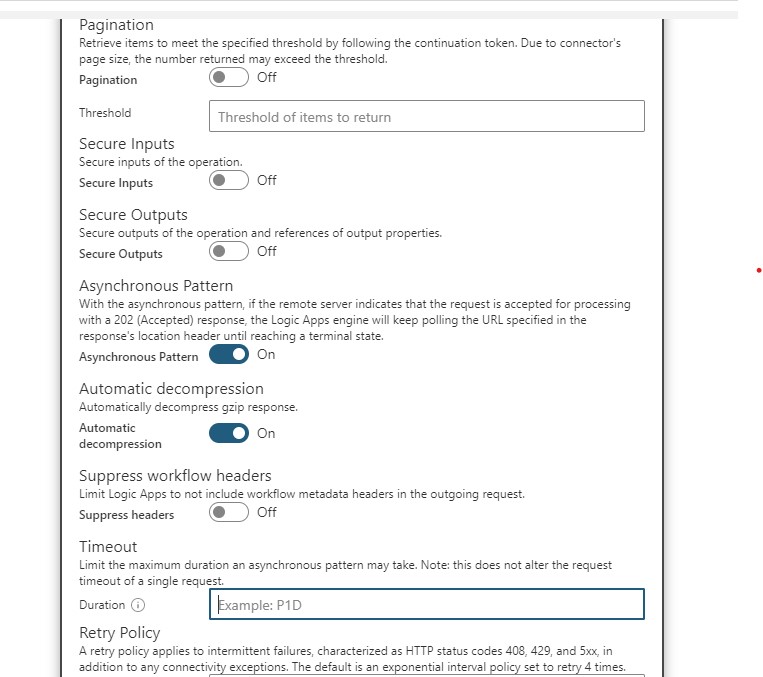
Any suggestion we can make the 3rd API increase timeout or make it asynchronous so that it does not fail within that 2mins timeout limit?

Hi @Ankita Panda ,
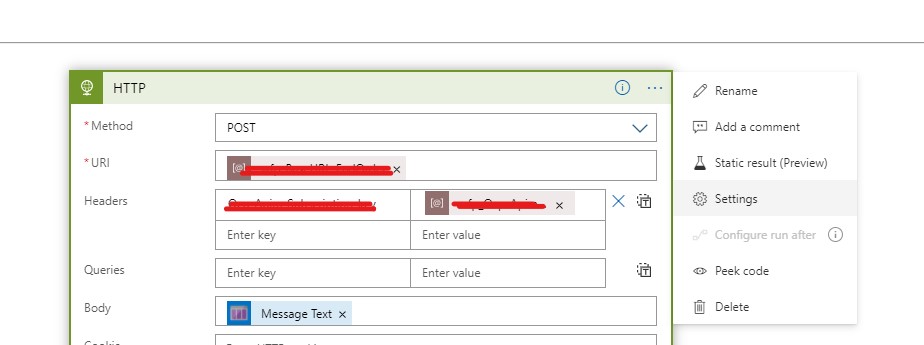
yes, you can make HTTP call asynchronous and also you can increase timeout duration (please see the screenshots below). Hope this helps!
----------
If the above response is helpful, please accept as answer and up-vote it. Thanks!
Hi @Nasreen Akter
Thanks for your response but I tried with the above settings, it is still failing with timeout error.
The file is around 12mb in size and it fails in 3rd step.
Any suggestions to try out?
Hi @Ankita Panda , filesize looks good to me. I am adding @MayankBargali-MSFT , @HimanshuSinha , @MartinJaffer-MSFT . They might be able to help you with this issue. Thanks!
' cx='32' cy='32' r='32' /%3E%3Ctext x='50%25' y='55%25' dominant-baseline='middle' text-anchor='middle' fill='%23FFF' %3EJM%3C/text%3E%3C/svg%3E)
Hello @Ankita Panda , Please refer to https://learn.microsoft.com/en-us/answers/questions/298852/index.html and let us know if the answer helps in this case.