Exchange Online
A cloud-based service included in Microsoft 365, delivering scalable messaging and collaboration features with simplified management and automatic updates.
This browser is no longer supported.
Upgrade to Microsoft Edge to take advantage of the latest features, security updates, and technical support.
' cx='32' cy='32' r='32' /%3E%3Ctext x='50%25' y='55%25' dominant-baseline='middle' text-anchor='middle' fill='%23FFF' %3ED%3C/text%3E%3C/svg%3E)
I have 2 trouble mailboxes that will not migrate to exchange online for the life of me.... . i keep getting "Synced with Errors" message when trying to run the migration batch .the error says that the custom Microsoft domain/o365 routing address is missing from the mailbox i am trying to migrate .
I have gone into "attribute editor" and added and checked numerous times that the routing address does indeed exist and is present .
i have run numerous delta sync and initial sync but still getting the same error .
What can i do here? Check my screen shot . Cleary the routing address is present .
The target mailbox doesn't have an SMTP proxy matching 'domain.mail.onmicrosoft.com'.
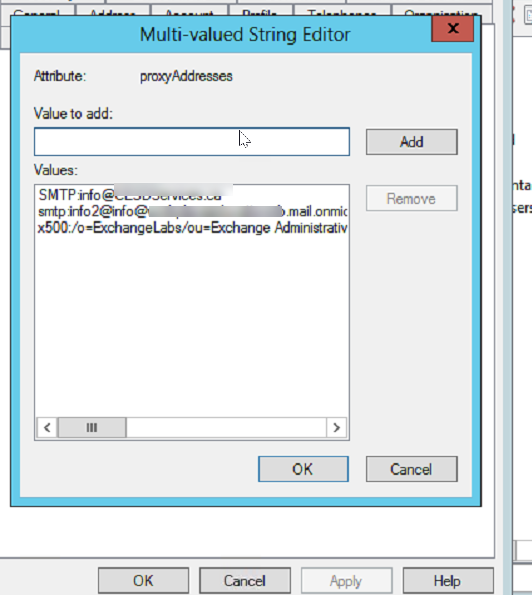

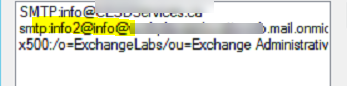
Thats not a valid SMTP Address
Should be info2@keyman .mail.onmicrosoft.com
You have two "@" in there.
here is the error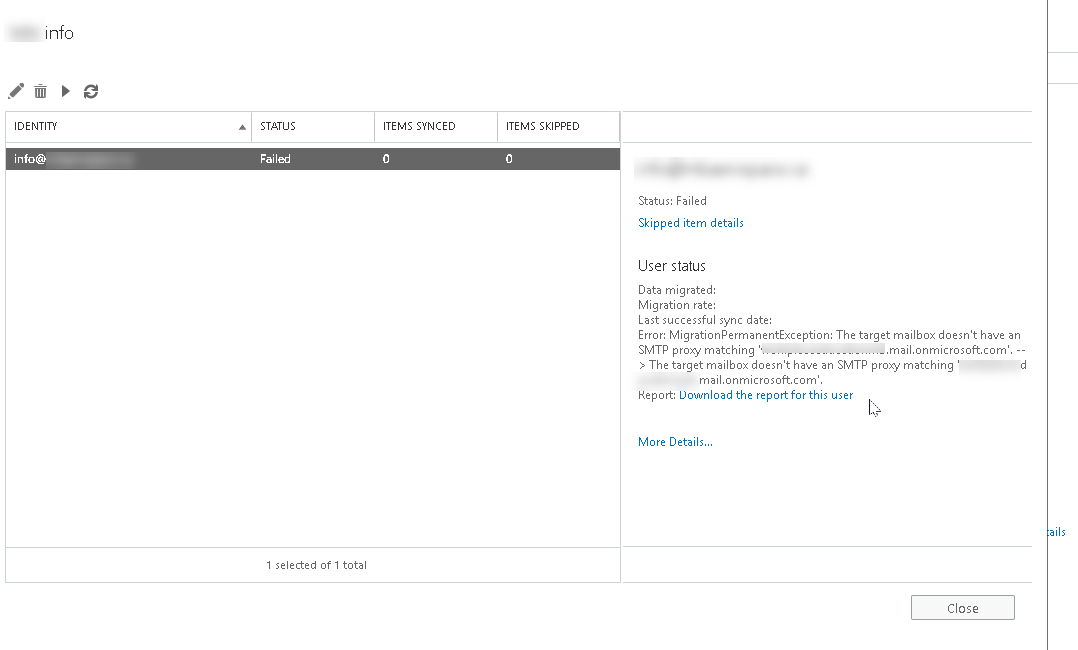 from exchange online .
well that was a dumb mistake !! DOH
thanks,
no problem! If you could, please accept an answer so this can be closed up. Thanks!