Microsoft Security | Microsoft Entra | Microsoft Entra ID
A cloud-based identity and access management service for securing user authentication and resource access

This browser is no longer supported.
Upgrade to Microsoft Edge to take advantage of the latest features, security updates, and technical support.
' cx='32' cy='32' r='32' /%3E%3Ctext x='50%25' y='55%25' dominant-baseline='middle' text-anchor='middle' fill='%23FFF' %3EAK%3C/text%3E%3C/svg%3E)
Hello everyone,
When I send a POST request to get a refreshable token for Power BI REST API I get the following error:
{
"error": "invalid_grant",
"error_description": "AADSTS50126: Error validating credentials due to invalid username or password.\r\nTrace ID: 99c45d79-6d9d-4e29-8aa8-912e47e65e00\r\nCorrelation ID: bb95c25d-0f3c-4212-9502-95f16703f035\r\nTimestamp: 2021-03-08 10:09:56Z",
"error_codes": [
50126
],
"timestamp": "2021-03-08 10:09:56Z",
"trace_id": "99c45d79-6d9d-4e29-8aa8-912e47e65e00",
"correlation_id": "bb95c25d-0f3c-4212-9502-95f16703f035",
"error_uri": "https://login.microsoftonline.com/error?code=50126"
}
This is what I did :
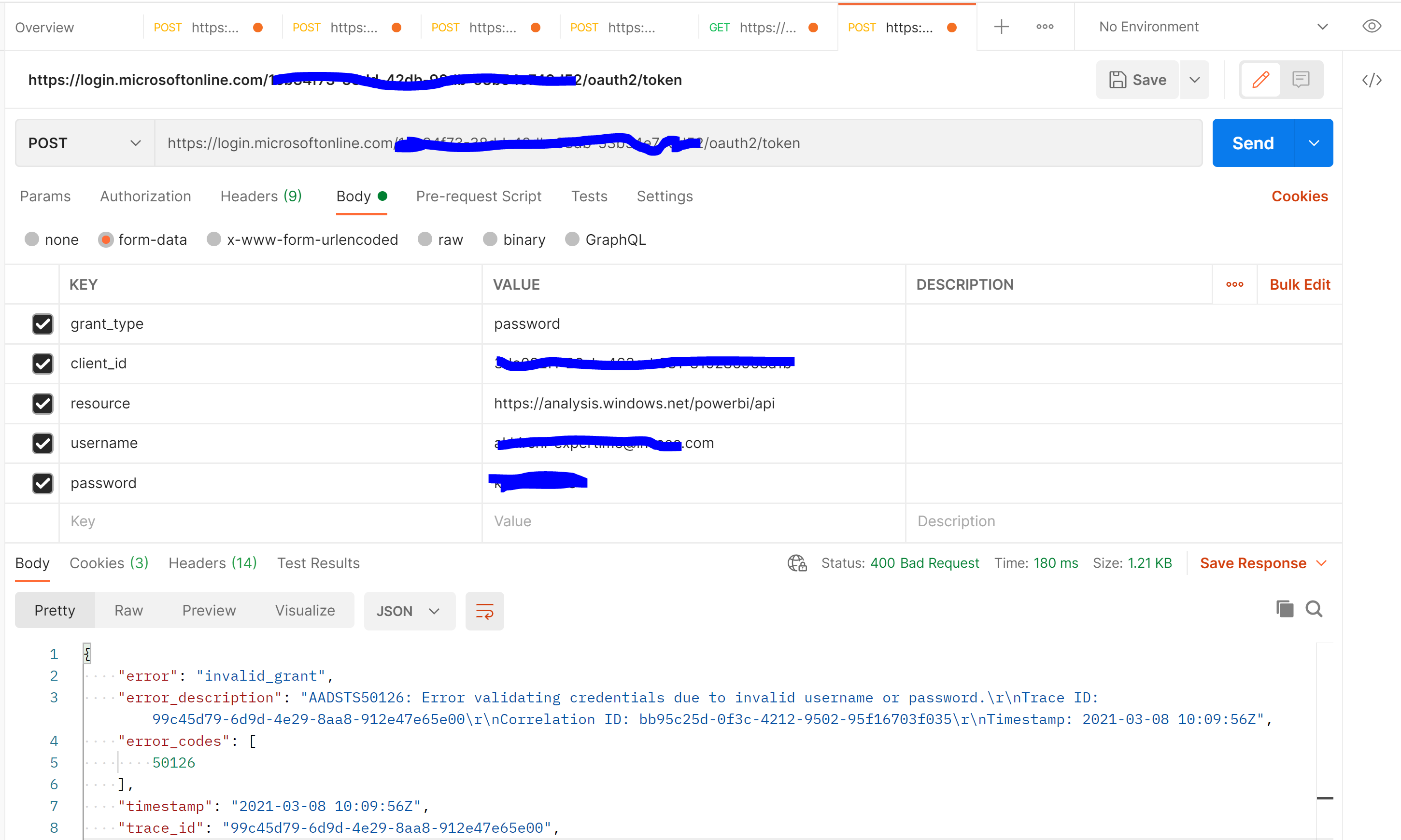
Thanks in advance.

Hi @Ad-K · The account you are using is a federated account, which requires redirection to ADFS for authentication. The ROPC (password) flow doesn't support this redirection and tries to authenticate the user directly in Azure AD. Hence, the error AADSTS50126: Error validating credentials due to invalid username or password. is thrown.
To resolve the issue, you can choose to go with one of the below options:
-----------------------------------------------------------------------------------------------------------
Please "Accept the answer" if the information helped you. This will help us and others in the community as well.
' cx='32' cy='32' r='32' /%3E%3Ctext x='50%25' y='55%25' dominant-baseline='middle' text-anchor='middle' fill='%23FFF' %3EKR%3C/text%3E%3C/svg%3E)
Hi All
Please follow the solution provided by @AmanpreetSingh-MSFT . 1. cloud only user account .
it worked for me .
Thank you so much @AmanpreetSingh-MSFT

Hello @Ad-K ,
Thanks for reaching out.
I had tried above steps and was able to generate token successfully. Here is outcome from Postman.
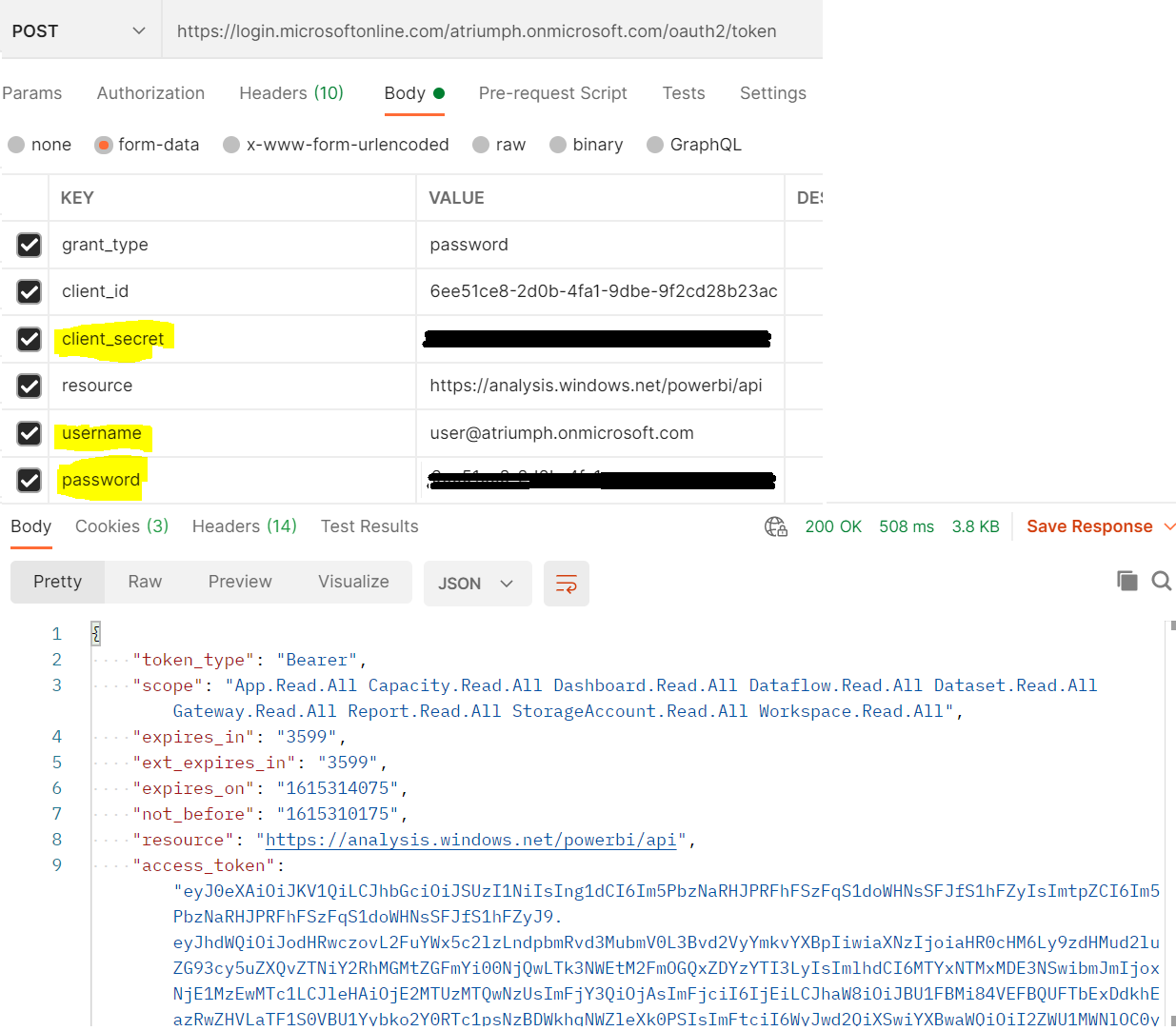
Looking at above error message AADSTS50126, which indicate invalid username or password also I see that you had verified your email and password several times, just wondering did you try to access azure portal with same credential successfully?
These are possible causes I could think of:
Content-Type mentioned as application/x-www-form-urlencoded in PostMan header , because when UPN or Password contains special characters then using urlencoded make sure values are being translated with right format. 
username key-value must be UPN (User principal Name) not email address, ignore this step if UPN and email address both are same. Hope this helps
Do let us know if this helps and if there are any more queries around this, please do let us know so that we can help you further. Also, please do not forget to accept the response as an Answer; if the above response helped in answering your query.
Hello,
Thank you for the feedback. Yes I am connected to the Azure Portal with the same credentials and my UPN=my email address and also my password doesn't contain any special characters. I also tried to connect to Power BI to use this command to get a refreshable token but it doesn't work (followed the instructions in this video here: https://www.youtube.com/watch?v=2RZkc_qrV1g&t=158s&ab_channel=BIElite)
I also was able to generate a token using the following :

But when I try to use that token in Power BI it doesn't work; meaning none of the authentication options work:

Thanks for detailed information.
I could see you are still using form-data instead of x-www-form-urlencoded from Postman. I would
request you to use x-www-form-urlencoded format in Header and body as shown below and try with Grant_Type as password.
Body:

Header:

In addition to that I am not very sure if Power BI support Grant_Type as client_credentials , may be that could be the reason why you were getting error while passing token from Power BI.
Can you test if above steps help you with getting access token?
I sent a new POST request but this time using x_www-form-urlencoded, and checked the value at the headers, I still got the same error message, nothing changed.
{
"error": "invalid_grant",
"error_description": "AADSTS50126: Error validating credentials due to invalid username or password.\r\nTrace ID: c1da58d2-6956-4e27-b47a-df6c17b61500\r\nCorrelation ID: 62ea8cbb-75e2-4c6c-93ab-502e38c962bb\r\nTimestamp: 2021-03-10 14:28:20Z",
"error_codes": [
50126
],
"timestamp": "2021-03-10 14:28:20Z",
"trace_id": "c1da58d2-6956-4e27-b47a-df6c17b61500",
"correlation_id": "62ea8cbb-75e2-4c6c-93ab-502e38c962bb",
"error_uri": "https://login.microsoftonline.com/error?code=50126"
}
Thanks for the confirmation.
Could you please try with PowerShell way and see if that helps? just replace with your own values which are highlight in yellow as shown below:
PowerShell outcome from my lab:
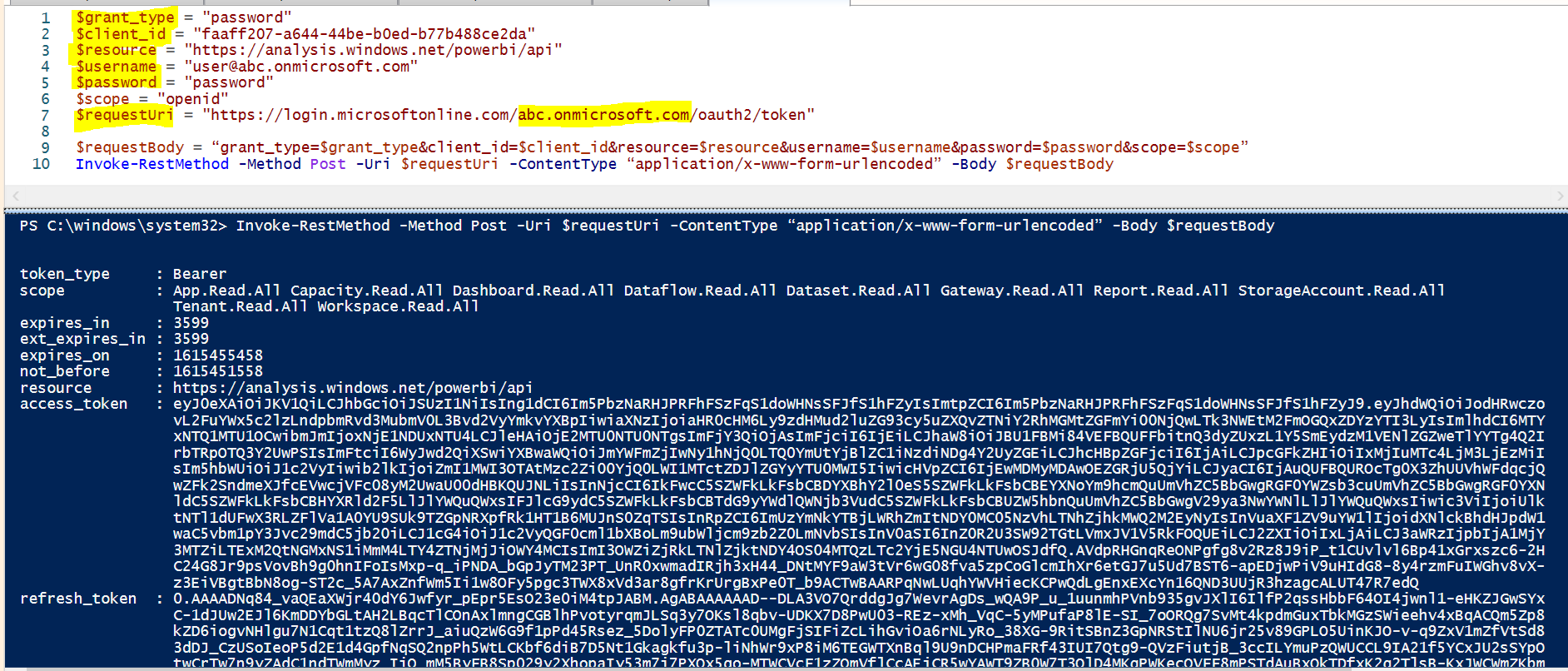
PowerShell cmdlet
Replace with your own values
$grant_type = "password"
$client_id = "faaff207-1111-44be-1111-b77b488ce2da"
$resource = "https://analysis.windows.net/powerbi/api"
$username = "******@abc.onmicrosoft.com"
$password = "password"
$scope = "openid"
$requestUri = "https://login.microsoftonline.com/abc.onmicrosoft.com/oauth2/token"
Then execute these cmdlet
$requestBody = “grant_type=$grant_type&client_id=$client_id&resource=$resource&username=$username&password=$password&scope=$scope”
Invoke-RestMethod -Method Post -Uri $requestUri -ContentType “application/x-www-form-urlencoded” -Body $requestBody
if PowerShell doesn't work, then can you try with different username and password ?
If none of these works, feel free to send me an email with subject line “Attn:SivaKumarS” to AzCommunity@microsoft.com, include your subscription ID, and I will gladly open a free support case for you.
------
Please "Accept the answer" if the information helped you. This will help us and others in the community as well.