Azure SQL Database
An Azure relational database service.
This browser is no longer supported.
Upgrade to Microsoft Edge to take advantage of the latest features, security updates, and technical support.
' cx='32' cy='32' r='32' /%3E%3Ctext x='50%25' y='55%25' dominant-baseline='middle' text-anchor='middle' fill='%23FFF' %3ES%3C/text%3E%3C/svg%3E)
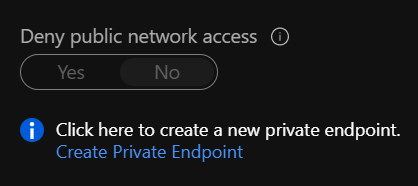
We recently looked at deploying some new SQL PaaS instances and were presented with the SQL Connectivity Settings in the Server Firewall within the Azure portal. As can be seen in the first image on this docs article (https://learn.microsoft.com/en-us/azure/azure-sql/database/connectivity-settings#deny-public-network-access) the default setting is to allow public access, ie "Deny Public Access = NO".
We believe this should be default set to be "Deny Public Access = YES", therefore being least privilege at the start and secured out of the box on an Azure SQL Server instance. If public access is needed the customer needs to enable both this setting and configure SQL firewall rules to support their connectivity requirements. Therefore the tooltips, documentation and other onboarding wizards will need updating to address this configuration decision.
Hope you agree, and maybe this isnt the only similar resource in Azure that could be more secure from the initial deployment and put the active choice into the hands of the customer.
many thanks
Stephen

Agree with you. The tooltip should be updated with more details but it currently just has a link to documentation.
If this is not a question but suggestion/feedback on documentation or change in default settings behavior, you may post it in below. The feedbacks are monitor by product team and taken up based on priority and votes -
https://feedback.azure.com/forums/217321-sql-database
Please don't forget to Accept Answer and Up-vote if the response helped -- Vaibhav
anonymous userChaudhari , thanks for replying, however I think you misunderstood my point. Adding more information to the tooltip as it is does not rectify the issue, that out of the box the SQL PaaS Server has public access enabled. This leaves a new instance exposed and potentially not understood. If the setting is configured to Deny Public = Yes then the customer is forced to make an active choice to enable it and configure appropriate firewall rules.
So my reason for flagging this is to force a change in the default configuration, and only from that change will tooltips and documentation need updating.
I await input from the Azure team on this topic
' cx='32' cy='32' r='32' /%3E%3Ctext x='50%25' y='55%25' dominant-baseline='middle' text-anchor='middle' fill='%23FFF' %3EKM%3C/text%3E%3C/svg%3E)
@Stephen Thank you for reaching out.
You are right. For complete isolation from public internet, Deny Public Access should be set to Yes.
This also means that customers will now have to go through creating and managing services like Azure Private Endpoint or Azure Private Link
Some customers have their workloads on multiple cloud providers and need to connect to Azure SQL Database over public internet.
When customers have a database that is exposed, new tooltips encourage customers to create a private end point and deny public internet access.
Azure Security Center identifies and makes recommendations accordingly.
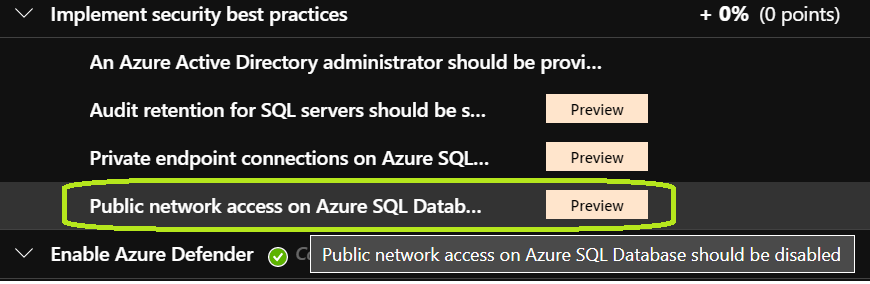
As of today, to cater to all generic use cases, Deny Public Access is not currently enforced by default while sensitizing customers on the subject and encouraging them to take action.
Your suggestion is definitely valid, please do post it here
----------
If an answer is helpful, please "Accept answer" or "Up-Vote" for the same which might be beneficial to other community members reading this thread.