Outlook | Windows | Classic Outlook for Windows | For business
Using classic Outlook for Windows in business environments

This browser is no longer supported.
Upgrade to Microsoft Edge to take advantage of the latest features, security updates, and technical support.
' cx='32' cy='32' r='32' /%3E%3Ctext x='50%25' y='55%25' dominant-baseline='middle' text-anchor='middle' fill='%23FFF' %3ECC%3C/text%3E%3C/svg%3E)
Hi, I have a question about the copy of an appointment from one calendar (associated with my working account) to another calendar (associated with my personal account) in Outlook. The copy is executed correctly but iuf I update the source appointment (contained in the calender of my working account) the copied appointment (contained in the calendar of my personal account) is not updated consistently and I cannot see changes in the copied appointment. Thanks
Using classic Outlook for Windows in business environments

Hi @Claudio Cappello ,
Just checking in to see if above information was helpful. If you have any further updates on this issue, please feel free to post back.
Hi @Claudio Cappello ,
Welcome!
May I know how did you make the copy of your source calendar to your personal account? And what email account are you using? O365 email account, Outlook.com email account or some others?
Are you using Outlook desktop client? If yes, what's the version of your Outlook? (File > Office Account > About Outlook).
As I know, usually, simple copying calendars to other email account could help share calendar items but when the calendar changes or have some updates, these changes indeed will not be synced via this method.
If you are using O365 email account or Outlook.com email account as the source account, the publish calendar method should be able to help. To achieve that, you need to firstly log into your web mail and grant permissions like below:
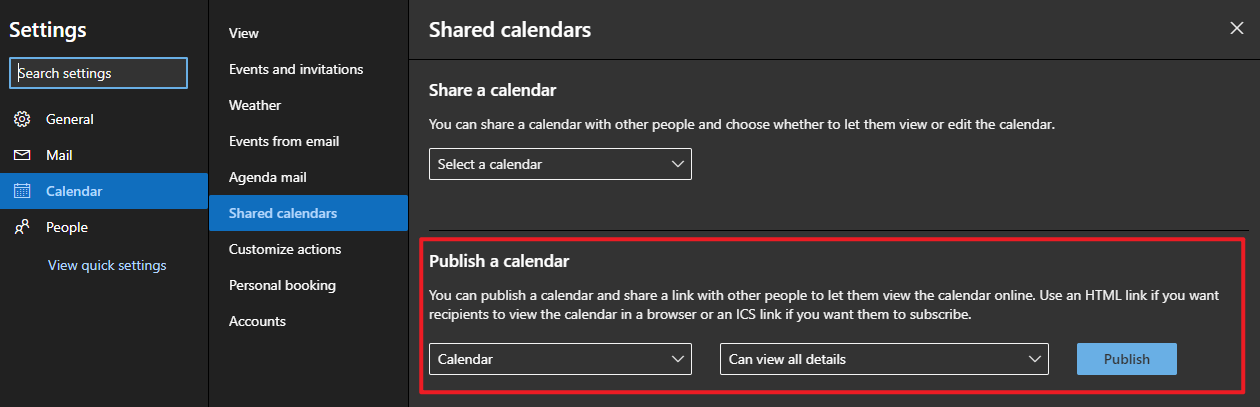
After clicking the Publish button, you will get shared links like below:
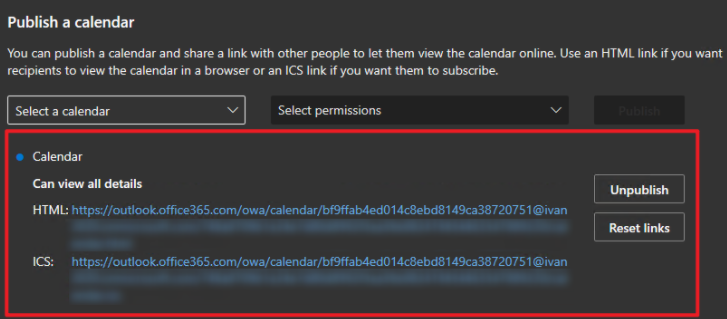
And you can copy the ICS link to your personal email account in Outlook desktop client via "From Internet" option
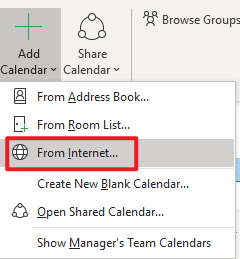
Then you will get your source calendar in other email accounts and the updates can also be synced via this way.
Hope this can be helpful.
If an Answer is helpful, please click "Accept Answer" and upvote it.
Note: Please follow the steps in our documentation to enable e-mail notifications if you want to receive the related email notification for this thread.