Developer technologies | .NET | Xamarin
A Microsoft framework for building cross-platform mobile apps using .NET and C# with native performance and user interfaces.
This browser is no longer supported.
Upgrade to Microsoft Edge to take advantage of the latest features, security updates, and technical support.
' cx='32' cy='32' r='32' /%3E%3Ctext x='50%25' y='55%25' dominant-baseline='middle' text-anchor='middle' fill='%23FFF' %3EGS%3C/text%3E%3C/svg%3E)
I have tried so many different things and looked at so many different examples, tutorials, forum posts - but I just can't get this to work. Note: I am new to Xamarin so some of this may not be ideal / the best way of doing things!
I have a page that needs to display a list of items (devices). I am using CollectionView:
DevicesPage.xaml contains:
<ContentPage.BindingContext>
    <viewModels:DevicesPageViewModel />
</ContentPage.BindingContext>
<ContentPage.Content>
    <StackLayout>
        <Label Text="My Devices"/>
        <CollectionView x:Name="DevicesView" ItemsSource="{Binding MyDevices}">
            <CollectionView.ItemTemplate>
                <DataTemplate>
                    <Grid Padding="10">
                        <Grid.RowDefinitions>
                            <RowDefinition Height="Auto" />
                            <RowDefinition Height="*" />
                        </Grid.RowDefinitions>
                        <Grid.ColumnDefinitions>
                            <ColumnDefinition Width="Auto" />
                            <ColumnDefinition Width="*" />
                        </Grid.ColumnDefinitions>
                        <Image Grid.RowSpan="2"
                               Source="{Binding ProductImage}"
                               Aspect="AspectFill"
                               HeightRequest="60"
                               WidthRequest="60" />
                        <Label Grid.Row="0" Grid.Column="1"
                               Text="{Binding MaskedPAN, StringFormat='PAN: {0}'}"
                               FontAttributes="Bold" />
                        <Label Grid.Row="1"
                               Grid.Column="1" HeightRequest="30"
                               Text="{Binding CardBalanceText}"
                               VerticalOptions="End"  />
                    </Grid>
                </DataTemplate>
            </CollectionView.ItemTemplate>
        </CollectionView>
    </StackLayout>
</ContentPage.Content>
DevicesPage.xaml.cs contains:
[XamlCompilation(XamlCompilationOptions.Compile)]
public partial class DevicesPage : ContentPage
{

    public DevicesPage()
    {
        InitializeComponent();

        //BindingContext = new DevicesPageViewModel();
    }
}
DevicesPageViewModel.cs contains:
public class DevicesPageViewModel : BaseViewModel
{
    public ObservableCollection<MyDevice> MyDevices { get; set; }

    public DevicesPageViewModel()
    {
        var api = new apiService(Configuration.ApiBaseUrl);
        var rtnData = api.GetUserDevices(CredentialsStorage.GetAccessTokenAsync().Result);


        MyDevices = new ObservableCollection<MyDevice>();

        foreach (var device in rtnData.Data.Devices)
        {
            var newDevice = new MyDevice
            {
                ProductId = device.ProductId,
                CurrencyCode = device.CurrencyCode,
                IsLive = device.IsLive,
                MaskedPAN = device.MaskedPAN,
                Primary = device.Primary,
                PrimaryToken = device.PrimaryToken,
                Product = device.Product,
                PublicToken = device.PublicToken,
                StatCode = device.StatCode,
                UserDefinedName = device.UserDefinedName,
                ProductImage = ImageSource.FromResource(device.ProductImage)
            };

            MyDevices.Add(newDevice);
        }
    }
}
MyDevice.cs contains:
public class MyDevice
{
    public string ProductId { get; set; }
    public string CurrencyCode { get; set; }
    public string StatCode { get; set; }
    public string PublicToken { get; set; }
    public string Primary { get; set; }
    public string PrimaryToken { get; set; }
    public string IsLive { get; set; }
    public string Product { get; set; }
    public string MaskedPAN { get; set; }

    public string UserDefinedName { get; set; }

    public ImageSource ProductImage { get; set; }

    public string CardBalance { get; set; }

    public string CardBalanceText
    {
        get
        {
            if (CardBalance != null && !string.IsNullOrEmpty(CardBalance))
            {
                return $"Balance: £{CardBalance:F2}";
            }

            return string.Empty;
        }
    }
}
And this is what I get when I run the app in the Android emulator:
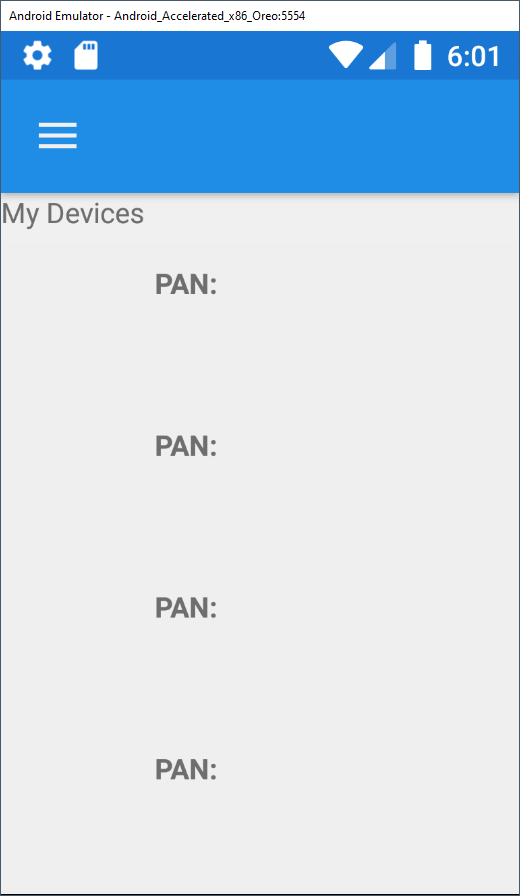
So - why do none of the values show?!
I have debugged it and the list of devices is definitely being populated.

So your list is clearly populated with MyDevice objects, but what are the property values on those objects? It looks like your API is returning you a bunch of empty devices.
II have debugged the code after returning from the API call, and it contains actual (expected) data. I checked at the end of the function and the list contained multiple items which all contained data values.
For some reason, the data isn’t being shown. The number of (blank) rows is correct, but no content is showing!? It’s like the binding of each element isn’t working?
I wonder if it has anything to do with performing a blocking async call in your constructor. If you move the code to make the API call and fill out MyDevices to a public method and call it from the Page's OnAppearing does it work better?
I have managed to get it working, the solution was a combination of using async-await and moving the population code to OnAppearing()
' cx='32' cy='32' r='32' /%3E%3Ctext x='50%25' y='55%25' dominant-baseline='middle' text-anchor='middle' fill='%23FFF' %3EJ%3C/text%3E%3C/svg%3E)
Hello,
Welcome to our Microsoft Q&A platform!
The number of (blank) rows is correct, but no content is showing!? It’s like the binding of each element isn’t working
Hi, GordonS-9701. I created a basic demo to test the function and replace the populating data code as below, it works fine. There may be something wrong with the part of populating data, please mark sure the data have been added successfully. Try adding a breakpoint to check the 'MyDevices' collection. You could use the following code to test to vertify the function.
   public DevicesPageViewModel()
   {
       //var api = new apiService(Configuration.ApiBaseUrl);
       //var rtnData = api.GetUserDevices(CredentialsStorage.GetAccessTokenAsync().Result);
       MyDevices = new ObservableCollection<MyDevice>();
       for (int i = 0; i < 10; i++)
       {
           var newDevice = new MyDevice
           {
               ProductId = "ProductId_" + i,
               CurrencyCode = "CurrencyCode_" + i,
               IsLive = "IsLive_" + i,
               MaskedPAN = "MaskedPAN_" + i,
               Primary = "Primary_" + i,
               PrimaryToken = "PrimaryToken" + i,
               Product = "Product" + i,
               PublicToken = "PublicToken" + i,
               StatCode = "StatCode" + i,
               UserDefinedName = "UserDefinedName" + i,
               ProductImage = "grid_"
           };
           MyDevices.Add(newDevice);
       }
   }
The CredentialsStorage.GetAccessTokenAsync() command may take some time to get the result, try to use async-await wrap the code to ensure to get the correct result.
Best Regards,
Jarvan Zhang
If the response is helpful, please click "Accept Answer" and upvote it.
Note: Please follow the steps in our documentation to enable e-mail notifications if you want to receive the related email notification for this thread.