Microsoft Security | Microsoft Entra | Microsoft Entra ID
A cloud-based identity and access management service for securing user authentication and resource access

This browser is no longer supported.
Upgrade to Microsoft Edge to take advantage of the latest features, security updates, and technical support.
' cx='32' cy='32' r='32' /%3E%3Ctext x='50%25' y='55%25' dominant-baseline='middle' text-anchor='middle' fill='%23FFF' %3EEP%3C/text%3E%3C/svg%3E)
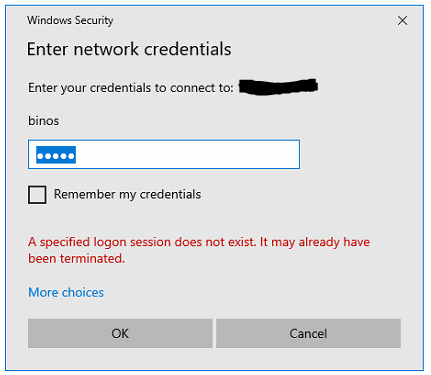
a specified logon session does not exist. it may already have been terminated - after i joined the device to azure active directory
-i cannot access our shared folder in our server after i joined the device to azure AD and use office 365 account (Please see click the link below to see the error image for your reference), but if i use local administrator of the device i can access the file server using the credentials with no problem, please note that we dont have an premises active directory or GPO, kindly help me.
A cloud-based identity and access management service for securing user authentication and resource access
' cx='32' cy='32' r='32' /%3E%3Ctext x='50%25' y='55%25' dominant-baseline='middle' text-anchor='middle' fill='%23FFF' %3EA%3C/text%3E%3C/svg%3E)
I had this problem with a mapped drive to a NAS for a user. I added the name of the NAS as the domain name before his logon name "NASNAME\LOGONNAME" that appears to disconnect it from the AZURE directory and the drive mapped.
' cx='32' cy='32' r='32' /%3E%3Ctext x='50%25' y='55%25' dominant-baseline='middle' text-anchor='middle' fill='%23FFF' %3EME%3C/text%3E%3C/svg%3E)
I had same problem issue , and I've read many article , but the last solution is easy and solved the problem . To reach a network storage just you need to write NASNAME\LOGONNAME , if you write only LOGONNAME you cannot reach.
Thanks for the solution providers.
Mehmet ERMAN
' cx='32' cy='32' r='32' /%3E%3Ctext x='50%25' y='55%25' dominant-baseline='middle' text-anchor='middle' fill='%23FFF' %3EBA%3C/text%3E%3C/svg%3E)
Hi MehmetErman,
Yes it is working as you said. Thank you very much. Haveto enter NASNAME\LogonName in Username then will enter to the password. Advance Happy New Year 2021.
' cx='32' cy='32' r='32' /%3E%3Ctext x='50%25' y='55%25' dominant-baseline='middle' text-anchor='middle' fill='%23FFF' %3ECN%3C/text%3E%3C/svg%3E)
Hey just wanted to come in here to say that I had this exact same issue with some new Windows 10 computers I bought for my organization. This fixed the problem easily.
' cx='32' cy='32' r='32' /%3E%3Ctext x='50%25' y='55%25' dominant-baseline='middle' text-anchor='middle' fill='%23FFF' %3ESM%3C/text%3E%3C/svg%3E)
Thanks! John, this worked like a charm.
' cx='32' cy='32' r='32' /%3E%3Ctext x='50%25' y='55%25' dominant-baseline='middle' text-anchor='middle' fill='%23FFF' %3EDL%3C/text%3E%3C/svg%3E)
I believe this fix will work for me but I'm not sure where to put it into the system/logon
Until I can I can't upgrade the lunch software because the pc can't see the server which is a NAS and needs access to it to save the daily data and backup the data.
Any suggestions would be greatly appreciated.
' cx='32' cy='32' r='32' /%3E%3Ctext x='50%25' y='55%25' dominant-baseline='middle' text-anchor='middle' fill='%23FFF' %3EMG%3C/text%3E%3C/svg%3E)
Absolutely correct. I enabled SMB, disabled firewalls to test connection and nothing. Used 10.50.40.x\USERNAME and it went straight through. Thanks heaps
' cx='32' cy='32' r='32' /%3E%3Ctext x='50%25' y='55%25' dominant-baseline='middle' text-anchor='middle' fill='%23FFF' %3EBB%3C/text%3E%3C/svg%3E)
' cx='32' cy='32' r='32' /%3E%3Ctext x='50%25' y='55%25' dominant-baseline='middle' text-anchor='middle' fill='%23FFF' %3ERH%3C/text%3E%3C/svg%3E)
I just came here to say I've been chasing this bug down for MONTHS since we Azure AD joined all our laptops to the network... and yet this simple solution solved the problem. THANK YOU!!!!!
' cx='32' cy='32' r='32' /%3E%3Ctext x='50%25' y='55%25' dominant-baseline='middle' text-anchor='middle' fill='%23FFF' %3EJ%3C/text%3E%3C/svg%3E)
In my case, I added credentials to the credential manager, using the following information:
Network address: IP-address of the server
Username: IP\Username
Password: Password
When connecting for the first time using \IP, I had to click more options and select the new credential. Then I re-typed the password, and I gained access. Optionally, you can click the checkbox to remember the credentials, so you don't have to log in over again.
' cx='32' cy='32' r='32' /%3E%3Ctext x='50%25' y='55%25' dominant-baseline='middle' text-anchor='middle' fill='%23FFF' %3ETF%3C/text%3E%3C/svg%3E)
' cx='32' cy='32' r='32' /%3E%3Ctext x='50%25' y='55%25' dominant-baseline='middle' text-anchor='middle' fill='%23FFF' %3EAH%3C/text%3E%3C/svg%3E)
' cx='32' cy='32' r='32' /%3E%3Ctext x='50%25' y='55%25' dominant-baseline='middle' text-anchor='middle' fill='%23FFF' %3EA%3C/text%3E%3C/svg%3E)
' cx='32' cy='32' r='32' /%3E%3Ctext x='50%25' y='55%25' dominant-baseline='middle' text-anchor='middle' fill='%23FFF' %3ESB%3C/text%3E%3C/svg%3E)
' cx='32' cy='32' r='32' /%3E%3Ctext x='50%25' y='55%25' dominant-baseline='middle' text-anchor='middle' fill='%23FFF' %3EKE%3C/text%3E%3C/svg%3E)
Great answer. If you got a new laptop and started Windows 11 as a work/school account, this will solve your problem.
' cx='32' cy='32' r='32' /%3E%3Ctext x='50%25' y='55%25' dominant-baseline='middle' text-anchor='middle' fill='%23FFF' %3EJS%3C/text%3E%3C/svg%3E)
Thank you so much. I spent 2 hours on the line with Western Digital trying to access my storage device, only to have them tell me I needed to contact Microsoft. This totally fixed my issue. THANK YOU!!!!
' cx='32' cy='32' r='32' /%3E%3Ctext x='50%25' y='55%25' dominant-baseline='middle' text-anchor='middle' fill='%23FFF' %3EJJ%3C/text%3E%3C/svg%3E)
Thanks so much - being going round in circles for HOURS!!!!
' cx='32' cy='32' r='32' /%3E%3Ctext x='50%25' y='55%25' dominant-baseline='middle' text-anchor='middle' fill='%23FFF' %3EGF%3C/text%3E%3C/svg%3E)
Honestly, I am very frustrated with the way Microsoft keeps breaking basic interoperability that has worked for ever. That being said, I have found that using '.' in front of the account will tell Windows this is a local user. i.e. '.\useraccount' will allow you to connect where 'useraccount' won't. That worked for me on my Azure AD joined workstation connecting to SMB shares on local NAS and Linux boxes.
' cx='32' cy='32' r='32' /%3E%3Ctext x='50%25' y='55%25' dominant-baseline='middle' text-anchor='middle' fill='%23FFF' %3ED%3C/text%3E%3C/svg%3E)
I can't believe it, but this worked and solved my problem today. Thanks for posting it!
Awesome, Gary. This is a slick and super easy solution. I can't believe I spent 1 1/2 days banging my head against the wall. Great thanks.
' cx='32' cy='32' r='32' /%3E%3Ctext x='50%25' y='55%25' dominant-baseline='middle' text-anchor='middle' fill='%23FFF' %3EAK%3C/text%3E%3C/svg%3E)
' cx='32' cy='32' r='32' /%3E%3Ctext x='50%25' y='55%25' dominant-baseline='middle' text-anchor='middle' fill='%23FFF' %3EMD%3C/text%3E%3C/svg%3E)
Did it for me on a Asustor NAS. thanks ! this has been a painpoint for a long time.
' cx='32' cy='32' r='32' /%3E%3Ctext x='50%25' y='55%25' dominant-baseline='middle' text-anchor='middle' fill='%23FFF' %3ED2%3C/text%3E%3C/svg%3E)
Thanks so much for posting this Gary, it solved our problems too. I agree with your comment about Microsoft breaking basic interoperability. When you're not a pro it's very time consuming and frustrating trying to get issues like these sorted. So grateful to people like you x
' cx='32' cy='32' r='32' /%3E%3Ctext x='50%25' y='55%25' dominant-baseline='middle' text-anchor='middle' fill='%23FFF' %3EA%3C/text%3E%3C/svg%3E)
Thank you very much, it worked! But I completely agree with you, why change the functionality that has been working for years!? Unbelievable.
' cx='32' cy='32' r='32' /%3E%3Ctext x='50%25' y='55%25' dominant-baseline='middle' text-anchor='middle' fill='%23FFF' %3ER%3C/text%3E%3C/svg%3E)
Holy, i can't believe it worked. Amazing answer
' cx='32' cy='32' r='32' /%3E%3Ctext x='50%25' y='55%25' dominant-baseline='middle' text-anchor='middle' fill='%23FFF' %3EBF%3C/text%3E%3C/svg%3E)
Using Microsoft is becoming more and more frustrating. Thank you for this obscure fix. Saved me a lot of headache.
' cx='32' cy='32' r='32' /%3E%3Ctext x='50%25' y='55%25' dominant-baseline='middle' text-anchor='middle' fill='%23FFF' %3ED%3C/text%3E%3C/svg%3E)
Thanks - great solution that worked. Would never have worked it out myself! Comletely agree with the comments above about this being a class MS timewaster - change one thing, and MS breaks something else (apparently) completely unrelated.
' cx='32' cy='32' r='32' /%3E%3Ctext x='50%25' y='55%25' dominant-baseline='middle' text-anchor='middle' fill='%23FFF' %3ESD%3C/text%3E%3C/svg%3E)
Works for me. I've been connecting to this drive for 5 years without a problem. Randomly stopped working today. Glad Microsoft is hard at work breaking things.
' cx='32' cy='32' r='32' /%3E%3Ctext x='50%25' y='55%25' dominant-baseline='middle' text-anchor='middle' fill='%23FFF' %3ED%3C/text%3E%3C/svg%3E)
Tears of frustration turned to tears of joy when I found this solution. Thanks from 2025 Gary.
' cx='32' cy='32' r='32' /%3E%3Ctext x='50%25' y='55%25' dominant-baseline='middle' text-anchor='middle' fill='%23FFF' %3EPB%3C/text%3E%3C/svg%3E)
This issue happens after joining a system to Azure AD that was previously on a workgroup or local domain pointing to a local NAS. The correct way to solve this is to specify the local name or ip of the NAS in your user name. So username would be something like 192.168.x.x\username and then whatever password belongs to that username that would exist on the NAS. I tried using the .\username to force a local sign on, but that did not work.
' cx='32' cy='32' r='32' /%3E%3Ctext x='50%25' y='55%25' dominant-baseline='middle' text-anchor='middle' fill='%23FFF' %3EAA%3C/text%3E%3C/svg%3E)
Above method works for me fine.
Thanks Paul!
This comment has been deleted due to a violation of our Code of Conduct. The comment was manually reported or identified through automated detection before action was taken. Please refer to our Code of Conduct for more information.
' cx='32' cy='32' r='32' /%3E%3Ctext x='50%25' y='55%25' dominant-baseline='middle' text-anchor='middle' fill='%23FFF' %3ECF%3C/text%3E%3C/svg%3E)
Thank you for this! This just helped me log in! 🙏
' cx='32' cy='32' r='32' /%3E%3Ctext x='50%25' y='55%25' dominant-baseline='middle' text-anchor='middle' fill='%23FFF' %3ERK%3C/text%3E%3C/svg%3E)
Add share path in web credentials in the windows PC . before adding the username add the share path url removing the two \ . it works for me
' cx='32' cy='32' r='32' /%3E%3Ctext x='50%25' y='55%25' dominant-baseline='middle' text-anchor='middle' fill='%23FFF' %3EH%3C/text%3E%3C/svg%3E)
@Rupin Kuruvilla That does not make sense. web credentials to connect to a local server?
no you would not use web creds to connect to a local nas... use the local accounts on the nas, make sure to specify the local account in the username filed using .\username if that does not work try .\path of nas on network\username
' cx='32' cy='32' r='32' /%3E%3Ctext x='50%25' y='55%25' dominant-baseline='middle' text-anchor='middle' fill='%23FFF' %3EMG%3C/text%3E%3C/svg%3E)
When entering the username put .\ at the beginning and then enter the username and password and connect.
' cx='32' cy='32' r='32' /%3E%3Ctext x='50%25' y='55%25' dominant-baseline='middle' text-anchor='middle' fill='%23FFF' %3EPH%3C/text%3E%3C/svg%3E)
I have the exact same issue on all new desktop builds where I connect with an office 365 account. Instead of asking for a login it's asking for a pin. I've added credentials through the credential manager and disabled the hello pin feature. Still getting the same error message.