Developer technologies | C#
An object-oriented and type-safe programming language that has its roots in the C family of languages and includes support for component-oriented programming.
This browser is no longer supported.
Upgrade to Microsoft Edge to take advantage of the latest features, security updates, and technical support.
' cx='32' cy='32' r='32' /%3E%3Ctext x='50%25' y='55%25' dominant-baseline='middle' text-anchor='middle' fill='%23FFF' %3ED%3C/text%3E%3C/svg%3E)
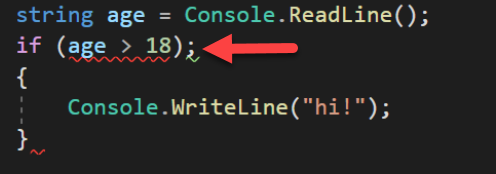
what's not ok?
i wanna create a age limit for my console app
what's the problem is with this code?


Hello,
Remove the semi-colon on the if statement, all you need is if (age > 18) no trailing semi-colon.
using System;

namespace ConsoleApp1
{
    class Program
    {
        static void Main(string[] args)
        {
            var input = Console.ReadLine();

            if (int.TryParse(input, out var age))
            {
                Console.WriteLine(age > 18 ? $"You are over 18" : "You are not over 18");
            }
            else
            {
                Console.WriteLine($"Invalid input {input}");
            }
        }
    }
}

Karen is correct that you need to remove the semicolon. However that is not the cause of the red squiggly line under age > 18. The problem there is that age is a string and age > 18 is comparing the string to a number. You need to convert the string to a number before doing the comparison. If you have questions about the following then please first look at the documentation of TryParse.
string age = Console.ReadLine();
int intage;
if (int.TryParse(age, out intage))
{
    if (intage > 18)
        Console.WriteLine("Over 18");
    else
        Console.WriteLine("17 or under");
}
else
    Console.WriteLine("Invalid response");