Microsoft 365 and Office | Word | For business | Windows
A family of Microsoft word processing software products for creating web, email, and print documents.

This browser is no longer supported.
Upgrade to Microsoft Edge to take advantage of the latest features, security updates, and technical support.
' cx='32' cy='32' r='32' /%3E%3Ctext x='50%25' y='55%25' dominant-baseline='middle' text-anchor='middle' fill='%23FFF' %3ETM%3C/text%3E%3C/svg%3E)
I'm not sure if I've named this question exactly right. I have a Word document in which all of the components (drop-downs, checkboxes, etc) are in some sort of a design mode. By that I mean when you select them they open up to dialog rather than actually displaying the contents..
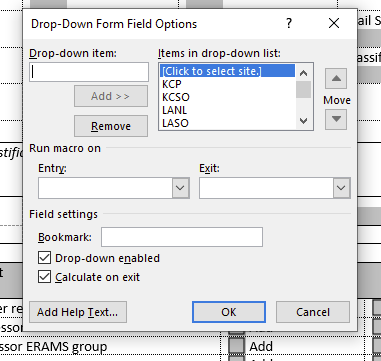
So, all I want to do is get out of this mode. I've Googled how to get into and out of Design Mode - go to Developer and then select or deselect Design Mode. But this doesn't seem to work - I still get the dialog rather than the actual drop-down.
thanks much
I think I figured it out. There's a lock icon in the upper-left-hand corner of the doc that must be selected to put it back into non-design mode.
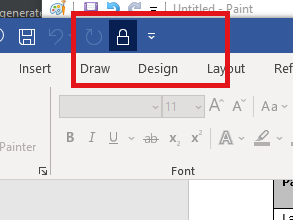

You found it. This appears to be Mac version.
If you have the time, you may want to look into using Content Controls which are more robust. However, they are not easily created or edited in the Mac versions.
See John Korchok's page on this: http://www.brandwares.com/bestpractices/2019/08/content-controls-for-macos-cool-code/

Hi @Tim Mitchell ,
Thanks for sharing solution here, please click "Accept Answer" and upvote it. Other partners who read the forums with the same issue can get more information from the correct result.
Thank you.