Developer technologies | .NET | Other
Microsoft Technologies based on the .NET software framework. Miscellaneous topics that do not fit into specific categories.
This browser is no longer supported.
Upgrade to Microsoft Edge to take advantage of the latest features, security updates, and technical support.
' cx='32' cy='32' r='32' /%3E%3Ctext x='50%25' y='55%25' dominant-baseline='middle' text-anchor='middle' fill='%23FFF' %3EAS%3C/text%3E%3C/svg%3E)
How to increase cell quantity using keyboard up and down arrows ?
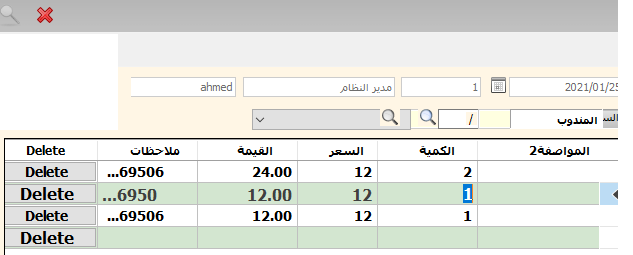
I work on windows form desktop application using csharp
I face issue I can't increase quantity or decrease using press on key up or down
on datagridview control
when have quantity 1 value then when press up arrow then will be 2
when have quantity 2 then when press down arrow will be 1
private void GridTrxInvF_KeyPress(object sender, KeyPressEventArgs e)
    {
        int currentNumber = Utilities.ObjectConverter.ConvertToInteger(GridTrxInvF.Rows[GridTrxInvF.CurrentCell.RowIndex].Cells["Quantity"].Value);

        if (e.KeyChar ==(char) Keys.Down)
        {

            GridTrxInvF.Rows[GridTrxInvF.CurrentCell.RowIndex].Cells["Quantity"].Value = (currentNumber - 1).ToString();
        }
        else if (e.KeyChar == (char)Keys.Up)
        {
            GridTrxInvF.Rows[GridTrxInvF.CurrentCell.RowIndex].Cells["Quantity"].Value = (currentNumber + 1).ToString();
        }

    }
when press up arrow or down
it moving to quanityt previous row when press down keyboard button
or moving to quantity Next rows when press up keyboard button
so what i do to solve issue please ?
' cx='32' cy='32' r='32' /%3E%3Ctext x='50%25' y='55%25' dominant-baseline='middle' text-anchor='middle' fill='%23FFF' %3EG%3C/text%3E%3C/svg%3E)
namespace WindowsFormsApp1
{
    using System;
    using System.Windows.Forms;


    public partial class Form1 : Form
    {
        //private DataGridViewEx GridTrxInvF;

        public Form1()
        {
            InitializeComponent();

            this.GridTrxInvF.UpDownKeyPress += GridTrxInvF_UpDownKeyPress;
        }

        private void GridTrxInvF_UpDownKeyPress(object sender, KeyEventArgs e)
        {
            if (GridTrxInvF.CurrentCell.OwningColumn.Name != "Quantity")
            {
                return;
            }

            int currentNumber = 0;
            var v = GridTrxInvF.Rows[GridTrxInvF.CurrentCell.RowIndex].Cells["Quantity"].Value;
            if (v != DBNull.Value && v != null)
            {
                int.TryParse(v.ToString(), out currentNumber);
            }

            if (e.KeyData == Keys.Down)
            {
                GridTrxInvF.Rows[GridTrxInvF.CurrentCell.RowIndex].Cells["Quantity"].Value = (currentNumber - 1).ToString();
                e.Handled = true;
            }
            else if (e.KeyData == Keys.Up)
            {
                GridTrxInvF.Rows[GridTrxInvF.CurrentCell.RowIndex].Cells["Quantity"].Value = (currentNumber + 1).ToString();
                e.Handled = true;
            }

        }
    }

    class DataGridViewEx : DataGridView
    {
        protected override bool ProcessDataGridViewKey(KeyEventArgs e)
        {
            switch (e.KeyCode)
            {
            case Keys.Down:
            case Keys.Up:
                UpDownKeyPress?.Invoke(this, e);
                if (e.Handled)
                {
                    return true;
                }
                break;

            }
            return base.ProcessDataGridViewKey(e);
        }

        public event KeyEventHandler UpDownKeyPress;
    }
}