Microsoft 365 and Office | Excel | For business | Windows
A family of Microsoft spreadsheet software with tools for analyzing, charting, and communicating data

This browser is no longer supported.
Upgrade to Microsoft Edge to take advantage of the latest features, security updates, and technical support.
' cx='32' cy='32' r='32' /%3E%3Ctext x='50%25' y='55%25' dominant-baseline='middle' text-anchor='middle' fill='%23FFF' %3EFM%3C/text%3E%3C/svg%3E)
Hi, I wanted to save a 100k row and 2k column excel file as csv. Unfortunately the saved csv is empty. Is there any way to get this done properly?

Could you please tell me what version of Office you are using?
Does this issue occur on this specific csv file or all?
You could create a new simple csv file to check.
If this specific csv file, how did you open it? Will it be opened successfully on another PC?
If you double-click it to open, please try to open Excel, then go to File>Open, in Browse, choose the csv file, click the drop-down button on the right side of the Open button, and select Open and Repair to check this issue.
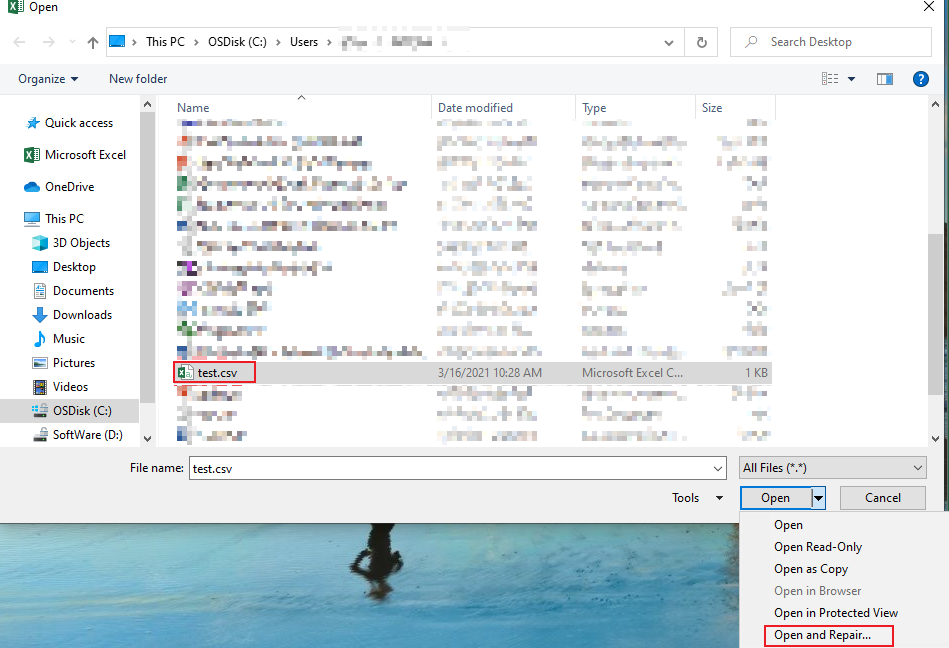
If all csv file, please try the following.
HKEY_CLASSES_ROOT\Excel.csv\shell\Open\command HKEY_CLASSES_ROOT\Excel.Sheet.12\shell\Open\command HKEY_CLASSES_ROOT\Excel.Sheet.8\shell\Open\command Before:
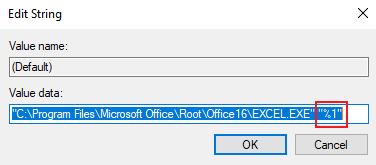
"C:\Program Files\Microsoft Office\Root\Office16\EXCEL.EXE" /dde
After:
"C:\Program Files\Microsoft Office\Root\Office16\EXCEL.EXE" "%1"
Take the first path as an example.
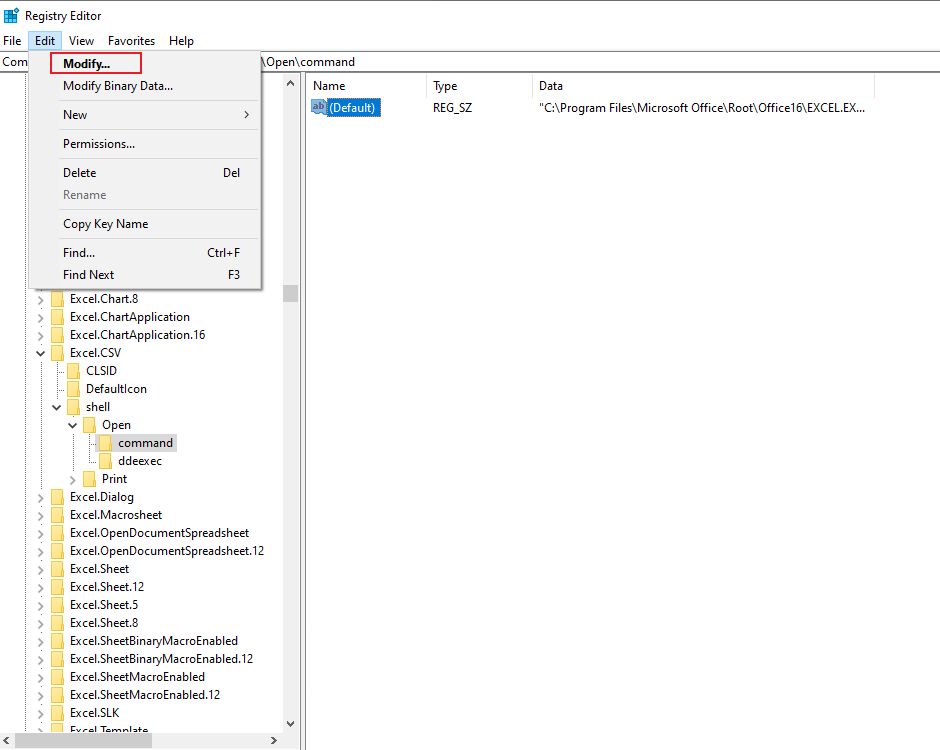
Besides, you could also open Excel in safe mode to eliminate interference from add-ins and startup items, then open csv file.
If you could open csv file successfully when opening Excel in safe mode:
Any updates, please let me know.
If an Answer is helpful, please click "Accept Answer" and upvote it.
Note: Please follow the steps in our documentation to enable e-mail notifications if you want to receive the related email notification for this thread.
@Finance Mozilor
How is your issue going now?
Is my reply helpful?
' cx='32' cy='32' r='32' /%3E%3Ctext x='50%25' y='55%25' dominant-baseline='middle' text-anchor='middle' fill='%23FFF' %3ED%3C/text%3E%3C/svg%3E)
Try Spire.XLS. You can install it into your visual studio via NuGet and then use the following code to convert Excel (xls or xlsx) to CSV format files.
using Spire.Xls;

namespace ToCSV
{
    class Program
    {
        static void Main(string[] args)
        {
            Workbook workbook = new Workbook();
            workbook.LoadFromFile(@"..\Excel.xlsx");
            Worksheet sheet = workbook.Worksheets[0];
            sheet.SaveToFile("result.csv", ",", Encoding.UTF8);
        }
    }
}