Azure Data Factory
An Azure service for ingesting, preparing, and transforming data at scale.
This browser is no longer supported.
Upgrade to Microsoft Edge to take advantage of the latest features, security updates, and technical support.
' cx='32' cy='32' r='32' /%3E%3Ctext x='50%25' y='55%25' dominant-baseline='middle' text-anchor='middle' fill='%23FFF' %3EAV%3C/text%3E%3C/svg%3E)
Hi Team,
How do we create expression builder to concatenate the dynamic columns in dataflow?
Or if there is any other way to achieve the same?
Following are the use cases where source file may have couple of columns (for addresses) which are to be combined to store in one column (FullAddress) in the sink.
a. Address1, Address2, LineAddress3 -> FullAddress (derived column)
b. Address2, Address1, City -> FullAddress (derived column)
c. City, Address2 -> FullAddress (derived column)
Please note that the order and the number of columns may vary depending on user.
' cx='32' cy='32' r='32' /%3E%3Ctext x='50%25' y='55%25' dominant-baseline='middle' text-anchor='middle' fill='%23FFF' %3EKM%3C/text%3E%3C/svg%3E)
concat(toString(columns()))
' cx='32' cy='32' r='32' /%3E%3Ctext x='50%25' y='55%25' dominant-baseline='middle' text-anchor='middle' fill='%23FFF' %3EMM%3C/text%3E%3C/svg%3E)
@Abhishek Vyas if you found your own solutioin, could you please share it with the community?
If all the colums are strings, you can use
byNames($myColumnNames)
Otherwise it gets more complicated.
reduce(array(byNames($columnames)),'',concat(#acc,toString(#item)),#result)

Hi @Abhishek Vyas ,
Hope you are looking for something like
iif(!isNull(toString(byName('Address1'))) && !isNull(toString(byName('Address2'))) && !isNull(toString(byName('LineAddress3'))),
    concat(iifNull(toString(byName('Address1')), ''), iifNull(toString(byName('Address2')), ''), iifNull(toString(byName('LineAddress3')), '')),
    iif(!isNull(toString(byName('Address2'))) && !isNull(toString(byName('Address1'))) && !isNull(toString(byName('City'))),
        concat(iifNull(toString(byName('Address2')), ''), iifNull(toString(byName('Address1')), ''), iifNull(toString(byName('City')), '')),
        iif(!isNull(toString(byName('City'))) && !isNull(toString(byName('Address2'))),
            concat(iifNull(toString(byName('City')), ''), iifNull(toString(byName('Address2')), '')),
            ''
        )
    )
)
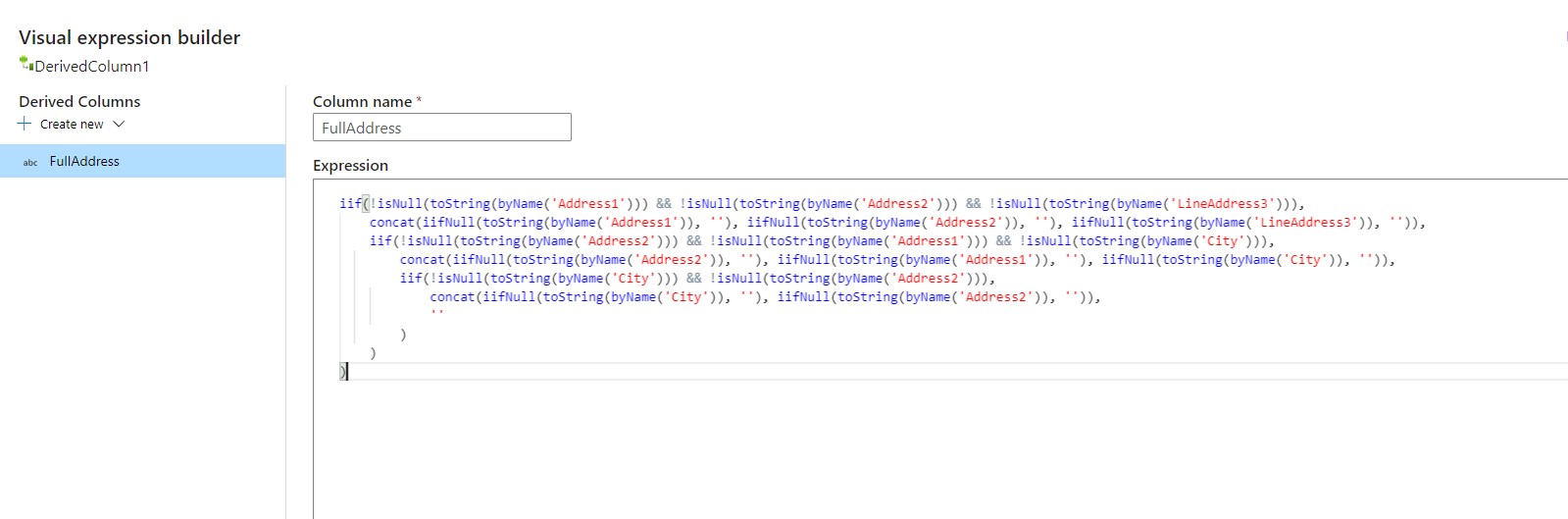
Thanks! :)
@Nasreen Akter . The solution is not dynamic in nature. Column names are dynamic.
@Abhishek Vyas , Not completely sure what you mean. But I think it's dynamic in a sense that the expression will not failed if the Columns in the Dataset are not present. ByName() function will only return value if you have the column, otherwise it will give you NULL. "columns are dynamic": in the same Dataset, if you want to pass different files with different schema with different column ordering, you have to use ByName()/byNames(). :)
@Abhishek Vyas do you mean the Column names change?
If you have an array of column names, then it is possible to use the map and reduce functions to transform and concatenate them.
Can you please post an example?
' cx='32' cy='32' r='32' /%3E%3Ctext x='50%25' y='55%25' dominant-baseline='middle' text-anchor='middle' fill='%23FFF' %3EA%3C/text%3E%3C/svg%3E)
Hi,
I want to improvise the requirement, consider before i perform the column concatenation, i want to perform the trim on each column. Below solution will not be sufficient.
concat(toString(columns()))
Thanks,
Naveen
' cx='32' cy='32' r='32' /%3E%3Ctext x='50%25' y='55%25' dominant-baseline='middle' text-anchor='middle' fill='%23FFF' %3EMS%3C/text%3E%3C/svg%3E)
I used this command as a Derived Column, and it works fine for me:
concatWS('~',toString(columns()))
'~' is a delimiter.