Microsoft 365 and Office | SharePoint | For business | Windows
A group of Microsoft Products and technologies used for sharing and managing content, knowledge, and applications.

This browser is no longer supported.
Upgrade to Microsoft Edge to take advantage of the latest features, security updates, and technical support.
' cx='32' cy='32' r='32' /%3E%3Ctext x='50%25' y='55%25' dominant-baseline='middle' text-anchor='middle' fill='%23FFF' %3EJ%3C/text%3E%3C/svg%3E)
I am trying to allow my site members to share list items/files externally via the "specific person" setting, but they keep receiving an error saying that my organization's settings do not allow them to do so, regardless of every setting appearing to be set correctly.
I have checked and rechecked every setting I can find to fix this problem. Including, but not limited to:
I've hit a dead-end, and my company is now at a complete loss on how to fix this. Please help.
' cx='32' cy='32' r='32' /%3E%3Ctext x='50%25' y='55%25' dominant-baseline='middle' text-anchor='middle' fill='%23FFF' %3EBH%3C/text%3E%3C/svg%3E)
Did you ever find a resolution to this? I verified everything ChelseaWu-MSFT posted and our organization is still having this issue.
Hi Brad,
Yes, after all this time I think we figured it out. We had to set the site as Public rather than Private, and then modify some permissions.
1) Click on the gear in the upper right-hand corner
2) Select "Site Information"
3) In the Site Information panel, use the dropdown menu under Privacy Settings to select "Public - anyone in the organization can access the site".
4) From what I remember, I think doing this creates new security groups or something. So, remove any additions that violate your preferred security settings and make sure your security settings are all still correct.

Hi @Joseph , thank you for posting in the Q&A forum.
With all external sharing set to most permissive status, please navigate to your site > Site Settings > Site collection features and find "Limited-access user permission lockdown mode" feature, make sure it is deactivated. After that, test again to see the result.

If the issue remains, please go through the settings one more time as following:
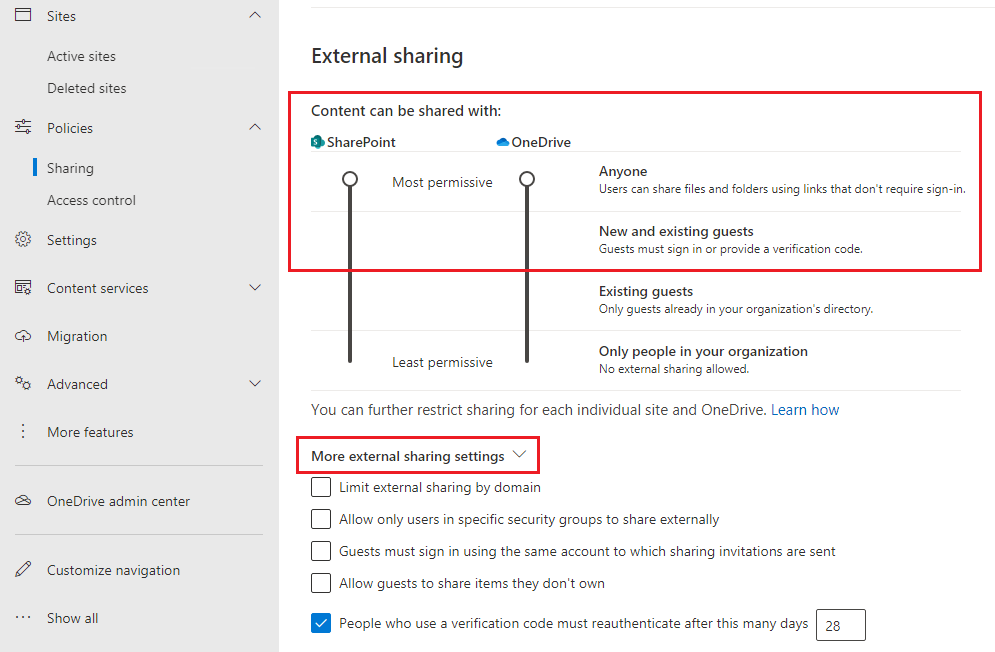
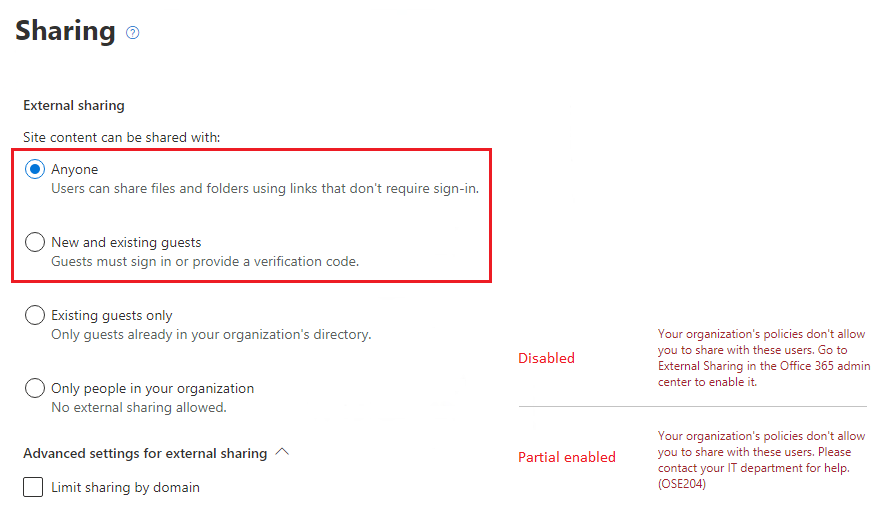
_layouts/15/user.aspx ) > Access Request Settings. 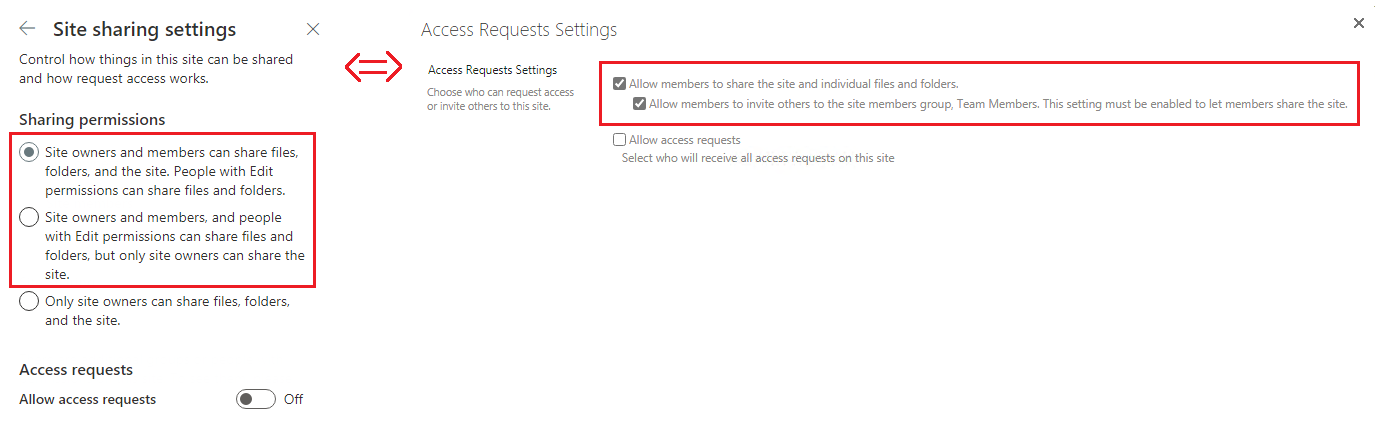
References: Manage sharing settings. / Sharing options are greyed out when sharing from SharePoint Online or OneDrive.
If an Answer is helpful, please click "Accept Answer" and upvote it.
**Note: Please follow the steps in our documentation to enable e-mail notifications if you want to receive the related email notification for this thread. **
Hi @Joseph , do you have any progress on this thread? Please feel free to let us know if you need further assistance.
' cx='32' cy='32' r='32' /%3E%3Ctext x='50%25' y='55%25' dominant-baseline='middle' text-anchor='middle' fill='%23FFF' %3EJM%3C/text%3E%3C/svg%3E)
Hi @Joseph milan , this is a public forum. In order to protect your personal privacy, we do not recommend you contain your personal information in the post, including (possible) personal email address. We will be modifying the address for you.
Also, please use Comment instead of Write an Answer section to post the reply unless when you provide a valid solution to the question.
We will be converting this reply for you.
If you have any question or solution about this thread, please write in details. Thank you for your understanding.
HI JOSEPHMILAN
Hi @Joseph milan , I'm having trouble understand your request, do you need further assistance on this thread?