Developer technologies | .NET | Xamarin
A Microsoft framework for building cross-platform mobile apps using .NET and C# with native performance and user interfaces.
This browser is no longer supported.
Upgrade to Microsoft Edge to take advantage of the latest features, security updates, and technical support.

Hey people!
We have an update scheduled for our iOS app which needs to be uploaded to TestFlight first. Hovever, just out of nowhere, the following error keeps preventing Visual Studio from uploading the solution to TestFlight:
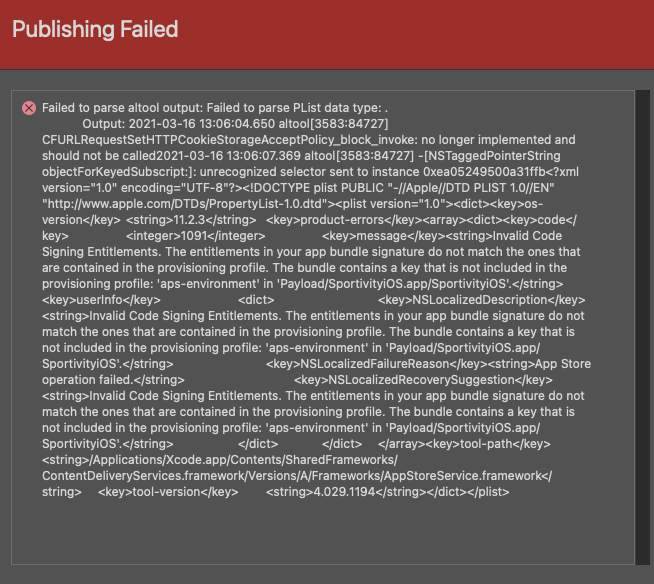
Some info:
I'm using Visual Studio for Mac (latest version)
macOS Big Sur (11.2.3 - latest)
I've already tried deleting bin and obj folders, restart vs, restart mac .etc
Already tried increasing the build number
It also appears to happen on older versions of the solution, which used to work totally fine..
I'd love to hear from anyone with a solution!!
I found the answer!
For some reason all I had to do was get rid of the old xCode version I had and download the latest from apple's website rather than the app store...
' cx='32' cy='32' r='32' /%3E%3Ctext x='50%25' y='55%25' dominant-baseline='middle' text-anchor='middle' fill='%23FFF' %3EA%3C/text%3E%3C/svg%3E)
Hello,
Welcome to our Microsoft Q&A platform!
Please increase the build number in the info.plist file.
Here is a similar thread:
Best Regards,
Leon Lu
If the response is helpful, please click "Accept Answer" and upvote it.
Note: Please follow the steps in our documentation to enable e-mail notifications if you want to receive the related email notification for this thread.
Thanks for the answer, but this is not solving the issue. I've been increasing the build number for every change I make to no avail
Try to close Visual Studio and delete the obj/bin folders in your project, restart your machine, open Visual Studio and publish to the App store.
Already tried, again to no avail. (should've wrote it down my bad)