Microsoft 365 and Office | SharePoint | For business | Windows
A group of Microsoft Products and technologies used for sharing and managing content, knowledge, and applications.

This browser is no longer supported.
Upgrade to Microsoft Edge to take advantage of the latest features, security updates, and technical support.
' cx='32' cy='32' r='32' /%3E%3Ctext x='50%25' y='55%25' dominant-baseline='middle' text-anchor='middle' fill='%23FFF' %3EMA%3C/text%3E%3C/svg%3E)
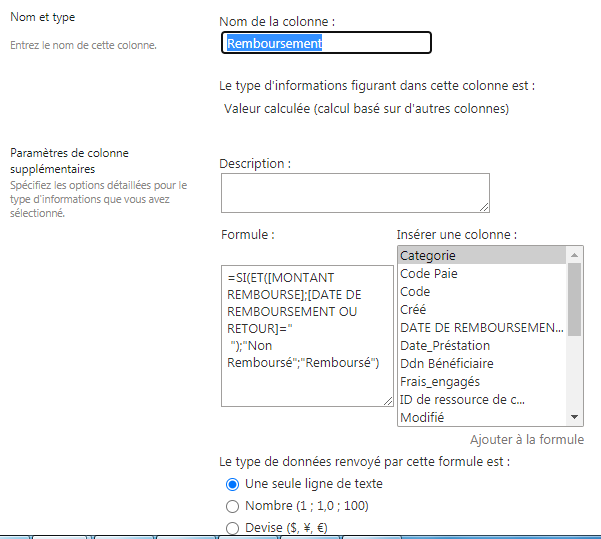
I created a calculated column to test if too other columns in the same list are empty (Blank), but my own formula didn't work I need help please !

Would you tell me whether your issue has been resolved or have any update?
I am looking forward to your reply.
Have a nice day!
Have you tried the solution I proposed? If you have any questions or progress, you can contact me in time.
Looking forward to your reply.
Have a lucky day!
Can you tell me whether your issue has been resolved or have any update?
I am looking forward to your reply.
Hello @Mustapha Ait Bencheikh ,
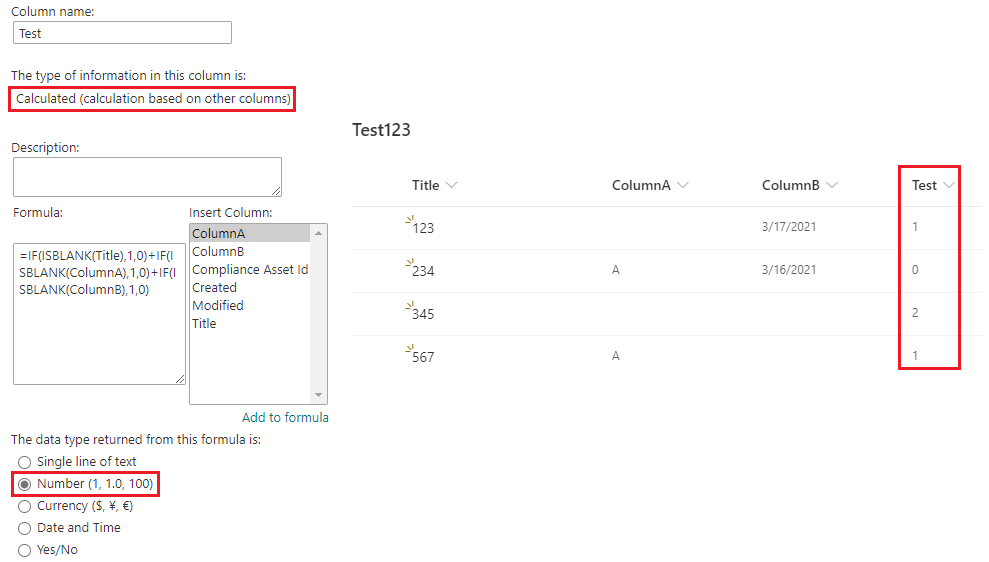
Use the following formula to count the number of blank fields.
=IF(ISBLANK(Title),1,0)+IF(ISBLANK(ColumnA),1,0) + IF(ISBLANK(ColumnB),1,0)
#When the value is 0, it means that no field is empty
Thanks,
Echo Du
====================
Updated Answer ===================
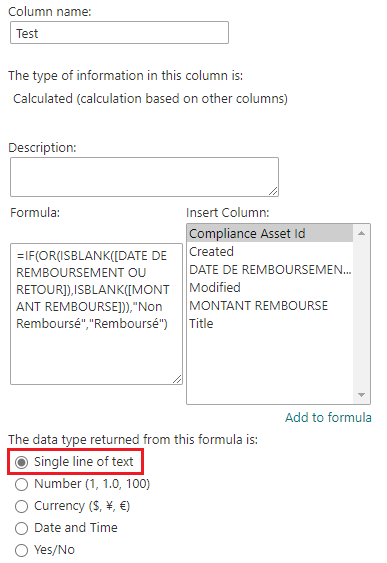
Please use the following formula:
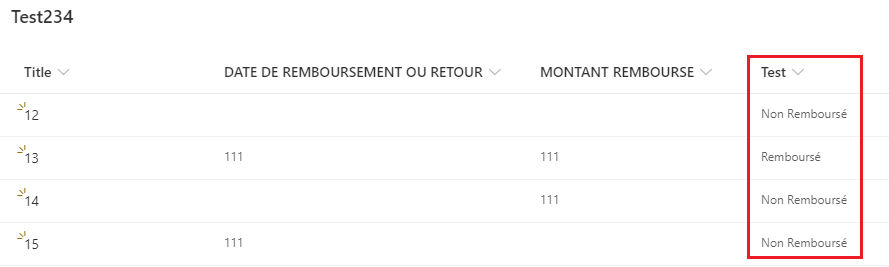
=IF(OR(ISBLANK([DATE DE REMBOURSEMENT OU RETOUR]),ISBLANK([MONTANT REMBOURSE])),"Non Remboursé","Remboursé")
Thanks,
Echo Du
================
If an Answer is helpful, please click "Accept Answer" and upvote it.
Note: Please follow the steps in our documentation to enable e-mail notifications if you want to receive the related email notification for this thread.
@Echo Du_MSFT first of all Thank you for your help, I tried your solution but didn't work I don't no why !


In my test, there was no similar error.
This may be because your Columns display name is too long, so you need to add square brackets [ ] .
=IF(ISBLANK([DATE DE REMBOURSEMENT OU RETOUR]),1,0)+IF(ISBLANK([MONTANT REMBOURSE]),1,0)

Thanks,
Echo Du
@Echo Du_MSFT
The code works finaly but this is not what I need, I need when the both fields or one of them empty return "Non Remboursé" else "Remboursé" is that possible becouse I tried to modify your code and still errors
Thanks for your reply.
I have updated answer under initial My Answer. Hope this can help you to solve issue.
Have a nice day!
Thanks,
Echo Du
===================
You can directly click “Comment” option under ”My Answered“ to put forward your opinions and thoughts about solution that I propose.