Developer technologies | .NET | Xamarin
A Microsoft framework for building cross-platform mobile apps using .NET and C# with native performance and user interfaces.
This browser is no longer supported.
Upgrade to Microsoft Edge to take advantage of the latest features, security updates, and technical support.
' cx='32' cy='32' r='32' /%3E%3Ctext x='50%25' y='55%25' dominant-baseline='middle' text-anchor='middle' fill='%23FFF' %3ECB%3C/text%3E%3C/svg%3E)
Good morning
I'm trying to display two fields of an object on a label within a CollectionView.
The problem I have is that I don't know how I can bind the object so I can concatenate the fields I need into a custom converter.
a code example for a better understanding of the problem
                    <CollectionView
                    ItemsSource="{Binding Purchases}"
                        >
                        <CollectionView.ItemTemplate>
                            <DataTemplate>
                                    <Grid>
                                        <Grid.ColumnDefinitions>
                                            <ColumnDefinition Width="0.65*"/>
                                            <ColumnDefinition Width="0.35*"/>
                                        </Grid.ColumnDefinitions>
                                        <Grid.RowDefinitions>
                                            <RowDefinition Height="*"/>
                                            <RowDefinition Height="*"/>
                                        </Grid.RowDefinitions>
                                    <Label Grid.Column="0" Grid.Row="0" Text="{Binding ??????, Converter={StaticResource PurchaseNameAndPriceConverter}}" ></Label>
                                </Grid>
                            </DataTemplate>
                        </CollectionView.ItemTemplate>
                    </CollectionView>


    class PurchaseNameAndPriceConverter : IValueConverter
    {
        public object Convert(object value, Type targetType, object parameter, CultureInfo culture)
        {
            Purchase p = (Purchase)value;
            return p.SellerName + p.Total.ToString() + " €";

        }

        public object ConvertBack(object value, Type targetType, object parameter, CultureInfo culture)
        {
            throw new NotImplementedException();
        }
    }
I tried to bind with Binding (dot) but in the converter the object does not arrive,
I've been looking for information about this and I haven't found anything.
Could someone help me about this?
A Microsoft framework for building cross-platform mobile apps using .NET and C# with native performance and user interfaces.
Answer accepted by question author
' cx='32' cy='32' r='32' /%3E%3Ctext x='50%25' y='55%25' dominant-baseline='middle' text-anchor='middle' fill='%23FFF' %3EA%3C/text%3E%3C/svg%3E)
Hello,
Welcome to our Microsoft Q&A platform!
You could add . for this binding like following layout.
   <?xml version="1.0" encoding="utf-8" ?>
   <ContentPage xmlns="http://xamarin.com/schemas/2014/forms"
                xmlns:x="http://schemas.microsoft.com/winfx/2009/xaml"
                xmlns:local="clr-namespace:App70"
                x:Class="App70.MainPage">
       <ContentPage.Resources>
           <ResourceDictionary>
               <local:PurchaseNameAndPriceConverter x:Key="MyPurchaseNameAndPriceConverter" />
           </ResourceDictionary>
       </ContentPage.Resources>
       <StackLayout>
           <CollectionView
                        ItemsSource="{Binding Purchases}"
                            >
               <CollectionView.ItemTemplate>
                   <DataTemplate>
                       <Grid>
                           <Grid.ColumnDefinitions>
                               <ColumnDefinition Width="0.65*"/>
                               <ColumnDefinition Width="0.35*"/>
                           </Grid.ColumnDefinitions>
                           <Grid.RowDefinitions>
                               <RowDefinition Height="*"/>
                               <RowDefinition Height="*"/>
                           </Grid.RowDefinitions>
                           <Label Grid.Column="0" Grid.Row="0" Text="{Binding . , Converter={StaticResource MyPurchaseNameAndPriceConverter}}" ></Label>
                       </Grid>
                   </DataTemplate>
               </CollectionView.ItemTemplate>
           </CollectionView>
       </StackLayout>

   </ContentPage>
In the background code. Please do not forget to add this.BindingContext = new MyViewModel();;
And you must change your code in PurchaseNameAndPriceConverter.cs, because ValueConverter will execute many times, we should judge the value of object value
   class PurchaseNameAndPriceConverter : IValueConverter
       {
           public object Convert(object value, Type targetType, object parameter, CultureInfo culture)
           {
               if (value!=null)
               {
                   Purchase p = (Purchase)value;
                   return p.SellerName + p.Total.ToString() + " €";
               }

               return "";
           }

           public object ConvertBack(object value, Type targetType, object parameter, CultureInfo culture)
           {
               // throw new NotImplementedException();

               return value;
           }
       }
   }
Here is my test MyViewModel.cs.
   using System;
   using System.Collections.Generic;
   using System.Collections.ObjectModel;
   using System.Text;

   namespace App70
   {
       public class MyViewModel
       {
           public  ObservableCollection<Purchase> Purchases { get; set; }
           public MyViewModel()
           {
               Purchases = new ObservableCollection<Purchase>();
               Purchases.Add(new Purchase() { SellerName="name1", Total=12 });
               Purchases.Add(new Purchase() { SellerName = "name2", Total = 15 });
               Purchases.Add(new Purchase() { SellerName = "name3", Total = 11 });
               Purchases.Add(new Purchase() { SellerName = "name4", Total = 13 });
           }
       }

       public class Purchase
       {
           public string SellerName { get; set; }

           public int Total { get; set; }
       }
   }
Here is running screenshot.
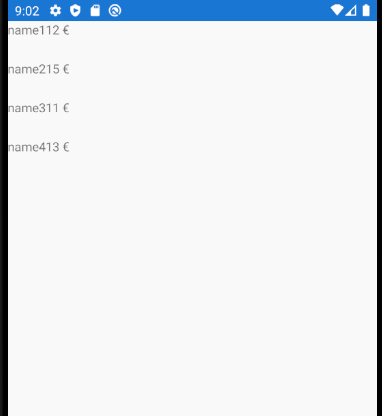
Best Regards,
Leon Lu
If the response is helpful, please click "Accept Answer" and upvote it.
Note: Please follow the steps in our documentation to enable e-mail notifications if you want to receive the related email notification for this thread.
@Carles Baldoví Do you try to use above code, Because first execute the PurchaseNameAndPriceConverter, the object value will be null, So I add the if to judge the value of object value.
Yes, I used your code and I was able to see what you're reviewing, that multiple calls are made and I just have to discard those that value is null.
Thank you very much for your help.
@Carles Baldoví Yes, you just have to discard those that value is null.