Azure Data Factory
An Azure service for ingesting, preparing, and transforming data at scale.
This browser is no longer supported.
Upgrade to Microsoft Edge to take advantage of the latest features, security updates, and technical support.

Till Yesterday i pipeline was working on fine.But today suddenly got issue :
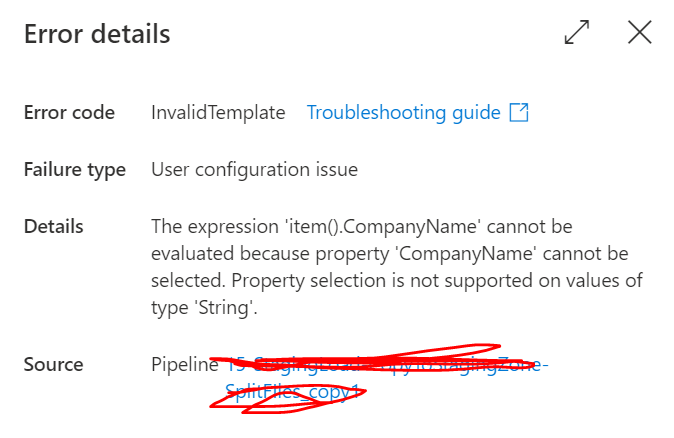
Not able to run the pipeline ..Please advise
Regards
RK
An Azure service for ingesting, preparing, and transforming data at scale.
Answer accepted by question author

I think you probably need this:
Conatiner: @pipeline().parameters.RawContainer
Folder: @{pipeline().parameters.RawFolder}/@{item()}/Tables/@{pipeline().parameters.TableName}
FileName :@{pipeline().parameters.TableName}_@{item()}.@{pipeline().parameters.RawFileFormat}

Is there any reason behind using array type for Company Name parameter?
You could try make it as String and it will form the right path
Edit #1 - Also as suggested by Nasreen -
instead of
pipeline().parameters.CompanyName
try
pipeline().parameters.CompanyName[0]
Please don't forget to Accept Answer and Up-vote if the response helped -- Vaibhav
Yes In foreach Activity what i need to mention :

Hi @Rohit Kulkarni ,
As the CompnyName is an Array, you could try the following:
Conatiner: @pipeline().parameters.RawContainer

Folder: @{pipeline().parameters.RawFolder}/item().CompanyName[0]/Tables/item().TableName

FileName :@{pipeline().parameters.TableName}_{item().CompanyName[0]}.pipeline().parameters.RawFileFormat
Hope this helps! Thanks! :)
@Rohit Kulkarni , if values for CompanyName are coming from pipeline parameters, then try to use pipeline().parameters.CompanyName[0] instead of item()
Thas is what i am passing :
Folder :@{pipeline().parameters.RawFolder}/@{pipeline().parameters.CompanyName}/Tables/@{pipeline().parameters.TableName}
FilaName :
@{pipeline().parameters.TableName}_@{pipeline().parameters.CompanyName}.@{pipeline().parameters.RawFileFormat}

I need to remove [] and display only Group O
If you are passing array e.g., ["Group1", "Group2"] in the CompanyName Pipeline Parameter, then to get the first element from that array, you have to do something like:
Folder :@{pipeline().parameters.RawFolder}/@{pipeline().parameters.CompanyName[0]}/Tables/@{pipeline().parameters.TableName}


FilaName :

@{pipeline().parameters.TableName}_@{pipeline().parameters.CompanyName[0]}.@{pipeline().parameters.RawFileFormat}
Guys i am near to the issue but i am getting error Please advise me how to remove [] .I need to display only Group O from the path :

Thanks in Advance
RK
I have made some changes in the parameter. But still i am getting error. I think some where in the syntax is getting error :
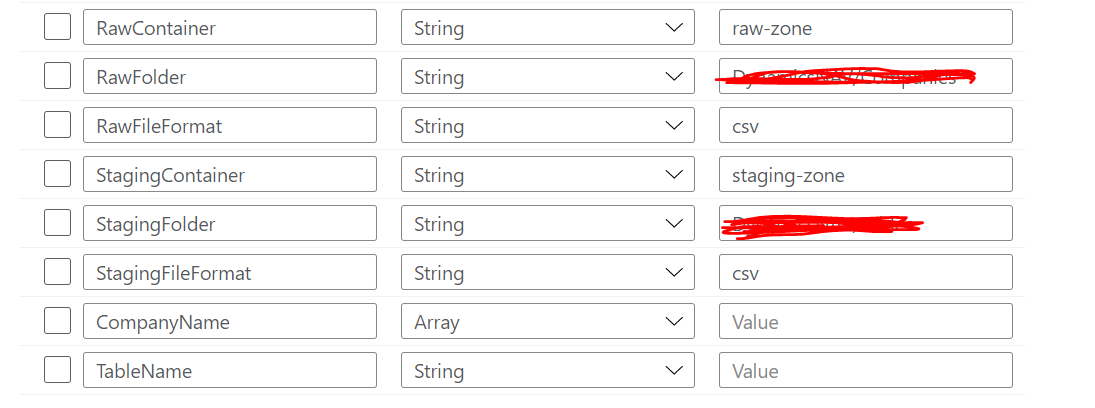

Conatiner :@pipeline().parameters.RawContainer
Folder :@{pipeline().parameters.RawFolder}/item().CompanyName/Tables/item().TableName
FileName :@{pipeline().parameters.TableName}_{item().CompanyName}.pipeline().parameters.RawFileFormat
Please advise
Thanks in advance
RK
