It's 2019, and the issue I've been reading about and experiencing for years is STILL THERE.
I use English and Russian keyboards. For both of them I use special custom typography layouts by Ilya Birman, which allow entering various special characters by using right Alt key.
After every few days or after every Windows update Windows 10 adds back its default keyboard layouts: English (US) and Russian (Russia). As a result I end up with four layouts instead of two. Moreover, look at this:
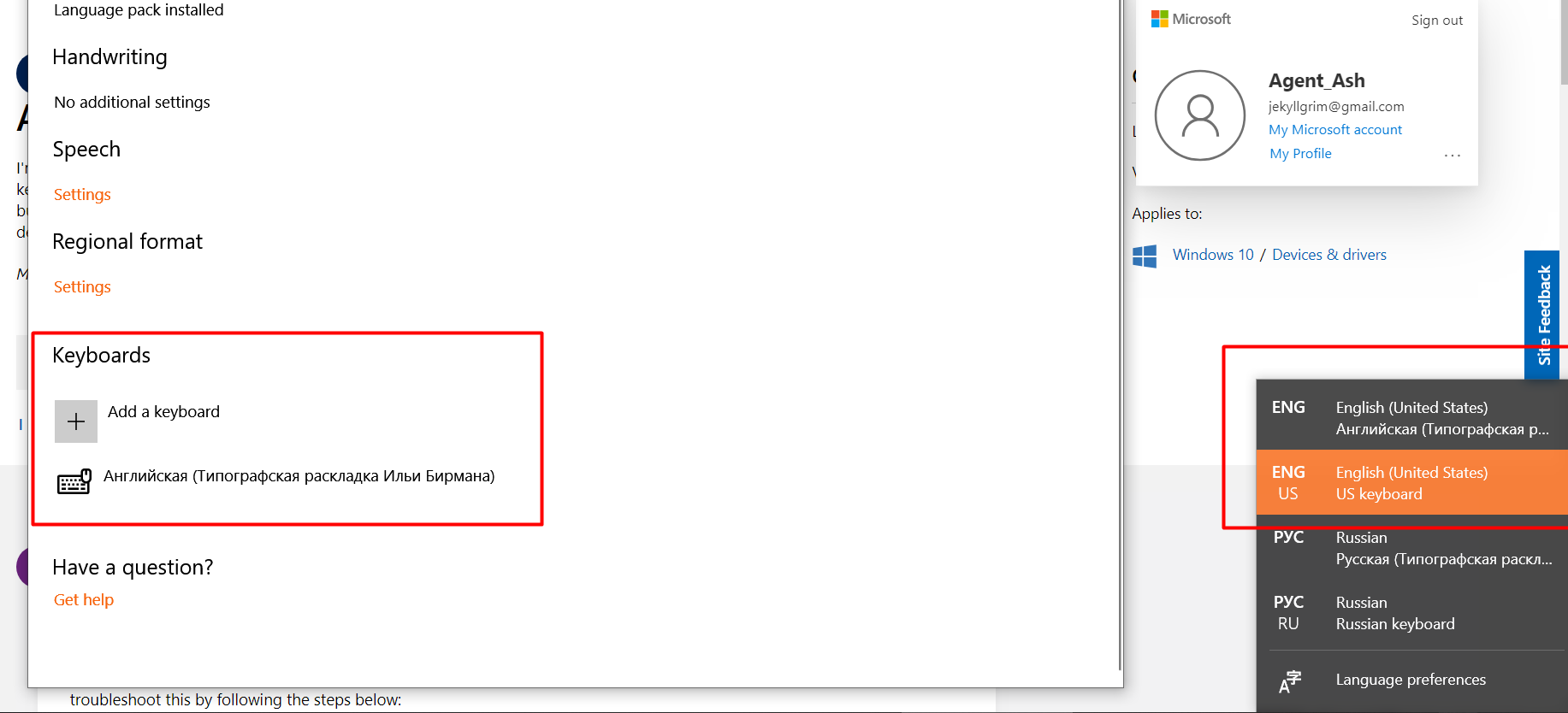
As you can I see, I have FOUR layouts in the actual language bar, but when I open the Keyboards menu, it DOESN'T EVEN SHOW THEM. Which is pretty clearly a bug. The only way for me to delete the unwanted layouts is to ADD them first (because, as you can see
on the left, they're not there), and then delete them again.
And they will be again recreated after another system launch or so!
I'm absolutely baffled by how this is an issue. Here's a list of things that DO NOT WORK:
* Creating a new profile
* Copying settings with the correct layouts using Administrative tab in the Language menu in control panel
* Disabling Location services
* Using IgnoreRemoteKeyboardLayout in the registry edtior — in fact, this option has nothing to do with this issue whatsoever
* Any kind of system checks, scans and other useless stuff
* anything else I've been able to find on the internet.
Does anyone have any better idea? In 1803 I had some luck by manually editing Registry key "Computer\HKEY_CURRENT_USER\Keyboard Layout\Preload" (making sure Data shows values for my custom layouts, not the default layouts), then block the SYSTEM
from editing this key. But in 1809 Windows manages to reinstate its control over editing Preload and re-adding the default layouts after every couple of restarts.
How do I stop this ridiculousness???
' cx='32' cy='32' r='32' /%3E%3Ctext x='50%25' y='55%25' dominant-baseline='middle' text-anchor='middle' fill='%23FFF' %3EA%3C/text%3E%3C/svg%3E)
