Azure SQL Database
An Azure relational database service.
This browser is no longer supported.
Upgrade to Microsoft Edge to take advantage of the latest features, security updates, and technical support.
' cx='32' cy='32' r='32' /%3E%3Ctext x='50%25' y='55%25' dominant-baseline='middle' text-anchor='middle' fill='%23FFF' %3ESD%3C/text%3E%3C/svg%3E)
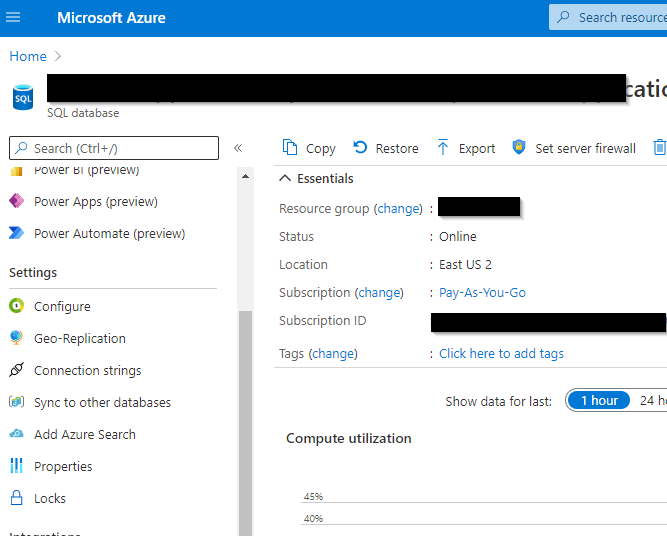
I am trying to set up a long-term backup of an Azure SQL database, basic tier. Every blog or tutorial I run across starts with going to the database server and then selecting settings/backups. The problem is that these backups settings are missing from our database, and I am unsure if this is because the database is a basic tier, or these settings are hidden elsewhere.
Regards,
-Sandy
Here is a screenshot of the navigation plane:
An Azure relational database service.
Answer accepted by question author

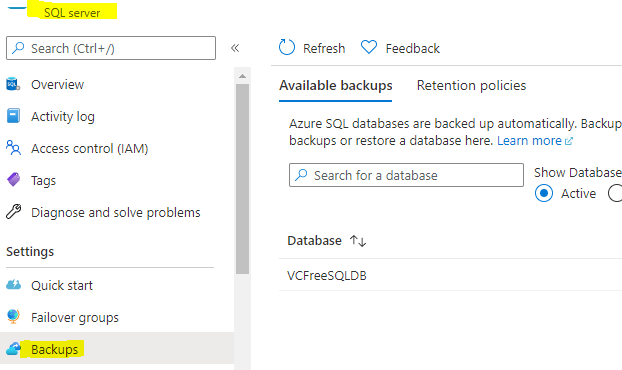
As you said, as per documents backup options are available on Database server level but you are looking into database options.
Can you open the SQL server in portal and there you should see backup options
----------
Please don't forget to Accept Answer and Up-vote if the response helped -- Vaibhav