Microsoft 365 and Office | SharePoint Server | Development
The process of building custom solutions for SharePoint Server.

This browser is no longer supported.
Upgrade to Microsoft Edge to take advantage of the latest features, security updates, and technical support.
' cx='32' cy='32' r='32' /%3E%3Ctext x='50%25' y='55%25' dominant-baseline='middle' text-anchor='middle' fill='%23FFF' %3ESA%3C/text%3E%3C/svg%3E)
Hello,
How can I cancel the submission on a SharePoint form when the "save" button is clicked and a field that I need filled in is blank?
thanks,
Sherazad.
Actually, a working answer to my question is in the post below:
regards,
Sherazad.

Hi @Sherazad Ahmed ,
Glad to hear that and thanks for sharing the answer.
For a better user experience, you could mark this answer as 'Accept answer' which may help other users who have the same question in the future. :)
Thanks,
Elsie Lu
Hi @Sherazad Ahmed ,
Per my understanding, if you have enabled version history, you could restore the previous version.
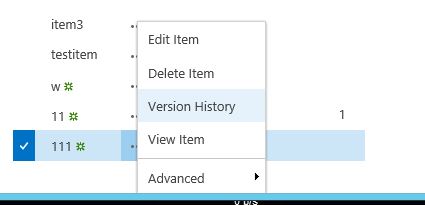
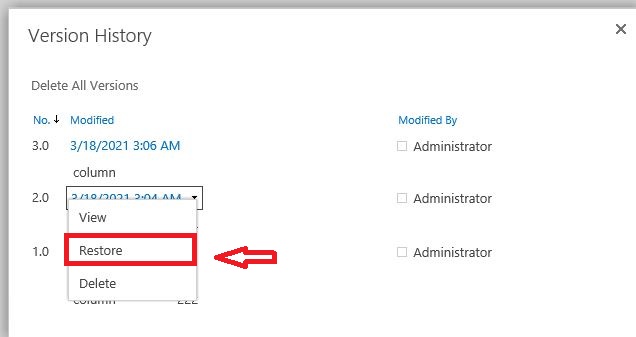
==========================================
In case you haven't enabled it before, then you could only edit this list manually. Try to quickly edit this list through Quick Edit , it is very convenient:
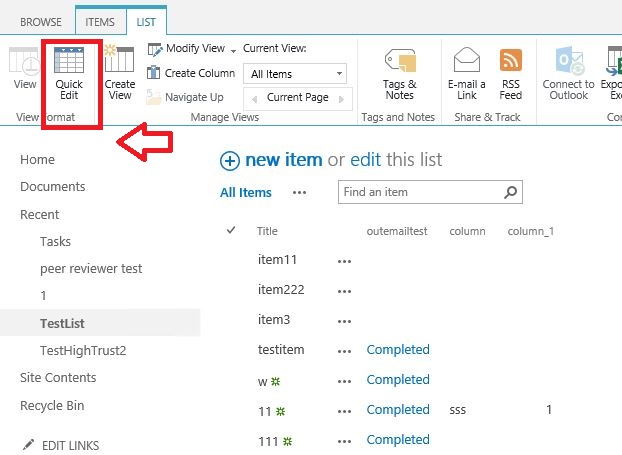
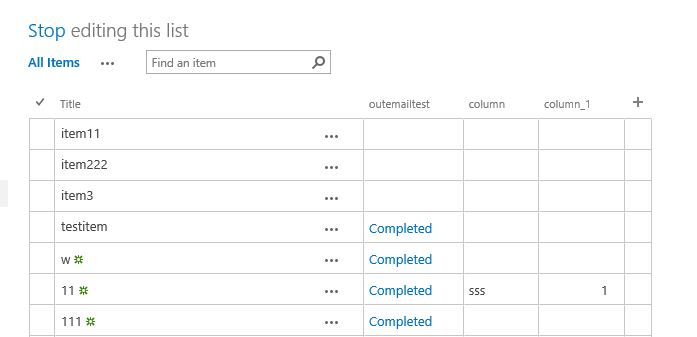
==========================================
If you enable version history now, you will only start recording from the current version, however if such issue occur in the future, then you are able to view and restore it through version history.
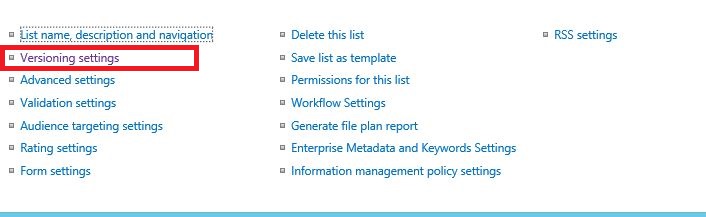
To enable it, go to list settings>version settings>Item Version History:
If the answer is helpful, please click "Accept Answer" and upvote it.
Note: Please follow the steps in our documentation to enable e-mail notifications if you want to receive the related email notification for this thread.
Apologies. I should have been clearer. I meant, how do I cancel submit on a SharePoint form using jquery.
thanks,
Sherazad.