Share via

Task Scheduler error 0XC025001C

Anonymous
2019-02-13T09:32:13+00:00

Hello all,

I'm using Task Scheduler to execute onedrive.exe for syncing between a local folder and cloud folder when a specific user account is inactive. The Trigger is set to activate the task every hour from 7AM to 7PM. The task is running on a Windows server 2012 R2.

When I run the task manually it seems like the task is working well. It looks like the task is running. But after I run it, the task immediately turns back to the status "Ready".

The task Gives (0XC025001C) as "last run result". I also checked the history of the task and it doesn't show any warnings or errors.

When I look at the OneDrive cloud folder, I see that nothing has happened. 

This is the task in the Task Scheduler.

I have no idea what the error means and I can't find it out also. 

I really hope you guys can help me out.

Thanks in advance,

Guus

Windows for home | Other | Apps

Locked Question. This question was migrated from the Microsoft Support Community. You can vote on whether it's helpful, but you can't add comments or replies or follow the question.

0 comments No comments

Answer accepted by question author

Anonymous
2019-02-14T03:22:09+00:00

Hi,

Thank you for writing to Microsoft Community Forums.

I see that you are using task scheduler on Windows server. However, for queries related to Windows Server 2012, we have a dedicated Windows 10 IT Pro forum, where you will be able to find engineers with the expertise on Windows Server 2012 to assist you with this query.

Regards,

Was this answer helpful?

1 person found this answer helpful.
0 comments No comments

2 additional answers

Sort by: Most helpful
  1. Anonymous
    2019-02-18T10:41:29+00:00

    We are glad to know that you were able to fix the issue and thank you for providing the steps how you were able to fix it, since it might help other users with similar issues. Please feel free to contact us back, in case you face any other issues with Windows in future.

    Have a great time ahead!

    Was this answer helpful?

    1 person found this answer helpful.
    0 comments No comments
  2. Anonymous
    2019-02-14T09:42:47+00:00

    Hi Naresh,

    thanks for your response.

    After a week of searching for the problem, it seems like that I need to ask people first before finding the problem myself.

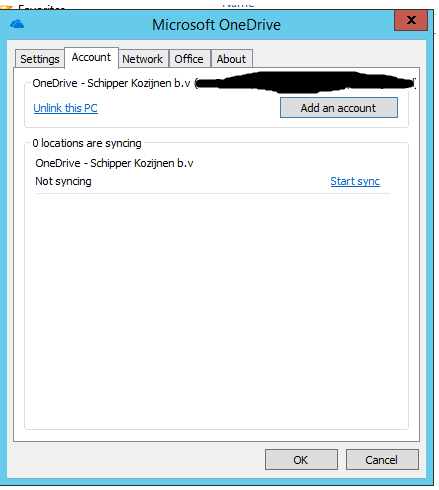
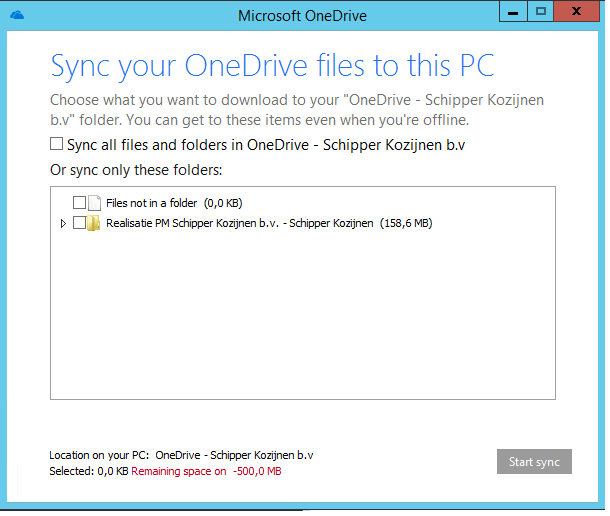
    OneDrive did not synchronize because of wrong storage space calculation.

    I have 1TB storage space on my OneDrive account but when syncing. OneDrive said I was 500 MB short of storage space. While I was trying to sync 160 MB (see images).

    Solved it by deinstalling OneDrive, killing all OneDrive processes and deleting all OneDrive folders (also hidden folders) before installing OneDrive again.
    It seems like the title and tags of this question need to change to something like "OneDrive error".

    But I hope I can help others with this post. Who are having trouble with Task Scheduler. 

    Thanks again for your response. 

    Guus

    Was this answer helpful?

    1 person found this answer helpful.
    0 comments No comments
