Microsoft 365 and Office | SharePoint | For business | Windows
A group of Microsoft Products and technologies used for sharing and managing content, knowledge, and applications.

This browser is no longer supported.
Upgrade to Microsoft Edge to take advantage of the latest features, security updates, and technical support.
' cx='32' cy='32' r='32' /%3E%3Ctext x='50%25' y='55%25' dominant-baseline='middle' text-anchor='middle' fill='%23FFF' %3ECM%3C/text%3E%3C/svg%3E)
I am using call
https://services.odata.org/V3/Northwind/Northwind.svc/Customers('ALFKI')?$format=json
I am logging the response and I see values
log the responseVariable {"odata.metadata":"https://services.odata.org/V3/Northwind/Northwind.svc/$metadata#Customers/@Angie Jude &$select=ContactName,CompanyName","CompanyName":"Alfreds Futterkiste","ContactName":"Maria Anders"}
next line in workflow i try to set value from dictionary using d/ContactName from the responseVariable (dictionary) and set to string but there is no value
tried using d/results[0]/ContactName as well nothing returned
A group of Microsoft Products and technologies used for sharing and managing content, knowledge, and applications.
except that in Sharepoint designer using the path did not work, using the Name only did work

Hi,
I didn't unterstand your answer. Which path? Which Name?

When you want to take a value from the return value, you need to pay attention to the structure of the return value, and take out the corresponding value according to the structure of the return value.

There is no d level in the structure of the API return value.
And I have updated my first answer, if my first answer helps you, please accept it as the answer. Thank you:).
Hi,
it works very well:
Result: Maria Anders
Yes that all works my question was for Sharepoint designer and the call http action and how the path d/name did not work HOWEVER dropping the d/ and using only the name ContactName does work.
Hi,
you need to pay attention to the structure of the return value:
https://services.odata.org/V3/Northwind/Northwind.svc/Customers('ALFKI')?$format=json
in ResponseContent get ContactName
https://services.odata.org/V3/Northwind/Northwind.svc/Customers('ALFKI')
in ResponseContent get d/ContactName
https://services.odata.org/V3/Northwind/Northwind.svc/Customers
in ResponseContent get d/results(0)/ContactName
I did use that action however the path d/name did not work. Instead if I drop the d/ and use only the name then the value is found.
Try to use "Get an Item from a Dictionary" action.
Reference:Understanding Dictionary actions in SharePoint Designer 2013
Updated:
When you want to take a value from the return value, you need to pay attention to the structure of the return value, and take out the corresponding value according to the structure of the return value.
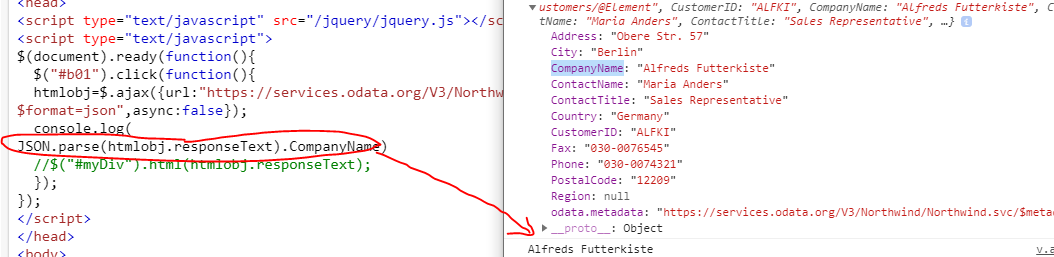
There is no d level in the structure of the API return value.
If the response is helpful, please click "Accept Answer" and upvote it.
Note: Please follow the steps in our documentation to enable e-mail notifications if you want to receive the related email notification for this thread.