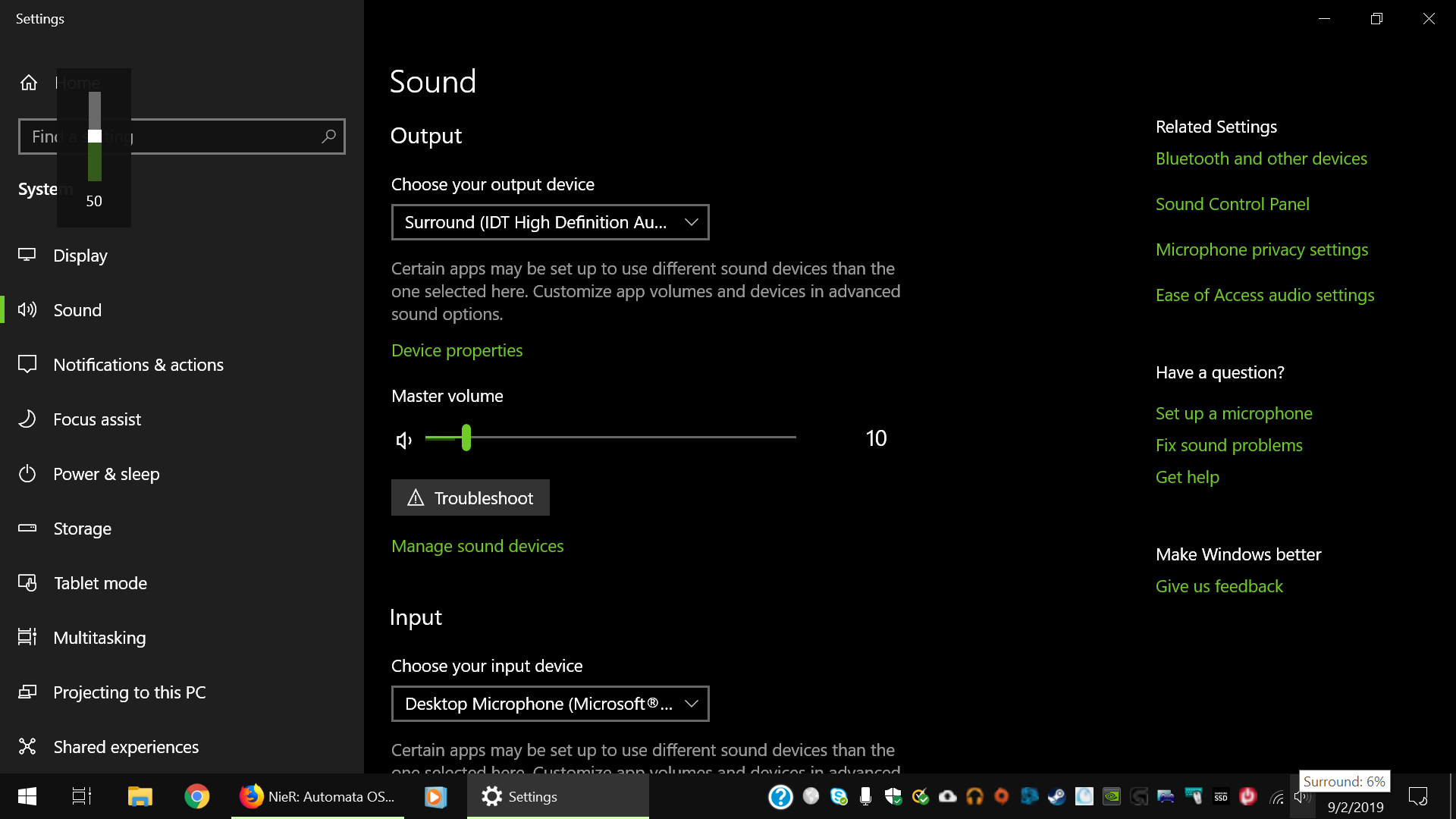
For a while now, Windows would show the wrong volume levels when I change it through my keyboard volume +- keys. What has happened before is the level display in the top left corner would lag behind by a level. My keyboard controls it in increments of 2,
so if I go all the way down to mute it would display 2%, and if I unmute it would say muted. Now it shows it at either 50 or 100. Mousing over the taskbar icon show it to be stuck on 6%. The only true indicator is the settings page. This only seems to happen
on the Back Panel output which I use for surround sound. Audio from other sources display correctly, such as my headset or graphics card to my TV. The audio itself works fine, but seeing the wrong level displayed is annoying. It used
to be occasional, but now seems permanent. I have included a screenshot that perfectly highlights the dilemma. I have tried checking for driver updates, but am not sure if that is the issue. Thank you for any help.
' cx='32' cy='32' r='32' /%3E%3Ctext x='50%25' y='55%25' dominant-baseline='middle' text-anchor='middle' fill='%23FFF' %3EA%3C/text%3E%3C/svg%3E)
