Microsoft 365 and Office | SharePoint Server | For business
A family of Microsoft on-premises document management and storage systems.

This browser is no longer supported.
Upgrade to Microsoft Edge to take advantage of the latest features, security updates, and technical support.
' cx='32' cy='32' r='32' /%3E%3Ctext x='50%25' y='55%25' dominant-baseline='middle' text-anchor='middle' fill='%23FFF' %3ECB%3C/text%3E%3C/svg%3E)
I am attempting to run the SMAT tool and get an error: System.InvalidProgramException: The minimum working area is 1024x728. We have detected the working area as 1280x680. Either run the assessment tool with -q to run in quiet mode or use a resolution larger than the minimum when connecting to the server.
I've attempted to run this on two different servers and have the same error message.
Help!

How are things going? Is there any update?
I ended up having to run the tool in -q mode. It worked then. I wasn't able to make these changes in resolution on the server.
Glad to hear that your problem has been resolved.
For a better user experience, you can turn this comment into an Answer and accept it as 'Accept Answer'. This will help users with similar questions in the future, and they will see the answer directly.
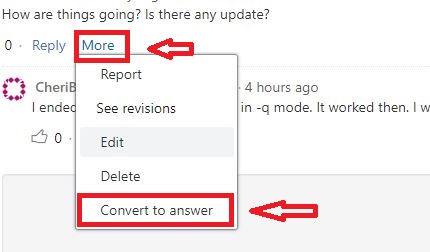
Have a nice day! :)

What is the resolution of the display or remote desktop window?
Hi @Cheri Bell ,
As trevorseward mentioned, you could try to adjust some resolution to see if it works normally.
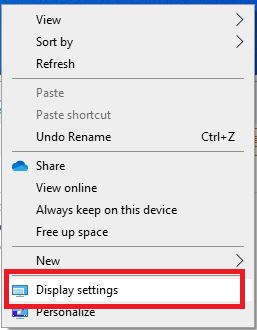
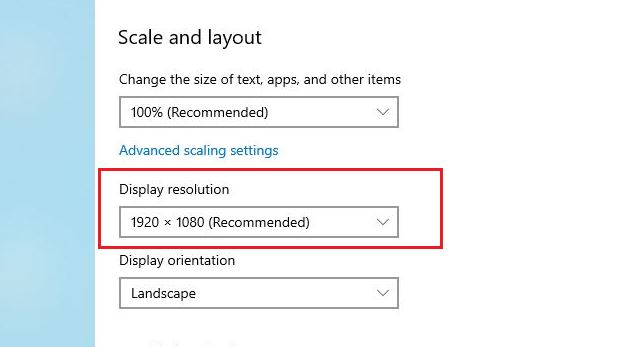
If the answer is helpful, please click "Accept Answer" and upvote it.
Note: Please follow the steps in our documentation to enable e-mail notifications if you want to receive the related email notification for this thread.
Yes, I tried, but I was accessing the server remotely and it wouldn't allow those changes. I ran the tool in -q mode.
' cx='32' cy='32' r='32' /%3E%3Ctext x='50%25' y='55%25' dominant-baseline='middle' text-anchor='middle' fill='%23FFF' %3EJW%3C/text%3E%3C/svg%3E)
I have the same issue. Changing the resolution on the remote server does not resolve the issue. I, as well, have to run SMAT -q to get it to run. I've validated resolution for the cmd window and the desktop resolution is above the required. Seems like a bug in the tool.