Microsoft 365 and Office | SharePoint Server | For business
A family of Microsoft on-premises document management and storage systems.

This browser is no longer supported.
Upgrade to Microsoft Edge to take advantage of the latest features, security updates, and technical support.

Hi Guys,
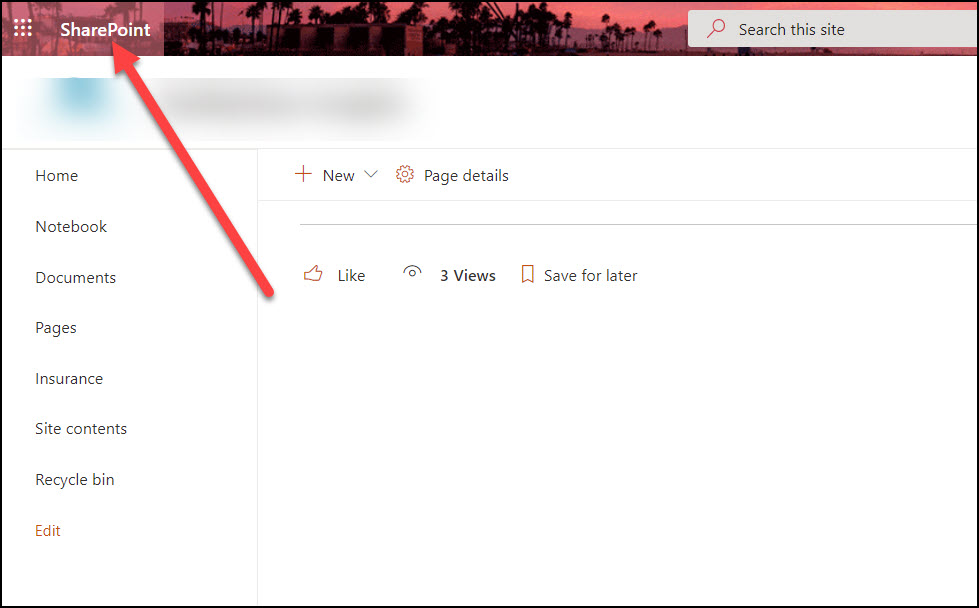
Is there any way to remove the "SharePoint" header name in the home page ?
PFA
' cx='32' cy='32' r='32' /%3E%3Ctext x='50%25' y='55%25' dominant-baseline='middle' text-anchor='middle' fill='%23FFF' %3EMM%3C/text%3E%3C/svg%3E)
Hi @SR VSP ,
Is there anything update? If my reply helps you, you could accept it as answer :)
Hi @SR VSP ,
You could hide the "SharePoint" header from the suite bar by injected CSS, but it's not supported by MS to customize the top suite bar.
Below are the steps:
Set-SPOsite <SiteURL> -DenyAddAndCustomizePages 0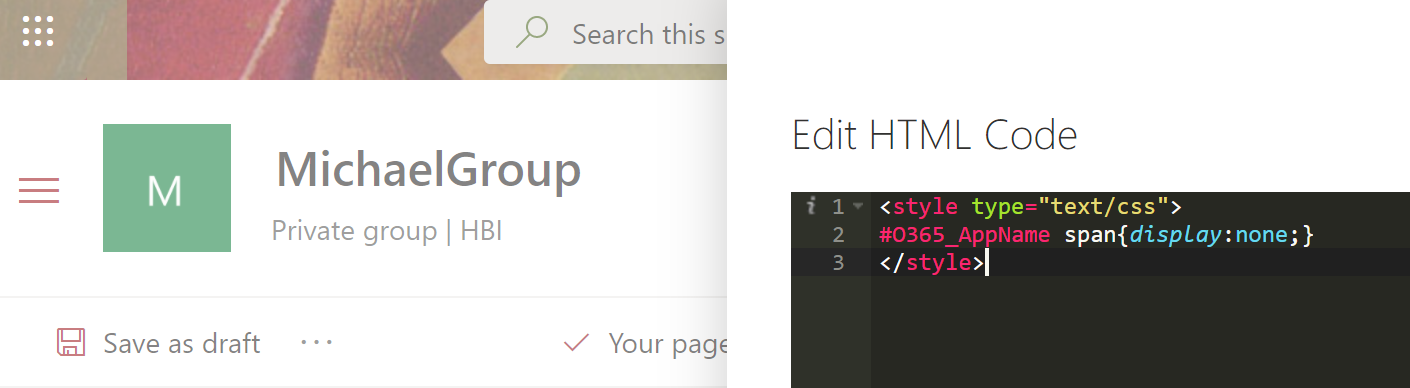
If an Answer is helpful, please click "Accept Answer" and upvote it.
Note: Please follow the steps in our documentation to enable e-mail notifications if you want to receive the related email notification for this thread.
Thank you
' cx='32' cy='32' r='32' /%3E%3Ctext x='50%25' y='55%25' dominant-baseline='middle' text-anchor='middle' fill='%23FFF' %3EZD%3C/text%3E%3C/svg%3E)
I have the Modern Script Editor enabled on our SharePoint Team Site but don't see how to add it to the top banner?